
Cosmic
December 9, 2025
Introducing AI Agents - autonomous AI assistants that build features, fix bugs, generate content, and automate workflows on your behalf. Set up an agent, give it instructions, and let it work in the background while you focus on what matters most.
Unified AI Agents Hub
A new AI Agents section is now available in your bucket navigation, providing a single place to manage all your autonomous agents. View active, completed, and scheduled agents at a glance with real-time status updates.
Think of it as mission control for your AI workforce - monitor progress, review completed work, and manage upcoming scheduled runs all in one place.
Code Agents
Code agents work directly with your GitHub repositories, creating isolated branches for each task. Each agent works independently on its own branch, preventing conflicts during parallel execution.
When an agent finishes, you can create a pull request for your team to review, review a dedicated preview link, then merge it to production.
Capabilities:
- Isolated branches for conflict-free parallel execution
- Automatic commit tracking and progress monitoring
- PR creation and management directly from agent cards
- Deployment status and preview link integration
Use Cases:
- Build new features from detailed specs
- Fix bugs with step-by-step instructions
- Update dependencies across your project
- Refactor code across multiple files
- Generate documentation
Content Agents
Content agents generate and manage CMS content - perfect for content teams who need AI-powered content creation at scale or on a schedule.
Give a content agent a prompt like "Create 3 new blog posts about headless CMS best practices" and it analyzes your existing content to match your tone, creates drafts in your bucket, and waits for your review and approval.
Capabilities:
- Create new objects (blog posts, products, pages)
- Update existing objects in bulk
- Draft-first workflow with human review
- Context-aware generation that matches your existing style
Use Cases:
- Generate SEO-optimized blog posts
- Run scheduled content campaigns
- Create product descriptions in bulk
- Build content roundups from existing articles
- Batch-update metadata across objects
Scheduled Agents
Automate recurring tasks with flexible scheduling. Set up a "Dependency Updater" that runs every morning at 6am, or a "Weekly Code Quality" agent that audits your codebase every Sunday night.
Note: Scheduled agents require a Starter plan or higher.
Schedule Types:
- One-time - Run once at a specific date and time
- Recurring - Hourly, daily, weekly, or monthly execution
Advanced Options:
- Only run if no open PRs exist
- Skip automatically if recent failures detected
- Set token budgets per run
- Cap maximum runs per month
Email Notifications
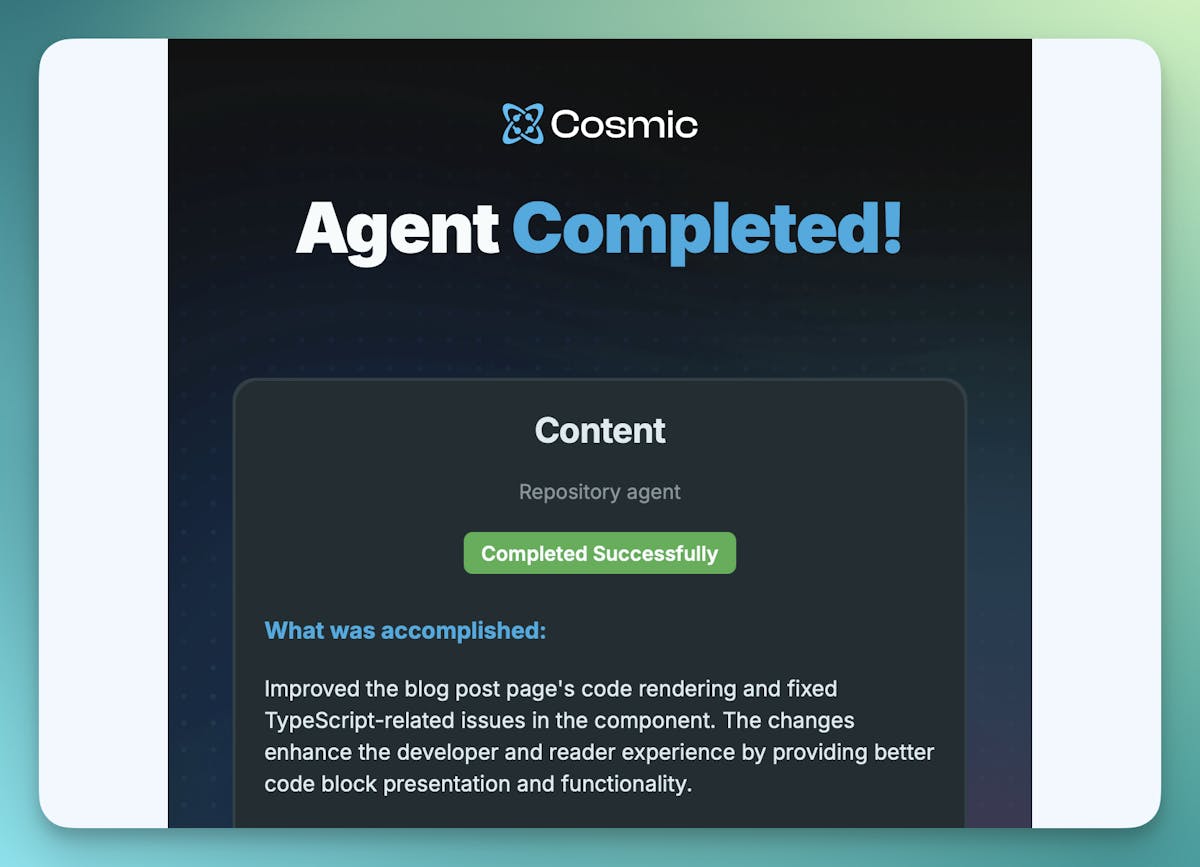
Stay informed without watching the dashboard. When an agent completes, you'll receive an email with:
- What the agent accomplished (AI-generated summary)
- Technical details like commits made and files changed
- Direct links to view agent details or the pull request
- Start and completion timestamps
Saved Prompts
Save your best prompts for quick reuse. Each saved prompt preserves the prompt text, context configuration, selected object types, and model preferences. Next time you need to run a similar task, it's one click away.
Progressive Discovery
When pointing agents at external links for context, progressive discovery lets the AI explore intelligently - following relevant links within boundaries you define, rather than just reading a single page.
Limits and Access
Role-Based Access
- Admin and Developer roles: Full access to AI Agents and AI Studio
- Editor and Contributor roles: No access to AI Agents or AI Studio (these navigation items are hidden)
Usage Limits
- Max Active Agents: 2 agents per project (Free plan), higher limits available on paid plans. Code agents also have a separate limit of 5 active agents per repository.
- Default Token Budget: 100,000 tokens per run (adjustable)
- Default Run Limit: 50 runs per month for scheduled agents (adjustable)
- Scheduled Agents: Requires Starter plan or higher
Getting Started
- Log in to your Cosmic dashboard and navigate to AI Agents in your bucket navigation (Admin/Developer only)
- Click Create New Agent
- Choose Code or Content agent type
- Configure your prompt, schedule, and context
- Click Create Agent and let AI do the work
Access Requirements: AI Agents and AI Studio are available to users with Admin or Developer bucket roles. Editor and Contributor roles do not have access to these features.
AI Agents is currently in Beta. We'd love your feedback - join the conversation on the Cosmic Discord server.
Continue Learning

Claude Sonnet 5.5 vs Sonnet 5: What Changed, and Should You Switch?


Tony Spiro and Mia
October 6, 2026