Introducing the Cosmic CLI: AI-Powered Content and Code Management from Your Terminal

Cosmic
February 10, 2026
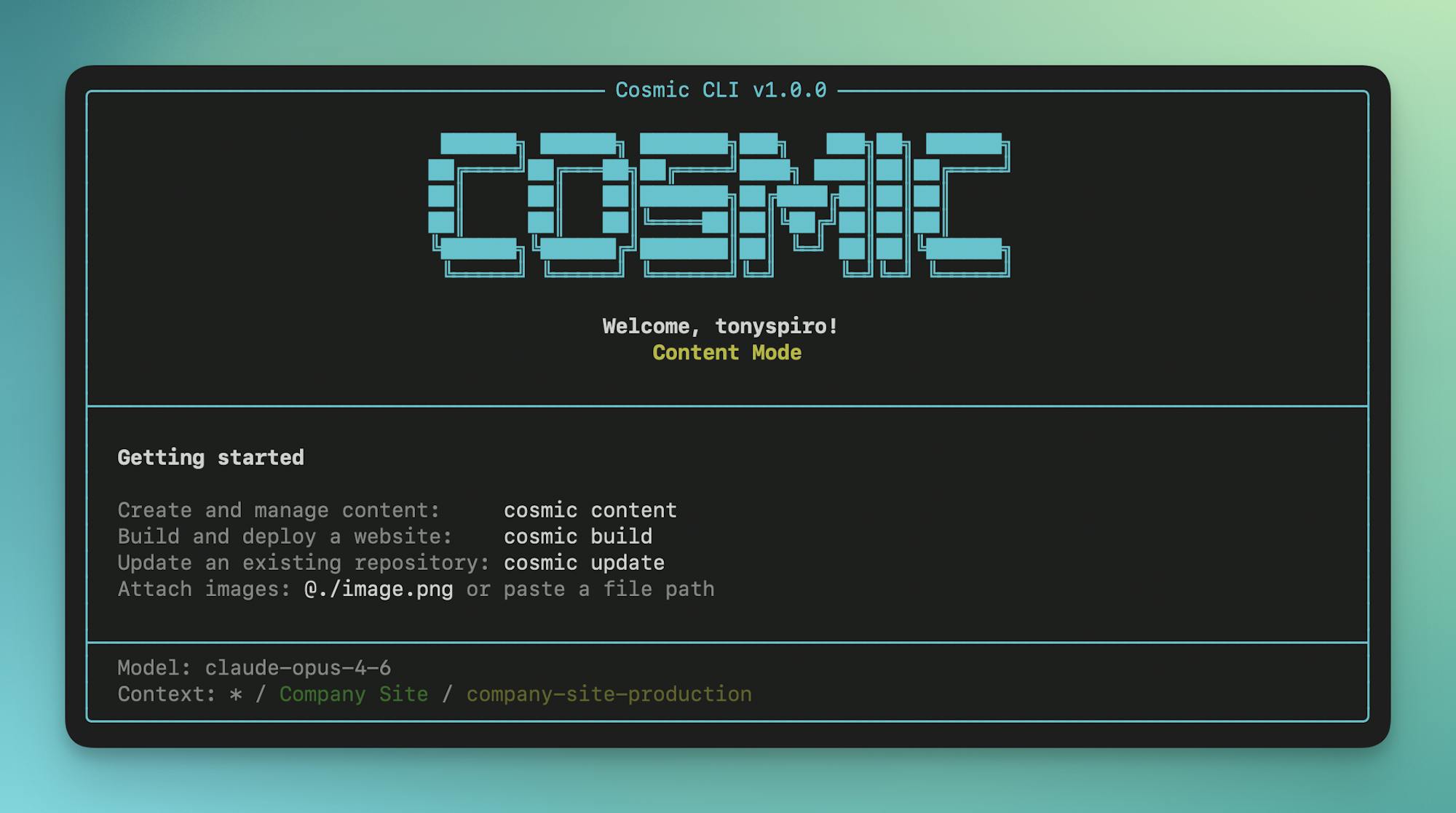
Meet the Cosmic CLI, an AI-powered command-line interface that brings the full capabilities of the Cosmic platform to your terminal. Build apps, manage content, deploy to production, and orchestrate AI agents, all without leaving your command line.
Install in one command
npm install -g @cosmicjs/cli
From zero to production in minutes
The Cosmic CLI is designed to collapse the traditional development workflow into a handful of commands. What used to require designing schemas, building admin interfaces, writing frontend code, configuring hosting, and setting up CI/CD now looks like this:
cosmic login
cosmic projects create
cosmic content -p "Create 5 recipes with images across different categories"
cosmic build -p "A recipe blog with search and category filtering"
cosmic deploy start --watch
That is a complete, production-ready application with content, a GitHub repository, and a live Vercel deployment.
Why a CLI?
The Cosmic dashboard is a powerful visual environment for managing content and building applications. But developers live in the terminal. Whether you are scripting automations, integrating with CI/CD pipelines, or simply prefer the speed of keyboard-driven workflows, the Cosmic CLI puts every platform capability at your fingertips.
This is not just a wrapper around API calls. The CLI includes an interactive shell, AI-powered chat modes, natural language commands, and shortcut workflows that condense complex multi-step processes into single commands.
What you can do
Manage content at scale
The content command provides AI-powered content creation and management:
cosmic content -p "Create 5 blog posts about headless CMS best practices"
The Content Agent researches topics, matches your existing content style, and creates properly structured objects in your Cosmic bucket. You can also use interactive content chat mode for ongoing content operations.
Build complete applications with natural language
The build command lets you describe what you want, and the CLI generates a complete, production-ready application connected to your Cosmic project:
cosmic build -p "A modern recipe blog with search and category filtering"
The CLI generates the application, creates a GitHub repository, and prepares everything for deployment. What used to take hours of scaffolding, configuration, and wiring up API calls now takes a single command.
Update existing code with AI
Already have a project? The update command connects to your repository and makes intelligent changes based on your instructions:
cosmic update my-repo -p "Add dark mode and a favorites feature" -b theme
The Code Agent analyzes your codebase, creates a feature branch, and commits the changes. From there, you can create a pull request and deploy a preview, all from the terminal.
Deploy with a single command
Deploy your applications directly to Vercel with built-in environment variable management, custom domains, and real-time log streaming:
cosmic deploy start <repoId> --watch
The CLI handles Vercel integration, environment configuration, preview deployments, and production releases. Monitor deployment progress, manage custom domains, and configure environment variables in real time.
Run AI agents from the command line
Create, run, and manage all three agent types directly from the terminal. AI Agents that previously required dashboard access are now fully controllable via CLI:
# Create and run a content agent
cosmic agents create --type content --name "Weekly Roundup" \
  --prompt "Create a weekly summary of new products" \
  --schedule --schedule-frequency weekly

# Create a code agent and open a PR from its work
cosmic agents create --type repo --name "Bug Fixer" \
  --prompt "Fix accessibility issues" --run
cosmic agents pr <agentId>
You can also capture browser authentication sessions for Computer Use Agents, approve pending operations, and follow up on agent work with additional instructions.
Orchestrate multi-step workflows
Chain multiple agents into automated AI Workflows:
cosmic workflows create --name "Content Pipeline" --agent writer-id
cosmic workflows add-step <workflowId> --agent editor-id
cosmic workflows add-step <workflowId> --agent publisher-id
cosmic workflows run <workflowId>
Monitor workflow executions, review step-by-step progress, and cancel runs when needed.
Key features
Interactive shell
Start an interactive session where you can run commands without the cosmic prefix, navigate your workspace like a filesystem, and execute system commands with the ! prefix:
cosmic shell
cosmic default> ls
cosmic default> cd my-project
cosmic my-project> objects list
cosmic my-project> !git status
The shell includes command history, context-aware prompts showing your current workspace and bucket, and tab-friendly navigation.
AI chat modes
Start a conversational AI session with full context awareness of your content:
cosmic chat                  # Read-only ask mode
cosmic chat --content        # Content mode (can modify content)
cosmic chat --build          # Build mode (generate apps)
cosmic chat --repo           # Repository mode (code changes)
Provide additional context to the AI using flags:
cosmic chat --types posts,authors --links "https://docs.example.com"
Filesystem-style navigation
Navigate your Cosmic workspace hierarchy just like a filesystem:
cosmic ls                    # List contents at current level
cosmic cd my-project         # Navigate into a project
cosmic cd posts              # Navigate into an object type
cosmic cd ..                 # Go up one level
cosmic pwd                   # Show current location
Full repository management
Manage GitHub repositories, branches, pull requests, environment variables, and custom domains:
cosmic repos clone                              # Clone with auto-configured .env
cosmic repos branches <repoId> create           # Create branches
cosmic repos pr create <repoId>                 # Create pull requests
cosmic repos pr merge <repoId> 1                # Merge pull requests
cosmic repos env create <repoId> -k KEY -v VALUE  # Manage env vars
cosmic repos domains create <repoId> example.com   # Add custom domains
The clone command automatically configures your local environment with the correct Cosmic API keys, including NEXT_PUBLIC_ variants for Next.js applications.
Multiple AI models
Choose from multiple AI providers and set your default:
cosmic models                                    # List available models
cosmic config set defaultModel claude-opus-4-5-20251101  # Set default
cosmic ai generate --model=gpt-5 "Your prompt"  # Per-command override
Available models include Claude (Anthropic), GPT (OpenAI), and Gemini (Google).
Full walkthrough: zero to production
Here is a complete example showing the full lifecycle from nothing to a live, deployed application:
# 1. Login to Cosmic
cosmic login

# 2. Create a new project with AI-generated content model
cosmic projects create
# Describe: "A recipe blog with recipes, categories, and authors"

# 3. Generate content with AI
cosmic content -p "Create 5 recipes with images across different categories"

# 4. Build an app from your content
cosmic build -p "A modern recipe blog with search and category filtering"

# 5. Deploy to Vercel
cosmic deploy start <repoId> --watch
# Deployed: https://recipe-blog.vercel.app

# 6. Clone locally for development
cosmic repos clone <repoName>
cd recipe-blog && npm install && npm run dev

# 7. Make updates on a feature branch
cosmic update recipe-blog -p "Add a favorites feature and dark mode" -b theme

# 8. Create and merge a PR (auto-deploys to production)
cosmic repos pr create <repoId>
cosmic repos pr merge <repoId> 1
The entire process, from project creation to a live production application with content, takes minutes.
Getting started
Install the Cosmic CLI globally:
npm install -g @cosmicjs/cli
Or with bun:
bun add -g @cosmicjs/cli
Then log in and start building:
cosmic login
cosmic use          # Select your workspace
cosmic shell        # Start interactive mode
The CLI supports two authentication methods. User authentication provides full dashboard access with your Cosmic account:
cosmic login
cosmic whoami
Bucket key authentication provides quick access to a specific bucket without logging in:
cosmic use --bucket=my-bucket --read-key=your-read-key --write-key=your-write-key
Limits and access
The Cosmic CLI respects the same plan-based limits as the dashboard:
- AI Agents: 2 agents per project on the Free plan, higher limits on paid plans
- Scheduled Agents: Requires Starter plan or higher
- AI Token Usage: Based on your plan allocation
- Role-Based Access: Admin and Developer roles have full CLI access
What's next
The Cosmic CLI brings the full power of the Cosmic AI Platform to the command line, making it faster than ever to build, manage, and deploy content-driven applications. Whether you are automating content pipelines, building new features, or managing deployments across environments, the CLI fits naturally into your development workflow.
We are looking forward to seeing what you build. Join the conversation on the Cosmic Discord server to share your feedback and see what others are creating.
Resources
- CLI Documentation
- GitHub Repository
- npm Package
- Cosmic Documentation
- AI Agents Documentation
- Framework Guides
Ready to get started? Install the Cosmic CLI and start shipping faster.