
Tony Spiro
April 10, 2026
Why Developers Are Migrating from Storyblok to Cosmic
Storyblok was a smart choice for teams who wanted a visual editor baked into their CMS. But as applications grow in complexity and AI becomes central to content operations, its limitations become harder to work around.
Three pain points keep coming up in migration conversations:
- Visual editor lock-in. Storyblok components are built around page presentation, which couples your content model to your frontend. When you need to reuse content across channels, that coupling becomes a bottleneck.
- Pricing pressure. Seat fees, delivery limits, and add-on costs compound as teams grow. Budgeting for Storyblok at scale is unpredictable.
- No native AI. Adding AI to a Storyblok workflow requires third-party integrations and significant custom engineering. Cosmic has AI Agents built in.
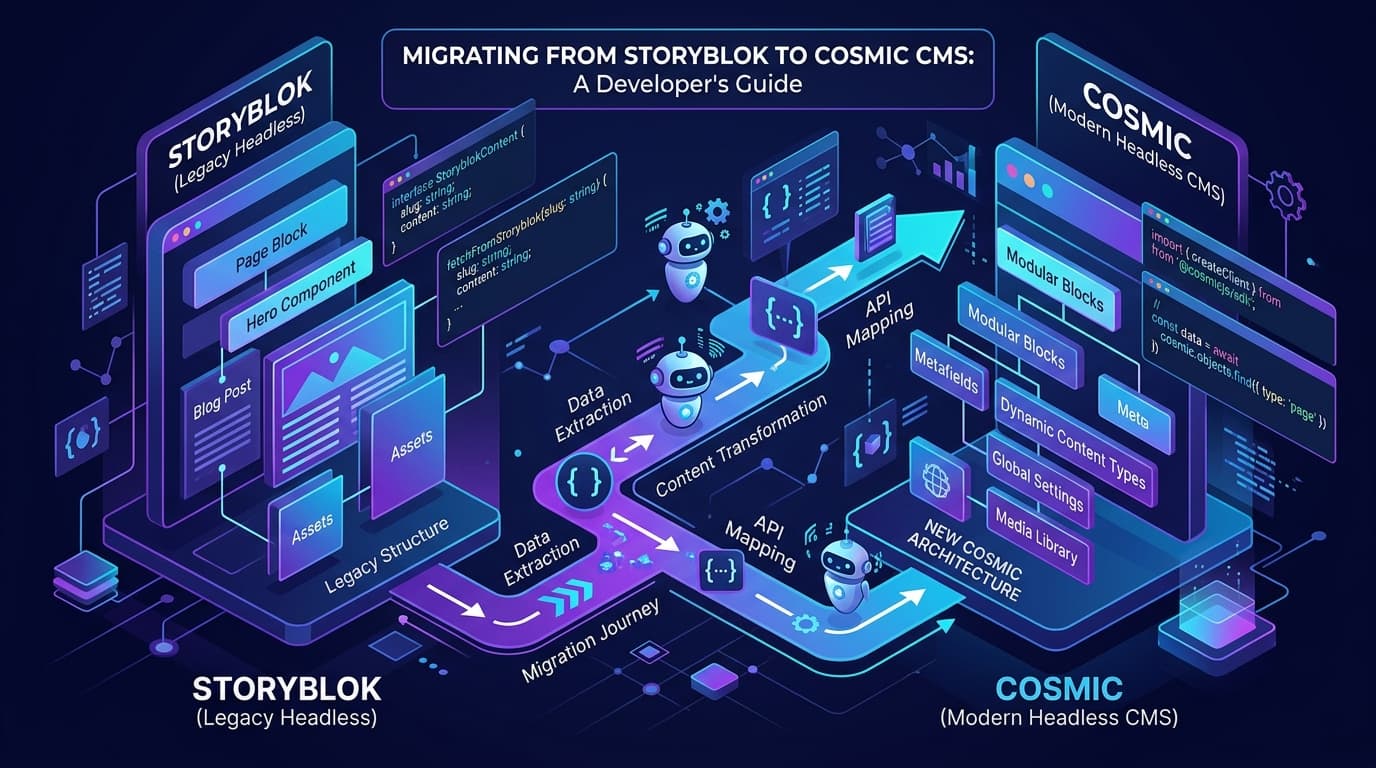
If any of those sound familiar, this guide will walk you through the full migration process: content model mapping, component-to-metafield conversion, media migration, API migration, and webhooks.
Before You Start: Understanding the Key Differences
| Storyblok Concept | Cosmic Equivalent |
|---|---|
| Story | Object |
| Component/Block | Object Type + Metafields |
| Component Field | Metafield |
| Space | Bucket |
| Asset | Media |
| Datasource | Object Type (for structured reference data) |
| Webhook | Webhook (via add-on) |
The most important conceptual shift: Storyblok organizes content around components on stories. Cosmic organizes content around Objects of a given Object Type. The result is more flexible — you're not constrained by what a visual editor can preview.
Step 1: Map Your Content Model
Start by auditing your Storyblok components. For each component, you'll create a corresponding Object Type in Cosmic with the right Metafields.
Storyblok Component → Cosmic Object Type
If you have a Storyblok component like this:
// Storyblok: Blog Post component
{
  "name": "blog_post",
  "display_name": "Blog Post",
  "schema": {
    "title": { "type": "text" },
    "body": { "type": "richtext" },
    "author": { "type": "text" },
    "published_date": { "type": "datetime" },
    "featured_image": { "type": "asset" }
  }
}
Your Cosmic Object Type would look like:
// Cosmic: Blog Post Object Type (created via dashboard or API)
{
  title: 'Blog Posts',
  slug: 'blog-posts',
  metafields: [
    { key: 'title', title: 'Title', type: 'text' },
    { key: 'body', title: 'Body', type: 'markdown' },
    { key: 'author', title: 'Author', type: 'text' },
    { key: 'published_date', title: 'Published Date', type: 'date' },
    { key: 'featured_image', title: 'Featured Image', type: 'file' }
  ]
}
Tips for the mapping process:
- Storyblok
richtext→ Cosmicmarkdownorhtml-textarea - Storyblok
asset→ Cosmicfile - Storyblok
multiasset→ Cosmicfiles - Storyblok
option(single select) → Cosmicselect - Storyblok
options(multi select) → Cosmicmulti-select - Storyblok nested blocks → Cosmic
objectsrelationship field orrepeater - Storyblok
storyreference → Cosmicobjectrelationship field
Step 2: Export Your Content from Storyblok
Use the Storyblok Management API to export your stories. You'll need your Storyblok API token.
// export-storyblok.ts
import fetch from 'node-fetch'

const STORYBLOK_TOKEN = process.env.STORYBLOK_TOKEN
const STORYBLOK_SPACE_ID = process.env.STORYBLOK_SPACE_ID

async function exportStories(page = 1, allStories: any[] = []): Promise<any[]> {
  const res = await fetch(
    `https://mapi.storyblok.com/v1/spaces/${STORYBLOK_SPACE_ID}/stories/?per_page=100&page=${page}`,
    {
      headers: {
        Authorization: STORYBLOK_TOKEN as string
      }
    }
  )

  const data = await res.json() as { stories: any[], total: number }
  const stories = data.stories || []
  allStories.push(...stories)

  const total = parseInt(res.headers.get('total') || '0')
  const fetched = allStories.length

  if (fetched < total) {
    return exportStories(page + 1, allStories)
  }

  return allStories
}

exportStories().then(stories => {
  console.log(`Exported ${stories.length} stories`)
  // Write to JSON file for import step
  const fs = require('fs')
  fs.writeFileSync('storyblok-export.json', JSON.stringify(stories, null, 2))
})
Step 3: Migrate Media Assets
Before importing content objects, migrate your media. Storyblok stores assets on their CDN; you'll need to re-upload them to Cosmic's media library.
// migrate-media.ts
import { createBucketClient } from '@cosmicjs/sdk'

const cosmic = createBucketClient({
  bucketSlug: process.env.COSMIC_BUCKET_SLUG as string,
  readKey: process.env.COSMIC_READ_KEY as string,
  writeKey: process.env.COSMIC_WRITE_KEY as string
})

interface AssetMap {
  [storyblokUrl: string]: string // maps to Cosmic imgix_url
}

async function migrateAsset(storyblokUrl: string): Promise<string> {
  // Cosmic accepts external URLs and uploads them automatically
  const { media } = await cosmic.media.insertOne({
    url: storyblokUrl,
    // Optional: specify a folder
    folder: 'migrated-from-storyblok'
  })
  return media.imgix_url
}

async function migrateAllAssets(stories: any[]): Promise<AssetMap> {
  const assetMap: AssetMap = {}
  const assetUrls = new Set<string>()

  // Collect all unique asset URLs from stories
  function extractAssets(obj: any) {
    if (!obj || typeof obj !== 'object') return
    if (obj.filename && typeof obj.filename === 'string' && obj.filename.includes('storyblok')) {
      assetUrls.add(obj.filename)
    }
    for (const value of Object.values(obj)) {
      extractAssets(value)
    }
  }

  stories.forEach(story => extractAssets(story.content))

  console.log(`Found ${assetUrls.size} unique assets to migrate`)

  for (const url of assetUrls) {
    try {
      const cosmicUrl = await migrateAsset(url)
      assetMap[url] = cosmicUrl
      console.log(`Migrated: ${url}`)
    } catch (err) {
      console.error(`Failed to migrate: ${url}`, err)
    }
  }

  return assetMap
}
Step 4: Import Content to Cosmic
With your content model mapped and media migrated, import your stories as Cosmic Objects using the JavaScript SDK.
// import-to-cosmic.ts
import { createBucketClient } from '@cosmicjs/sdk'
import stories from './storyblok-export.json'
import assetMap from './asset-map.json'

const cosmic = createBucketClient({
  bucketSlug: process.env.COSMIC_BUCKET_SLUG as string,
  readKey: process.env.COSMIC_READ_KEY as string,
  writeKey: process.env.COSMIC_WRITE_KEY as string
})

function mapStoryToCosmicObject(story: any) {
  const { content } = story

  // Replace Storyblok asset URLs with Cosmic URLs
  function replaceAssetUrls(obj: any): any {
    if (!obj || typeof obj !== 'object') return obj
    if (typeof obj === 'string' && assetMap[obj]) return assetMap[obj]
    if (Array.isArray(obj)) return obj.map(replaceAssetUrls)
    return Object.fromEntries(
      Object.entries(obj).map(([k, v]) => [k, replaceAssetUrls(v)])
    )
  }

  const mappedContent = replaceAssetUrls(content)

  return {
    title: story.name,
    slug: story.slug,
    type: 'blog-posts', // Change to match your Object Type slug
    status: story.published ? 'published' : 'draft',
    metadata: {
      body: mappedContent.body || '',
      author: mappedContent.author || '',
      published_date: story.published_at
        ? new Date(story.published_at).toISOString().split('T')[0]
        : null,
      featured_image: mappedContent.featured_image?.filename
        ? assetMap[mappedContent.featured_image.filename]
        : null
    }
  }
}

async function importStories() {
  let created = 0
  let failed = 0

  for (const story of stories) {
    try {
      const cosmicObject = mapStoryToCosmicObject(story)
      await cosmic.objects.insertOne(cosmicObject)
      created++
      console.log(`Created: ${story.name}`)
    } catch (err) {
      failed++
      console.error(`Failed: ${story.name}`, err)
    }
  }

  console.log(`\nMigration complete: ${created} created, ${failed} failed`)
}

importStories()
Step 5: Update Your API Calls
Storyblok and Cosmic have different API patterns. Here's how to update your frontend code.
Fetching Content
// Before: Storyblok
import { useStoryblokApi } from '@storyblok/react'

const storyblokApi = useStoryblokApi()
const { data } = await storyblokApi.get('cdn/stories', {
  version: 'published',
  starts_with: 'blog/'
})
const posts = data.stories

// After: Cosmic REST API
const response = await fetch(
  `https://api.cosmicjs.com/v3/buckets/${process.env.COSMIC_BUCKET_SLUG}/objects?` +
  new URLSearchParams({
    query: JSON.stringify({ type: 'blog-posts' }),
    props: 'title,slug,metadata,published_at',
    read_key: process.env.COSMIC_READ_KEY as string,
    status: 'published'
  })
)
const { objects: posts } = await response.json()
Using the Cosmic JavaScript/TypeScript SDK
// After: Cosmic SDK (recommended)
import { createBucketClient } from '@cosmicjs/sdk'

const cosmic = createBucketClient({
  bucketSlug: process.env.COSMIC_BUCKET_SLUG as string,
  readKey: process.env.COSMIC_READ_KEY as string
})

// Fetch all published blog posts
const { objects: posts } = await cosmic.objects
  .find({ type: 'blog-posts' })
  .props(['title', 'slug', 'metadata', 'published_at'])
  .status('published')
  .limit(10)

// Fetch a single post by slug
const { object: post } = await cosmic.objects
  .findOne({ type: 'blog-posts', slug: 'my-post-slug' })
  .props(['title', 'slug', 'metadata'])
  .status('published')
Important: Cosmic uses the REST API only. There is no GraphQL endpoint.
Step 6: Migrate Webhooks
If you use Storyblok webhooks to trigger builds or revalidation, you'll need to set up Cosmic webhooks.
Cosmic webhooks are available as an add-on ($99/month, or included in the $199/month bundle). Once enabled, configure them in the Cosmic dashboard under Settings > Webhooks.
// Example: Next.js webhook handler for Cosmic
// pages/api/revalidate.ts

import type { NextApiRequest, NextApiResponse } from 'next'

export default async function handler(
  req: NextApiRequest,
  res: NextApiResponse
) {
  // Verify the webhook signature
  const secret = req.headers['x-cosmic-secret']
  if (secret !== process.env.COSMIC_WEBHOOK_SECRET) {
    return res.status(401).json({ message: 'Invalid secret' })
  }

  const { type, data } = req.body

  try {
    if (type === 'object.published' || type === 'object.unpublished') {
      // Revalidate the relevant path
      const slug = data?.slug
      if (slug) {
        await res.revalidate(`/blog/${slug}`)
        await res.revalidate('/blog')
      }
    }
    return res.json({ revalidated: true })
  } catch (err) {
    return res.status(500).json({ message: 'Error revalidating' })
  }
}
Migration Checklist
Use this checklist to track your migration progress:
Content Model
- Audit all Storyblok components and fields
- Create corresponding Object Types in Cosmic dashboard
- Map all field types (richtext → markdown, asset → file, etc.)
- Test Object Type schemas with sample content
Media
- Export list of all Storyblok assets
- Run media migration script
- Verify asset URLs in Cosmic media library
- Build asset URL map for content import
Content
- Export all Storyblok stories via Management API
- Run content import script
- Verify published/draft status is correct
- Spot-check content in Cosmic dashboard
API Integration
- Replace Storyblok SDK imports with Cosmic SDK
- Update all API calls to use Cosmic REST API
- Update environment variables
- Test all content queries in development
Webhooks and Automation
- Recreate Storyblok webhooks in Cosmic
- Update webhook endpoints in your applications
- Test build triggers and cache revalidation
Go Live
- Run full content audit comparing Storyblok and Cosmic
- Update DNS / CDN configuration if needed
- Monitor error rates after launch
- Deprecate Storyblok account once migration is confirmed
Supported Frameworks
Cosmic works with all major JavaScript frameworks:
- Next.js — Full support including App Router and Pages Router
- React — Works with any React setup
- Vue — Full compatibility
- Nuxt — Server-side rendering and static generation
- Astro — Content collections and SSR
- Remix — Loader-based data fetching
- Svelte / SvelteKit — Full support
- Gatsby — Static generation
The Cosmic JavaScript/TypeScript SDK works in any Node.js environment and in modern browsers.
Pricing: What You Can Expect
Cosmic pricing is straightforward:
| Plan | Price | Buckets | Team Members | Objects |
|---|---|---|---|---|
| Free | $0/month | 1 | 2 | 1,000 |
| Builder | $99/month | 2 | 3 | 5,000 |
| Team | $299/month | 3 | 5 | 20,000 |
| Business | $499/month | 5 | 10 | 50,000 |
| Enterprise | Custom | Custom | Custom | Custom |
Additional users are $29/user/month. The Free plan is forever free — no credit card required.
Ready to Migrate?
Start your migration today. Cosmic's free plan gives you everything you need to prototype your new content architecture before committing.
Start for Free — No Credit Card Required
Want a guided migration walkthrough? Book a call with our team and we'll help you map your content model and plan the migration.
Related Resources
- Storyblok Alternative — Why teams choose Cosmic over Storyblok
- Prismic Alternative
- Strapi Alternative