
Tony Spiro
April 10, 2026
Headless CMS vs WordPress: Which One Should You Use in 2026?
WordPress powers roughly 40% of the internet. That number is real, and it carries weight. If WordPress is everywhere, why would you choose anything else?
Because the way teams build websites has changed significantly. The LAMP stack era, where your CMS was also your server-side renderer, templating engine, and plugin platform, works fine for a lot of use cases. But it introduces friction and architectural constraints that modern development teams increasingly don't want to deal with.
This guide is for developers and technical decision-makers evaluating whether to build on WordPress or move to a headless CMS. We'll go through the real tradeoffs: performance, developer experience, content flexibility, and total cost.
What Is a Headless CMS?
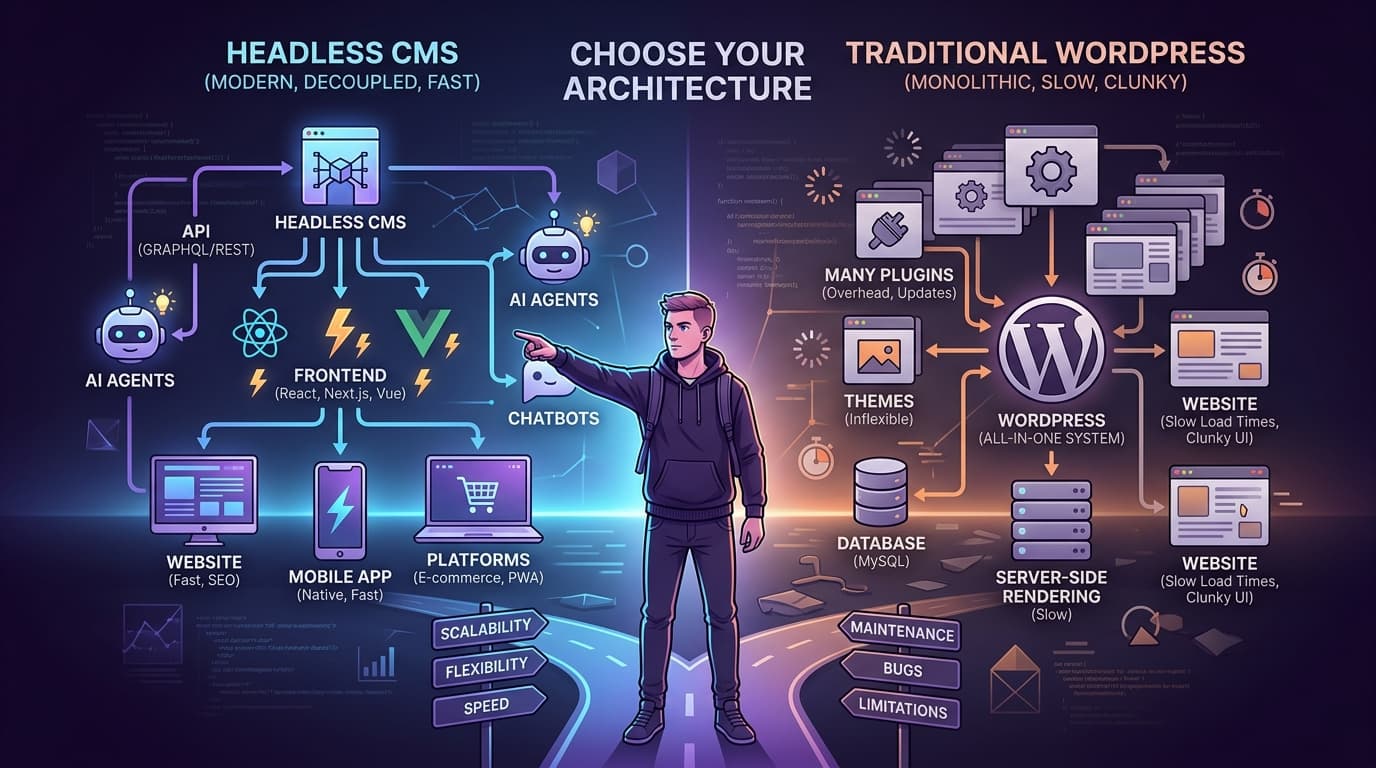
A headless CMS is a content management system that stores and delivers content via API, without any assumptions about how that content will be displayed. There's no theme engine, no template system, no frontend bundled in. You build the frontend however you want, in whatever framework you want, and pull content from the CMS via REST API or SDK.
The term "headless" refers to the removal of the "head" (the frontend). What remains is the body: a content repository with an API.
What that means in practice:
- Your content team manages content in the CMS dashboard
- Your frontend team fetches that content via API in Next.js, Astro, Nuxt, Remix, or any other framework
- The two sides are fully decoupled. Changing one doesn't require changing the other.
What Is WordPress?
WordPress is a full-stack CMS originally built for blogging, now used for everything from personal sites to enterprise marketing platforms. It couples a content backend (MySQL database, PHP admin panel) with a frontend rendering system (PHP templates, the block editor).
You can use WordPress in a "headless" configuration by disabling its frontend and using it purely as a content API via the WordPress REST API. This is called "headless WordPress" and it's a legitimate architectural pattern. But it comes with its own set of tradeoffs, which we'll cover below.
For this comparison, we'll focus on traditional WordPress (with its frontend) vs. a purpose-built headless CMS like Cosmic.
Head-to-Head: Headless CMS vs WordPress
Developer Experience
WordPress: The PHP ecosystem is mature, and there are millions of tutorials, plugins, and Stack Overflow answers. If you know PHP and the WordPress hook system, you can build a lot quickly. But modern JavaScript developers often find the WordPress developer experience frustrating: PHP template logic, plugin conflicts, a block editor that generates non-standard HTML, and a deployment model that wasn't designed for modern CI/CD pipelines.
Headless CMS (Cosmic): Built for the JavaScript ecosystem. The Cosmic JavaScript SDK is typed, well-documented, and integrates cleanly with Next.js, Nuxt, Astro, Remix, Svelte, and Gatsby. You write standard JavaScript or TypeScript. You deploy to Vercel, Netlify, or your platform of choice. No PHP, no plugin conflicts, no server-side template overrides.
// Fetching content from Cosmic in Next.js App Router
import { createBucketClient } from '@cosmicjs/sdk';

const cosmic = createBucketClient({
  bucketSlug: process.env.COSMIC_BUCKET_SLUG,
  readKey: process.env.COSMIC_READ_KEY,
});

export async function generateStaticParams() {
  const { objects } = await cosmic.objects
    .find({ type: 'blog-posts' })
    .props('slug')
    .limit(100);
  return objects.map((post) => ({ slug: post.slug }));
}
Compare that to a WordPress REST API call: you'd get a response payload with dozens of fields you didn't ask for, rendered HTML that includes block editor markup, and a content structure you can't easily customize without writing custom REST endpoints or filters.
Winner: Headless CMS for teams building in the JavaScript ecosystem. WordPress for teams already fluent in PHP.
Content Modeling
WordPress: Posts, pages, and custom post types. You can define custom post types and custom fields via plugins like ACF (Advanced Custom Fields) or pods. This works, but it layers complexity on top of a system that wasn't designed for it. ACF is not free at the tier most teams need (ACF Pro is $99-$249/year). The custom fields system can get unwieldy at scale, and content relationships across types require additional plugins or careful query planning.
Headless CMS (Cosmic): Object Types are the core unit. You define them natively: blog posts, products, events, team members, anything. Each type gets custom metafields: text, rich text, files, dates, numbers, dropdowns, object relationships, repeaters. No plugins required, no extra cost. The content model is yours to define from day one.
For a team that only publishes blog posts and static pages, WordPress's built-in post types are probably fine. For a team managing products, events, team bios, case studies, and documentation, a headless CMS scales without duct tape.
Winner: Headless CMS for complex content models. WordPress for standard blog and page content.
Performance
WordPress: A standard WordPress site loads PHP, queries MySQL, and renders HTML server-side on every request (unless you're using a caching plugin or a CDN). With the right caching setup (WP Rocket, Cloudflare, etc.), WordPress performance can be solid. But achieving it requires configuration that most setups don't have out of the box, and plugin overhead consistently affects TTFB.
Headless CMS (Cosmic): Your frontend is a static site or server-rendered app deployed to a CDN edge. Content is fetched at build time or on demand via Cosmic's API, then cached at the edge. There's no PHP, no MySQL query chain on every page load. A well-built Next.js or Astro site on Vercel with Cosmic as the CMS will reliably outperform a standard WordPress site on Core Web Vitals.
Cosmic's API delivers content via a global CDN, and Cosmic's media library uses imgix for automatic image optimization: resizing, format conversion to WebP and AVIF, and CDN caching. WordPress handles images via plugins that vary in quality.
Winner: Headless CMS for performance-critical sites. Optimized WordPress can close the gap, but requires more effort.
Security
WordPress: WordPress's ubiquity makes it a high-value attack target. The WordPress admin panel, login page, and PHP execution environment are frequently targeted by automated attacks. The plugin ecosystem introduces significant surface area: one poorly maintained plugin can compromise the entire site. WordPress security is manageable but requires ongoing attention (updates, security plugins, monitoring).
Headless CMS (Cosmic): When your frontend is a static export or an edge-deployed Next.js app, there's no PHP to exploit, no database directly accessible from the web, and no WordPress login page to brute force. The CMS backend is separate from your public-facing site. Content is served via API with authentication keys that can be scoped to read-only access. The attack surface is dramatically smaller.
Winner: Headless CMS for security posture.
Editor Experience
WordPress: The Gutenberg block editor is genuinely good for writers and editors who are familiar with it. The media library works. Scheduling, categories, tags, and revisions are all built in. For a content team that lives in WordPress, it's a comfortable workflow.
Headless CMS (Cosmic): Cosmic's editor is designed for non-technical users. Rich text editing, media uploads, and object management are all intuitive. For editors coming from WordPress, there's a learning curve, but most teams adapt quickly. Where Cosmic differs is in structured content: editors can fill in defined fields rather than trying to format content correctly in a block editor. That structure also means fewer content inconsistencies.
Real quote from Maximilian Wuhr, Co-Founder at FINN:
"Cosmic is: us never having to ask a developer to change anything on the backend of our website."
That captures it. A well-structured Cosmic setup lets editors work independently, without developer involvement.
Winner: Draw. WordPress has a more familiar interface for editors who've used it before. Cosmic's structured content approach reduces errors and developer dependency.
Multi-Site and Multi-Brand Management
WordPress: Running multiple sites on WordPress means running multiple WordPress installations (or WordPress Multisite, which adds its own complexity). Each site has its own database, admin panel, plugin set, and update cycle. At three or more sites, the operational overhead becomes significant.
Headless CMS (Cosmic): Multiple brands or sites get multiple Buckets under one account. All Buckets are managed from one dashboard, with shared team members, consistent API access, and no per-site infrastructure. Paid Cosmic plans include multiple Buckets:
- Builder ($99/month): 2 Buckets
- Team ($299/month): 3 Buckets
- Business ($499/month): 5 Buckets
- Enterprise: Custom
Winner: Headless CMS for multi-brand or multi-site setups.
Pricing
WordPress: WordPress.org is free and open-source. Hosting ranges from $5/month (shared hosting) to hundreds per month (dedicated or WP Engine-style managed hosting). A realistic production WordPress setup often includes: managed hosting ($25-100+/month), premium plugins ($200-500+/year for common essentials: ACF Pro, Yoast, WP Rocket, etc.), security plugin/service ($10-50/month), and developer time for maintenance.
Headless CMS (Cosmic): A free tier is available for individuals and small projects ($0/month, 1 Bucket, 2 team members). Paid plans:
- Builder: $99/month
- Team: $299/month
- Business: $499/month
- Enterprise: Custom
Additional team members: $29/user/month on any plan.
Frontend hosting (Vercel, Netlify) adds cost but is often free or near-free at smaller traffic levels. The key difference from WordPress: you're paying for a managed content API with no infrastructure overhead, versus paying for server infrastructure plus plugin licenses.
Winner: Depends on scale. WordPress self-hosted can be cheaper at small scale. Cosmic becomes more cost-effective as infrastructure and maintenance costs for WordPress compound.
What About Headless WordPress?
You can run WordPress headlessly: disable the frontend, expose content via the WordPress REST API, and build a Next.js or Nuxt frontend that queries it. This is called WPGraphQL + WordPress or REST + WordPress.
This approach lets you keep WordPress as the content backend while modernizing the frontend. Plugins like WP2Static or Frontity are built around this pattern.
When headless WordPress makes sense:
- Your team already has significant WordPress content and expertise
- You can't migrate all existing content to a new platform
- Your editors are deeply familiar with Gutenberg and resistant to change
Headless WordPress tradeoffs:
- You still maintain WordPress: PHP, MySQL, plugins, security updates
- The WordPress REST API returns verbose payloads with inconsistent structure
- Gutenberg block markup in the REST response is difficult to render cleanly in a React component tree
- You're paying for WordPress hosting AND frontend hosting
- Plugin conflicts and WordPress updates can still break things
Headless WordPress is a real architectural pattern, but it inherits most of WordPress's operational overhead. For greenfield projects, a purpose-built headless CMS is almost always a cleaner starting point.
When to Choose WordPress
- You or your team are fluent in PHP and the WordPress ecosystem
- Your content needs are primarily posts, pages, and standard blog patterns
- You have a large library of existing WordPress content that's impractical to migrate
- You need WooCommerce for ecommerce (no equivalent in the headless world comes close)
- Your hosting budget is constrained and you're comfortable with self-managed infrastructure
When to Choose a Headless CMS
- You're building with a modern JavaScript framework (Next.js, Astro, Nuxt, Remix, Svelte)
- You need custom content types beyond posts and pages
- Performance and Core Web Vitals are a priority
- You want to manage multiple brands or sites from one platform
- You want AI-assisted content creation and automated content workflows
- Security surface area matters to your team or organization
- You want your content team to work independently without developer involvement
Migrating from WordPress to a Headless CMS
If you're on WordPress and considering a move, the process is more manageable than it might seem:
- Export your WordPress content using WordPress's built-in XML export or the WordPress REST API
- Map your content types to Object Types in your headless CMS
- Migrate posts and pages via the CMS API or SDK
- Re-upload media to the headless CMS media library
- Rebuild your frontend using your chosen framework and the CMS SDK
- Set up redirects for any changed URLs
- Configure webhooks for cache invalidation on content updates
Cosmic provides migration assistance for Business and Enterprise customers. For teams on lower plans, the Cosmic JavaScript SDK and REST API make scripting a migration straightforward.
FAQ
Is a headless CMS better than WordPress?
For modern JavaScript development teams building on Next.js, Astro, or Nuxt: generally yes. For teams that are deeply invested in the PHP/WordPress ecosystem or need WooCommerce: WordPress may still be the right call. The best choice depends on your team's skills, your content model, and your performance and security requirements.
Can you use Cosmic with a WordPress site?
You can run Cosmic as the primary CMS for a new site while keeping an existing WordPress site running separately. Many teams migrate content incrementally rather than all at once.
What is the best headless CMS for developers in 2026?
Cosmic is a strong choice for developer teams: clean REST API, a typed JavaScript SDK, flexible content modeling, built-in AI tools, and pricing that scales from free to enterprise. See our full headless CMS comparison for a breakdown of Cosmic, Contentful, Sanity, and Strapi.
Does Cosmic have a free plan?
Yes. The Cosmic Free plan is $0/month with no credit card required. It includes 1 Bucket, 2 team members, 1,000 Objects, and 3 AI Agents.
Ready to Try Cosmic?
Start for free at cosmicjs.com. No credit card required.
Have questions about migrating from WordPress or evaluating Cosmic for your team? Book a call with Tony and we'll walk through your specific setup.
Further reading: