
Tony Spiro
April 11, 2026
Payload CMS vs Cosmic: Which Headless CMS Is Right for You?
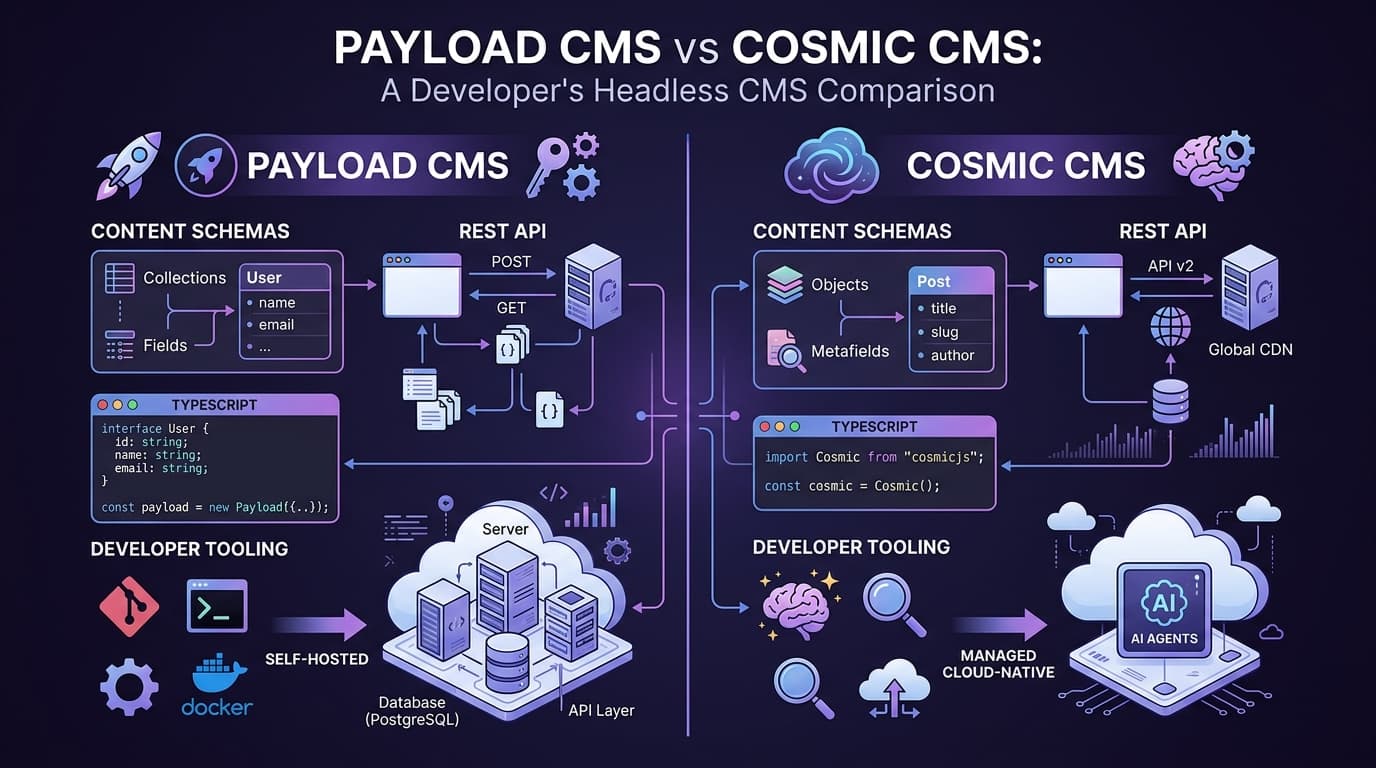
Both Payload CMS and Cosmic are TypeScript-first headless CMS platforms built for modern development workflows. The key difference comes down to one decision: do you want to manage your own infrastructure, or focus entirely on building your product?
Payload is self-hosted. Cosmic is fully managed and AI-native. That single distinction cascades into a meaningfully different developer experience, total cost of ownership, and set of capabilities. This guide breaks it all down.
What Is Payload CMS?
Payload CMS is an open-source, self-hosted headless CMS built on TypeScript. It launched in 2022 and has gained traction among developers who want full control over their stack. Payload uses a code-first configuration approach: you define your content model in TypeScript files, and Payload generates a REST API and admin UI from that config.
Key Payload characteristics:
- Open-source (MIT license)
- Self-hosted: runs on your own server or cloud VM
- Supports MongoDB and Postgres as the backing database
- TypeScript-first configuration
- REST API out of the box
- Built-in admin UI
- Requires Node.js runtime and database setup
- No managed hosting option
- No built-in AI features
Payload is well-suited for developers who need full control over their data, want to run on-premises, or have an open-source requirement.
What Is Cosmic?
Cosmic is a fully managed, AI-powered headless CMS. It provides a hosted content API, a collaborative dashboard, a TypeScript SDK, and a complete suite of AI agents, all without any infrastructure to manage.
Key Cosmic characteristics:
- Fully managed SaaS (no servers to provision)
- REST API with sub-100ms response times globally
- TypeScript SDK for type-safe content fetching
- 20+ metafield types for flexible content modeling
- Built-in AI agent suite (Team, Content, Code, Computer Use)
- MCP Server for AI tool integration
- imgix CDN for media delivery
- Built-in AI image and video generation
- 99.9% uptime SLA
- Forever-free plan
- YC W19 backed
Cosmic is built for teams that want to ship fast, collaborate without friction, and put AI to work on real content and development tasks.
Self-Hosting vs Managed: The Real Cost Comparison
This is the most significant practical difference between Payload and Cosmic, and it's often underestimated.
The Payload self-hosting bill
When you self-host Payload, you're responsible for:
- Server/VM hosting: A minimal production setup on AWS, GCP, or DigitalOcean runs $20-100/month before you add redundancy or auto-scaling.
- Database hosting: MongoDB Atlas or a managed Postgres instance adds another $25-100/month for production-grade reliability.
- CDN and media storage: You'll need to set up Cloudinary, AWS S3, or similar. Figure another $10-50/month depending on usage.
- Engineering time: Setup, configuration, security patching, version upgrades, database migrations, and incident response. Even for a lean project, this is 2-5 hours/month of senior engineering time.
A conservative estimate for a production Payload deployment: $55-250/month in infrastructure costs plus ongoing engineering overhead.
The Cosmic model
Cosmic's pricing is all-inclusive. Infrastructure, CDN, AI tokens, and media delivery are all bundled:
| Plan | Price | Objects | Team Members | Buckets |
|---|---|---|---|---|
| Free | $0/month | 1,000 | 2 | 1 |
| Builder | $99/month | 5,000 | 3 | 2 |
| Team | $299/month | 20,000 | 5 | 3 |
| Business | $499/month | 50,000 | 10 | 5 |
| Enterprise | Custom | Custom | Custom | Custom |
Additional team members are $29/user/month. No hidden infrastructure costs. No surprise bills when traffic spikes.
For most teams, Cosmic's total cost of ownership is lower than Payload once you factor in engineering time and infrastructure overhead.
AI Capabilities Comparison
This is where the gap is widest.
Payload AI capabilities
Payload has no built-in AI features. If you want AI-assisted content creation, image generation, or automated workflows, you need to build that yourself, integrating third-party APIs, writing custom plugins, and maintaining the glue code.
Cosmic AI capabilities
Cosmic ships with a production-ready AI agent suite:
Team Agents bring AI into your existing workflow. Connect them to Slack, WhatsApp, or Telegram and they can answer questions, qualify leads, manage content, and run scheduled check-ins. They have persistent memory and can be given specific goals and personas.
Content Agents handle CMS tasks autonomously. They can generate content objects, run bulk updates, migrate content between buckets, and execute scheduled publishing workflows, all without manual intervention.
Code Agents connect to your GitHub repositories. They can build features, fix bugs, open pull requests, and deploy to staging or production on your behalf.
Computer Use Agents automate browser tasks using visual AI. They can record demo videos, cross-post media across platforms, extract data from websites, and run automated QA flows.
Cosmic also provides an MCP Server, so AI tools like Claude can read and write your CMS content directly. This is the foundation for the next generation of AI-native applications.
Content Modeling Comparison
Both platforms offer flexible content modeling, but the experience differs significantly.
Payload content modeling
In Payload, you define your content model in TypeScript config files. This is powerful for developers who want version-controlled schemas and code-first workflows. The tradeoff: schema changes require a code deploy, and non-technical users can't modify content models without developer involvement.
Payload supports relationships, rich text (Lexical editor), arrays, blocks, and custom fields.
Cosmic content modeling
Cosmic's metafield system gives you 20+ field types: text, textarea, markdown, HTML, number, date, file, files, object (single relationship), objects (multi-relationship), select, multi-select, radio buttons, checkboxes, switch, color, JSON, emoji, repeaters, and parent groups.
Content models can be created and modified directly in the dashboard, no code deploy required. Conditional fields, validation rules, and help text can all be configured without touching your codebase.
Neither platform requires database migrations when you add new fields. Cosmic's approach is more accessible to non-technical content editors and product managers who need to iterate on content structures.
When to Choose Payload
Payload is the right choice if:
- Open-source license is a hard requirement: Your organization requires MIT-licensed software for compliance or internal policy reasons.
- You need on-premises deployment: Regulatory requirements (healthcare, government, finance) mandate that data stays within your own infrastructure.
- Full database control is critical: You need direct query access to your content database, custom indexes, or complex relational queries that go beyond what a managed API provides.
- You have the engineering capacity: Your team has dedicated devops resources and is comfortable owning infrastructure reliability.
- You're already deep in a Node.js monorepo: Payload can run alongside your application code in a single repo, which some teams prefer architecturally.
When to Choose Cosmic
Cosmic is the right choice if:
- You want to ship fast: No infrastructure setup, no database config. Your content API is live in minutes.
- AI is part of your roadmap: You want content generation, AI agents, and MCP integration without building it yourself.
- Your team includes non-technical collaborators: Editors, marketers, and PMs can use Cosmic's dashboard without developer support.
- You're building multiple projects: Cosmic's multi-bucket architecture lets you manage multiple sites or apps from one account.
- You need managed reliability: You want a 99.9% uptime SLA and global CDN without paying for a devops engineer.
- Media management matters: Cosmic's imgix CDN, AI image generation, and AI video generation are all ready to use on day one.
Migration Guide: Moving from Payload to Cosmic
Migrating from Payload to Cosmic is a two-step process: exporting your content and updating your frontend data layer.
Step 1: Set up your Cosmic bucket
Create a free account at cosmicjs.com and create a new bucket. Recreate your Payload collections as Cosmic Object Types using the dashboard or the API.
Step 2: Export from Payload
Payload's REST API makes it straightforward to export your content. Here's a simple export script:
// export-from-payload.ts
import fs from 'fs'

async function exportPayloadContent() {
  const baseUrl = 'https://your-payload-instance.com/api'

  // Export your posts collection
  const response = await fetch(`${baseUrl}/posts?limit=100&depth=2`, {
    headers: {
      Authorization: 'Bearer YOUR_PAYLOAD_API_KEY',
    },
  })

  const { docs } = await response.json()

  // Save to a local file for review
  fs.writeFileSync('payload-export.json', JSON.stringify(docs, null, 2))
  console.log(`Exported ${docs.length} posts`)
}

exportPayloadContent()
Step 3: Import to Cosmic
Use the Cosmic TypeScript SDK to import your content:
// import-to-cosmic.ts
import { createBucketClient } from '@cosmicjs/sdk'
import payloadData from './payload-export.json'

const cosmic = createBucketClient({
  bucketSlug: process.env.COSMIC_BUCKET_SLUG as string,
  readKey: process.env.COSMIC_READ_KEY as string,
  writeKey: process.env.COSMIC_WRITE_KEY as string,
})

async function importToCosmic() {
  for (const post of payloadData) {
    try {
      await cosmic.objects.insertOne({
        title: post.title,
        type: 'blog-posts',
        status: post._status === 'published' ? 'published' : 'draft',
        metadata: {
          content: post.content, // Map your Payload fields to Cosmic metafields
          teaser: post.excerpt,
          published_date: post.publishedAt,
        },
      })
      console.log(`Imported: ${post.title}`)
    } catch (error) {
      console.error(`Failed to import: ${post.title}`, error)
    }
  }
}

importToCosmic()
Step 4: Update your frontend
Replace your Payload REST API calls with the Cosmic SDK. Here's a before/after for a Next.js blog:
// BEFORE: Fetching from Payload
async function getPosts() {
  const response = await fetch(
    'https://your-payload-instance.com/api/posts?where[_status][equals]=published',
    { next: { revalidate: 60 } }
  )
  const { docs } = await response.json()
  return docs
}

// AFTER: Fetching from Cosmic
import { createBucketClient } from '@cosmicjs/sdk'

const cosmic = createBucketClient({
  bucketSlug: process.env.COSMIC_BUCKET_SLUG as string,
  readKey: process.env.COSMIC_READ_KEY as string,
})

async function getPosts() {
  const { objects } = await cosmic.objects
    .find({ type: 'blog-posts' })
    .props('id,title,slug,metadata,created_at')
    .status('published')
    .limit(20)

  return objects
}
// Fetching a single post by slug
async function getPost(slug: string) {
  const { object } = await cosmic.objects
    .findOne({ type: 'blog-posts', slug })
    .props('id,title,slug,metadata,created_at')
    .status('published')

  return object
}
// Using the REST API directly (no SDK required)
async function getPostsViaREST() {
  const response = await fetch(
    `https://api.cosmicjs.com/v3/buckets/${process.env.COSMIC_BUCKET_SLUG}/objects?type=blog-posts&read_key=${process.env.COSMIC_READ_KEY}&props=id,title,slug,metadata&status=published`,
    { next: { revalidate: 60 } }
  )
  const { objects } = await response.json()
  return objects
}
The Cosmic SDK is fully typed and works with any TypeScript frontend: Next.js, Nuxt, Astro, SvelteKit, Remix, or plain Node.js.
Conclusion
Payload CMS and Cosmic serve different needs. Payload is a strong choice for teams with strict open-source or on-premises requirements who have the engineering capacity to own their infrastructure. It gives you full control at the cost of setup complexity and ongoing maintenance.
Cosmic is the right choice for teams that want to move fast, collaborate effectively, and put AI to work on real product tasks. You get a fully managed content API, a complete AI agent suite, built-in media CDN, and transparent pricing without any infrastructure overhead.
If your goal is shipping great products instead of managing servers, Cosmic is built for you.
Start for free or book a demo with Tony to see Cosmic in action.