
Tony Spiro
March 31, 2026
What is a Headless CMS?
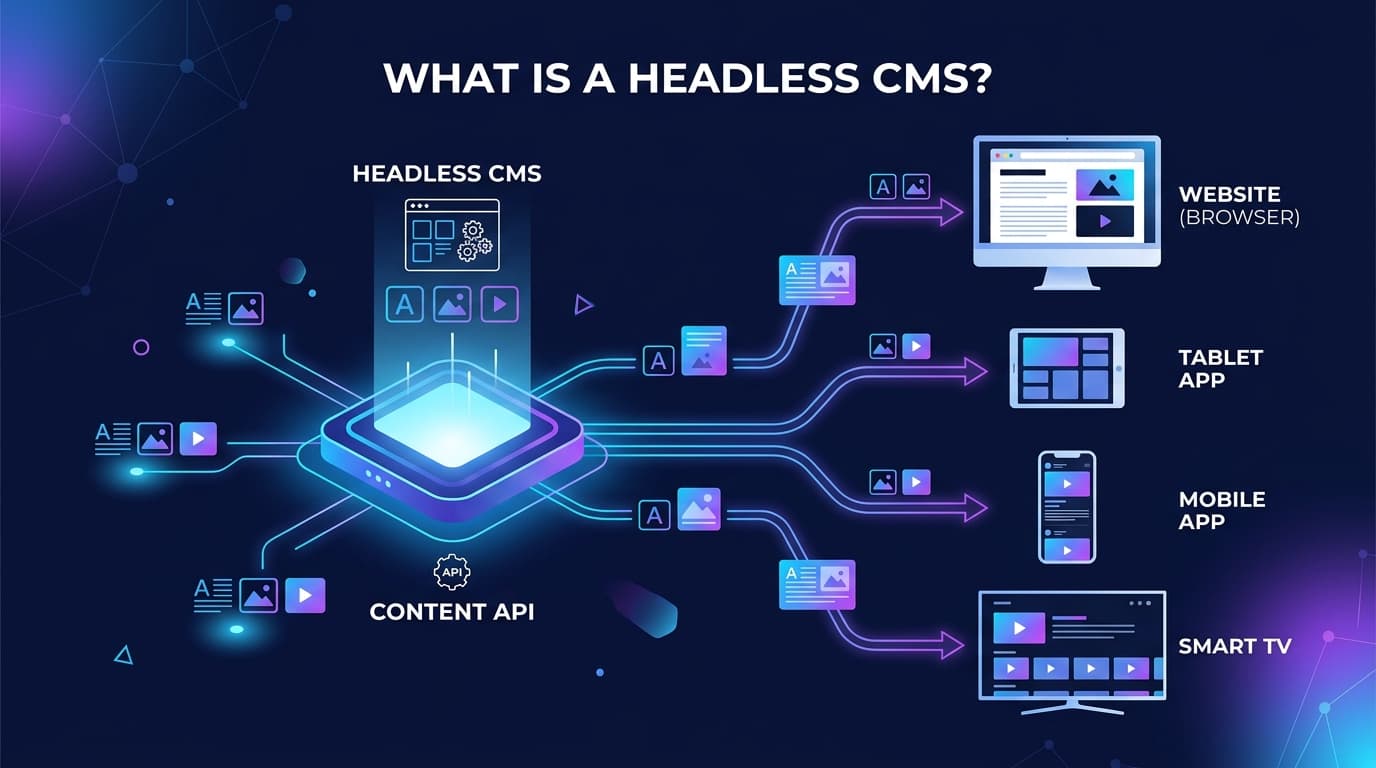
A headless CMS is a backend-only content repository that stores and delivers content via API, completely decoupled from the frontend presentation layer. Unlike a traditional CMS like WordPress, a headless CMS has no "head" meaning no built-in frontend, no theme system, and no assumptions about how your content will be displayed.
You store your content once. Then you deliver it anywhere: a Next.js website, a React app, a mobile app, a smart TV, a kiosk, a voice assistant. The same API, the same content, infinite frontends.
Traditional CMS vs. Headless CMS
To understand what makes a headless CMS different, it helps to understand what came before it.
Traditional CMS (e.g., WordPress, Drupal)
- Content and presentation are tightly coupled
- Templates and themes control how content looks
- Changing the frontend means changing the CMS
- Built for web-first, often web-only delivery
- Monolithic architecture, harder to scale independently
Headless CMS (modern headless platforms like Cosmic)
- Content and presentation are fully decoupled
- Content is delivered via REST API
- Frontend can be any framework: Next.js, React, Vue, Astro, Swift, Flutter
- Built for omnichannel delivery
- Microservices architecture, scale content and frontend independently
The core tradeoff: a traditional CMS is faster to set up if you only ever need a website. A headless CMS is the right choice if you need flexibility, performance, and the ability to deliver content across multiple channels.
How Does a Headless CMS Work?
Here is the basic flow:
- Content editors create and manage content in the CMS dashboard
- The CMS stores content in a structured, frontend-agnostic format
- Your frontend application calls the CMS API to fetch content at build time or runtime
- The frontend renders the content however it wants, using whatever framework or design system it chooses
- Content updates in the CMS are instantly available via the API, no redeployment needed
For example, with Cosmic, you might create a "Blog Post" object type with fields for title, body, author, and cover image. Your Next.js app fetches posts via the Cosmic REST API and renders them with your own components. Your iOS app fetches the same posts and renders them natively. Same content, two completely different experiences.
Why Developers Choose a Headless CMS
1. Freedom to use any tech stack
With a headless CMS, you are not locked into a specific language, framework, or hosting platform. Build with Next.js, Astro, Remix, SvelteKit, React Native, or anything else.
2. Faster performance
Because the frontend is decoupled, you can use modern static site generation (SSG) and incremental static regeneration (ISR) to serve pre-built pages from a CDN. This is dramatically faster than server-rendering pages from a traditional CMS on every request.
3. Better developer experience
Headless CMSes expose clean REST APIs with predictable data structures. You work with JSON. No PHP, no plugin ecosystem to fight with, no template engine to learn.
4. Content reuse across channels
Write a product description once. Display it on your website, your mobile app, your email template, and your voice assistant, all from the same API call.
5. Independent scaling
Your content API and your frontend are separate services. If your site gets a traffic spike, you scale your frontend hosting (Vercel, Netlify) without touching the CMS.
When Should You Use a Headless CMS?
A headless CMS is the right choice when:
- You are building with a modern JavaScript framework (Next.js, React, Astro, Vue)
- You need to deliver content to multiple channels (web, mobile, email, etc.)
- Your team separates content editors from frontend developers
- You need enterprise-grade scalability without the overhead of a monolith
- You want to use a CDN to serve content at the edge for global performance
- You are building a product, not just a marketing site
A traditional CMS may still be fine when:
- You need to launch a simple blog or brochure site quickly
- Your team has no frontend developers
- You do not need to deliver content outside of a single website
Headless CMS Use Cases
E-commerce: Product catalogs, landing pages, and editorial content managed in the CMS, rendered in a performant storefront built with Next.js or similar.
Digital publishing: Editorial teams manage articles, images, and metadata in the CMS. The frontend team controls the reading experience without being blocked by CMS constraints.
SaaS marketing sites: Marketing updates copy and launches campaigns without waiting for engineering. Developers own the design system and components.
Multi-brand / multi-site: One CMS instance powers multiple websites and apps, each with their own frontend and design.
Mobile apps: Native iOS and Android apps fetch content from the same CMS that powers the website. One content team, two platforms.
What to Look for in a Headless CMS
- API performance: Sub-100ms response times matter at scale. Look for CMSes with global CDN delivery.
- Content modeling flexibility: Can you define custom content types and relationships easily?
- Media management: Built-in image optimization and transformation.
- Developer experience: Good SDKs, clear documentation, and a well-designed API.
- Editor experience: Non-technical content editors need an intuitive interface.
- AI capabilities: In 2026, the best headless CMSes are adding AI agents for content creation, image generation, and workflow automation.
- Pricing and scalability: Understand the pricing model before you commit. See Cosmic's pricing plans for a transparent breakdown.
Why Cosmic
Cosmic is an AI-powered headless CMS built for modern development teams. It gives developers a flexible REST API with sub-100ms response times, while giving content editors an intuitive dashboard to manage content without touching code.
What sets Cosmic apart in 2026 is its built-in AI layer. Team Agents bring AI directly into Slack, WhatsApp, and Telegram, so your content team can create, edit, and publish content by sending a message. No developer required for routine content updates.
Real teams use Cosmic to power everything from automotive marketplaces (FINN) to science museums (Parque Explora) to music platforms (Eastman Music).
"Cosmic is: us never having to ask a developer to change anything on the backend of our website." - Maximilian Wuhr, Co-Founder at FINN
Curious about plans and limits? Review Cosmic's pricing page to find the right tier for your team.
Getting Started
Ready to try a headless CMS? Cosmic offers a free plan with no credit card required. You can have your first API endpoint returning content in under 5 minutes.
- Sign up free at Cosmic
- Create your first content type (e.g., "Blog Posts")
- Add some content
- Fetch it via the REST API or Cosmic SDK
No servers to configure, no plugins to install, no theme to fight with. Just your content, delivered via API.
Here is a quick example of fetching blog posts from Cosmic using the REST API:
// Fetch published blog posts from Cosmic REST API
const BUCKET_SLUG = 'your-bucket-slug';
const READ_KEY = 'your-read-key';

const res = await fetch(
  `https://api.cosmicjs.com/v3/buckets/${BUCKET_SLUG}/objects` +
  `?type=blog-posts&read_key=${READ_KEY}&props=title,slug,metadata`
);

const { objects } = await res.json();
console.log(objects); // Array of blog post objects
Swap in your bucket slug and read key from your Cosmic dashboard, and you are ready to go.
Frequently Asked Questions
Is a headless CMS harder to use than WordPress?
For developers, a headless CMS is often easier because you work with familiar REST APIs and JSON. For content editors, the experience depends on the CMS, but modern headless platforms like Cosmic are designed to be editor-friendly.
Does a headless CMS work with Next.js?
Yes. Next.js and headless CMSes are a natural pair. Next.js supports static generation, server-side rendering, and incremental static regeneration, all of which work seamlessly with headless CMS APIs.
Is a headless CMS more expensive than WordPress?
WordPress itself is free, but hosting, plugins, maintenance, and developer time add up. A headless CMS like Cosmic starts free and scales predictably.
What is the difference between a headless CMS and a static site generator?
A static site generator (like Gatsby or Hugo) is a build tool that generates HTML files. A headless CMS is a content storage and delivery system. They work together: the SSG fetches content from the CMS at build time and generates static pages.
Continue Learning

Claude Sonnet 5.5 vs Sonnet 5: What Changed, and Should You Switch?


Tony Spiro and Mia
October 6, 2026
Announcing the Cosmic AI Support Agent
Tony Spiro and Mia
October 5, 2026