Team Agent Workflows Now Available: Run Your Full Agent Toolset in Workflows

Cosmic
June 2, 2026

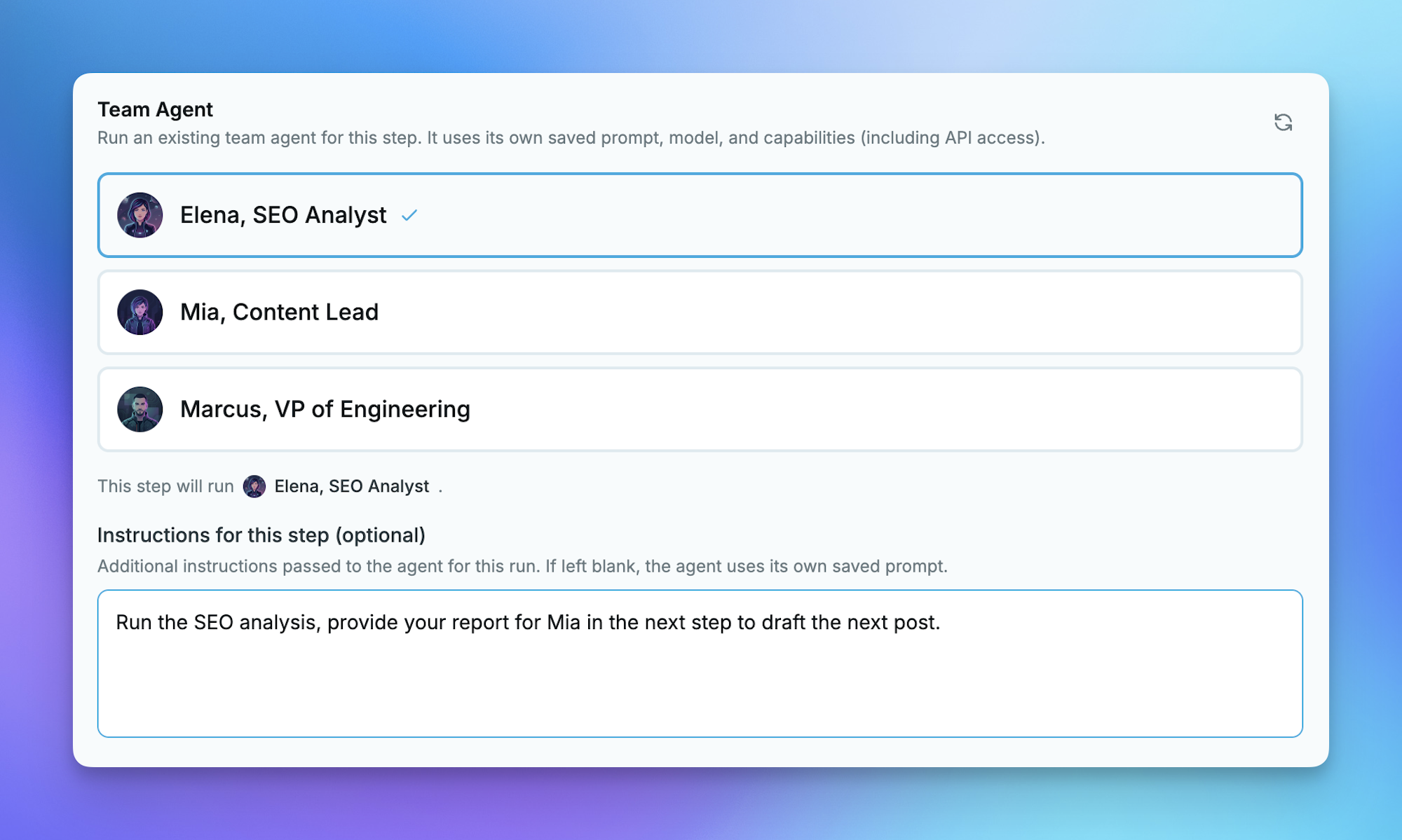
Workflows can now run your Team Agents as steps. Until now, a workflow step was limited to a one-off Content, Code, or Computer Use agent with a restricted toolset. A Team Agent step runs one of your existing team agents instead, with its own saved prompt, model, and full set of capabilities, including API requests, notifications, and any tools you have already configured on that agent.
This is the way to give a workflow step access to the complete team-agent toolset. When a step needs to call an external API, post to a channel, or use a custom integration, drop in a Team Agent step and it inherits everything that agent can already do in conversation.
What's New
- Team Agent steps in Workflows. Add a step, choose Team Agent, and pick an active team agent. The step runs that agent end to end and passes its output to the next step like any other.
- Full toolset, including API access. Team Agent steps run through the conversational engine, so they get the agent's real capabilities: API requests, notifications, CMS read/write, and connected integrations, rather than the limited content/code/computer-use toolset.
- Live agent references. A step stores a reference to the agent by its ID, not a frozen copy. Update the agent's prompt, model, or capabilities later and every workflow that uses it picks up the change automatically.
- Fresh, isolated runs. Each Team Agent step runs in a brand-new conversation with no prior chat history or cross-channel context bleeding in, so runs are clean and reproducible.
- Unified execution view. Team Agent steps show up in the execution timeline with the same layout, status, token accounting, and cost summary as every other step.
- No extra automation slot. A team agent referenced by a workflow step still counts once against your team-agent limit; the step itself does not consume an additional automation.
- Agent-managed too. Agents with the Agent Management capability can build these steps for you: set the step type to and provide the when creating or updating a workflow.
Why This Matters
Workflows were great at chaining content, code, and browser automation, but anything that needed a real external API call hit a wall. Team Agents already had that power in conversation, they just could not be dropped into an automated pipeline.
Now the two come together. You can research data with a Computer Use step, hand it to a Team Agent step that enriches it through a third-party API, and write the result back to your CMS, all in one scheduled, hands-off workflow.
How It Works
A Team Agent step is a first-class workflow step that runs one of your existing team agents with its full configuration: saved prompt, model, capabilities, and connected tools. Unlike a standard content or code step, it goes through the conversational engine, which means it can reach external APIs, send notifications, and use any integration the agent already has access to.
Outputs flow to the next step just like any other step type, and the execution timeline gives you per-step status, token usage, and cost so you can see exactly what happened.
Note: Team Agent steps do not support interactive approvals. If your agent requires approval to act, disable that on the agent or add a separate Approval Gate step. Activating a workflow on a plan that does not support scheduled or Computer Use workflows still follows your plan limits.
Sequential or Parallel Execution
Team Agent steps fit right into your existing workflow structure, so you can run them sequentially when one step's output feeds the next, or in parallel when you want multiple agents working at the same time on independent tasks. This gives you the flexibility to design pipelines that match how your team actually works.
Get Started
Team Agent steps are live now on all plans that support Workflows. The fastest path in:
- Log in to your dashboard and open Workflows, or create a free account if you're new to Cosmic.
- Create or open a workflow and add a step.
- Choose Team Agent as the step type and select one of your active team agents.
- Add optional per-step instructions, or leave them blank to use the agent's saved prompt.
- Save and run, then watch the unified execution view to see each step, its status, and cost.
If you don't have a team agent yet, create one first, give it the prompt, model, and capabilities it needs, then drop it into any workflow as a step.
Continue Learning
Ready to get started?
Build your next project with Cosmic and start creating content faster.
No credit card required • Free forever