What is a Headless CMS?
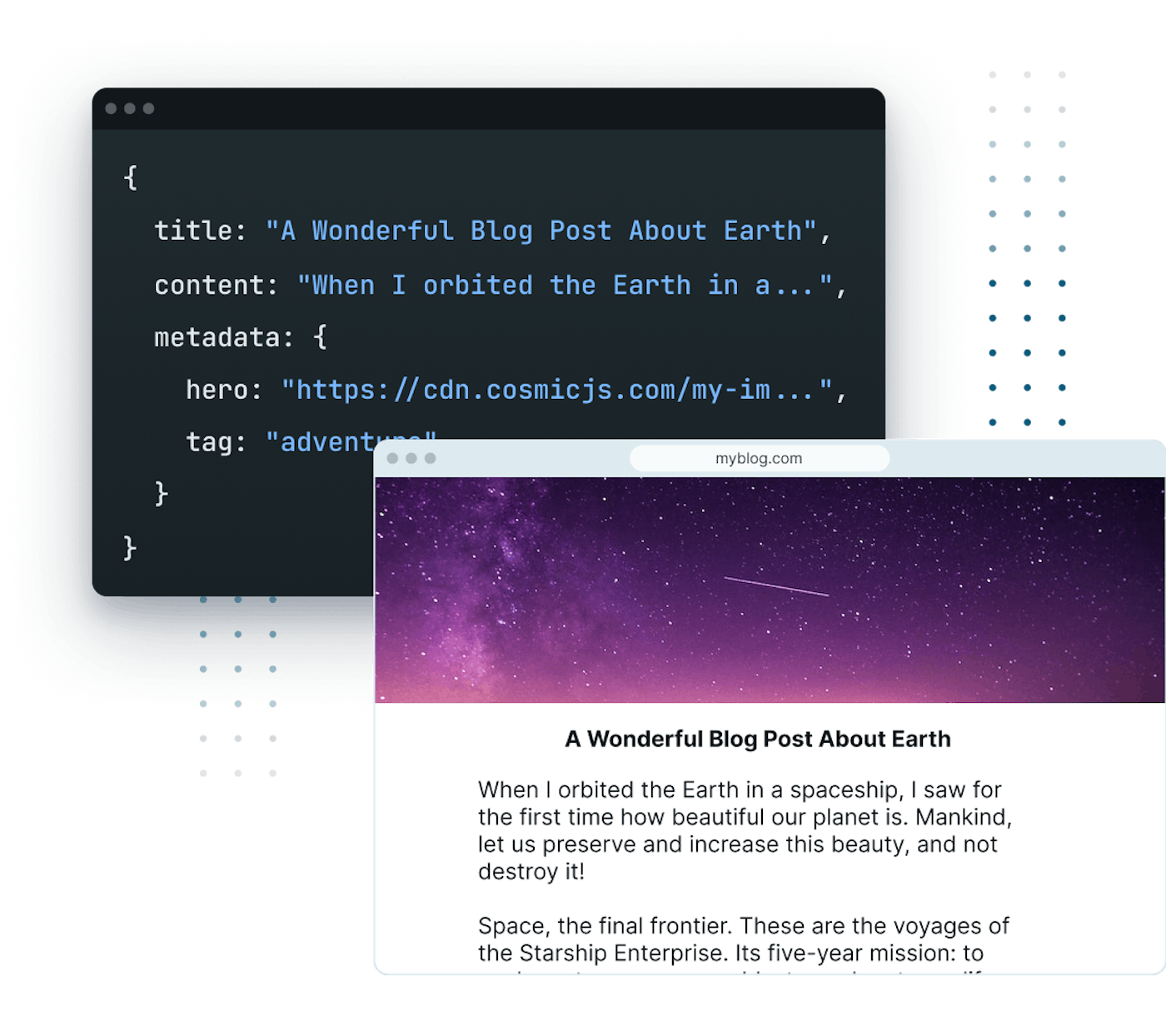
A headless CMS is a content management system that separates the content repository ("body") from the presentation layer ("head"). Content is created in a dashboard interface and delivered through API endpoints, making it available to any number of websites, mobile applications, IoT devices, or digital experiences simultaneously.
Unlike traditional systems like WordPress or Drupal that bundle content management with a specific frontend, a headless CMS treats content as structured data, accessible from anywhere through a simple API call.
The short version:
- What it is: a content backend with no built-in frontend. You model your content, then read it over an API.
- Why teams use it: one content source feeds a website, a mobile app, a kiosk, and an AI agent without duplicating the work.
- What you trade away: there is no theme to install. Someone has to build the frontend.
- What it costs: managed platforms usually start free and scale by seats, content volume, and API usage. Cosmic's full price list is further down this page.
- How you read content: one REST call, or the official TypeScript SDK. Working example further down.
Key Benefits of Headless CMS Architecture
The headless approach offers significant advantages for modern digital experiences:
- Omnichannel content delivery - Publish once, display on your website, mobile app, digital signage, or AI assistant simultaneously.
- Future-proof content strategy - Your content remains accessible regardless of how frontend frameworks evolve. No more painful CMS migrations.
- Developer flexibility - Frontend teams use their preferred frameworks and tools: React, Next.js, Astro, Vue, Svelte, or anything else.
- Improved performance - Lightweight API calls delivered through global CDNs instead of server-rendered database queries.
- Enhanced security - A reduced attack surface with no public-facing admin panel or server-side plugins to exploit.
- AI-native workflows - Modern headless CMS platforms integrate AI agents to automate content creation, code generation, and deployment.
How a Headless CMS Works
A headless CMS consists of two primary components working together to manage and deliver content:
1. Content Management Dashboard
The administrative interface where content teams collaborate to:
- Create and edit structured content using flexible content models
- Upload and manage digital assets with automatic optimization
- Implement approval workflows and governance processes
- Configure content relationships and taxonomies
- Set publishing schedules and manage version history
- Use AI-powered tools to generate, translate, and optimize content
2. Content Delivery API
The programmable interface that enables developers to:
- Retrieve content using API queries
- Filter and sort content based on specific parameters
- Transform content for different presentation contexts
- Cache responses for optimized performance
- Integrate content with any frontend technology or device
Here is a working example of fetching content from a headless CMS. Install the official TypeScript SDK:
npm install @cosmicjs/sdk
Then create a client and query your content:
import { createBucketClient } from '@cosmicjs/sdk';

const cosmic = createBucketClient({
  bucketSlug: 'my-site',
  readKey: 'YOUR_BUCKET_READ_KEY',
});

// Fetch blog posts from your headless CMS
const { objects: posts } = await cosmic.objects
  .find({ type: 'posts' })
  .props(['title', 'slug', 'metadata.excerpt', 'metadata.featured_image'])
  .depth(1);

// Use posts in any framework: React, Next.js, Astro, Vue, etc.
The props call is worth noting. You name exactly the fields you want, so the response carries only the data your component renders. depth controls how far the API follows relationships between objects, which lets you pull a post and its author in one request instead of two.
If React is your framework, the React CMS guide walks through the same query in a Server Component and in a client-side useEffect, including where to keep your read key.
Understanding APIs for Headless CMS
An API (Application Programming Interface) creates the communication bridge between your content repository and presentation layers. REST is the universal standard for headless CMS platforms, and for good reason.
REST API
REST APIs use standard HTTP methods understood by developers across all experience levels and every programming language. They offer excellent caching capabilities through HTTP standards, straightforward implementation with any framework, and predictable URLs that CDNs cache efficiently. Cosmic uses a REST API, which means you can fetch content with a simple HTTP request from any environment, or use the JavaScript and TypeScript SDK shown above for a typed interface. Response times under 100ms, globally distributed, with no proprietary query language to learn.
The REST-first approach also means your content layer is natively consumable by AI agents and LLM tools, which increasingly rely on standard HTTP interfaces to interact with external systems.
When the API comes first and the interface is built on top of it, rather than bolted on afterward, the architecture is usually described as API-first. That distinction has real consequences for how a system scales and how much of it you can automate. We cover it in depth in what an API-first CMS is and why it matters.
What is a Cloud Headless CMS?
A cloud headless CMS is a headless CMS delivered as a managed service. The vendor runs the database, the API layer, the CDN, and the dashboard. You get an endpoint and a set of API keys, and you never provision a server or apply a security patch.
The alternative is a self-hosted headless CMS, where you download the software and run it on your own infrastructure. That path gives you full control of the runtime and the data, and it costs engineering time: hosting, scaling, upgrades, backups, and uptime all become your responsibility.
Most teams choosing between the two are really weighing control against operational overhead:
| Cloud (managed) | Self-hosted | |
|---|---|---|
| Infrastructure | Run by the vendor | Run by your team |
| Scaling | Elastic, automatic | Manual provisioning |
| Upgrades and patching | Handled for you | Your responsibility |
| Global delivery | CDN included | You configure it |
| Time to first API call | Minutes | Hours to days |
| Data residency control | Vendor-defined | Full control |
Cosmic is a cloud headless CMS. Content is stored and delivered from managed infrastructure with a global CDN in front of it, so a new project can be querying live content within a few minutes of signup.
Headless CMS vs. Traditional CMS
Traditional content management systems were designed during the early web era when content was destined exclusively for websites. These monolithic platforms combine content management, database, server logic, and presentation templates in a single integrated system.
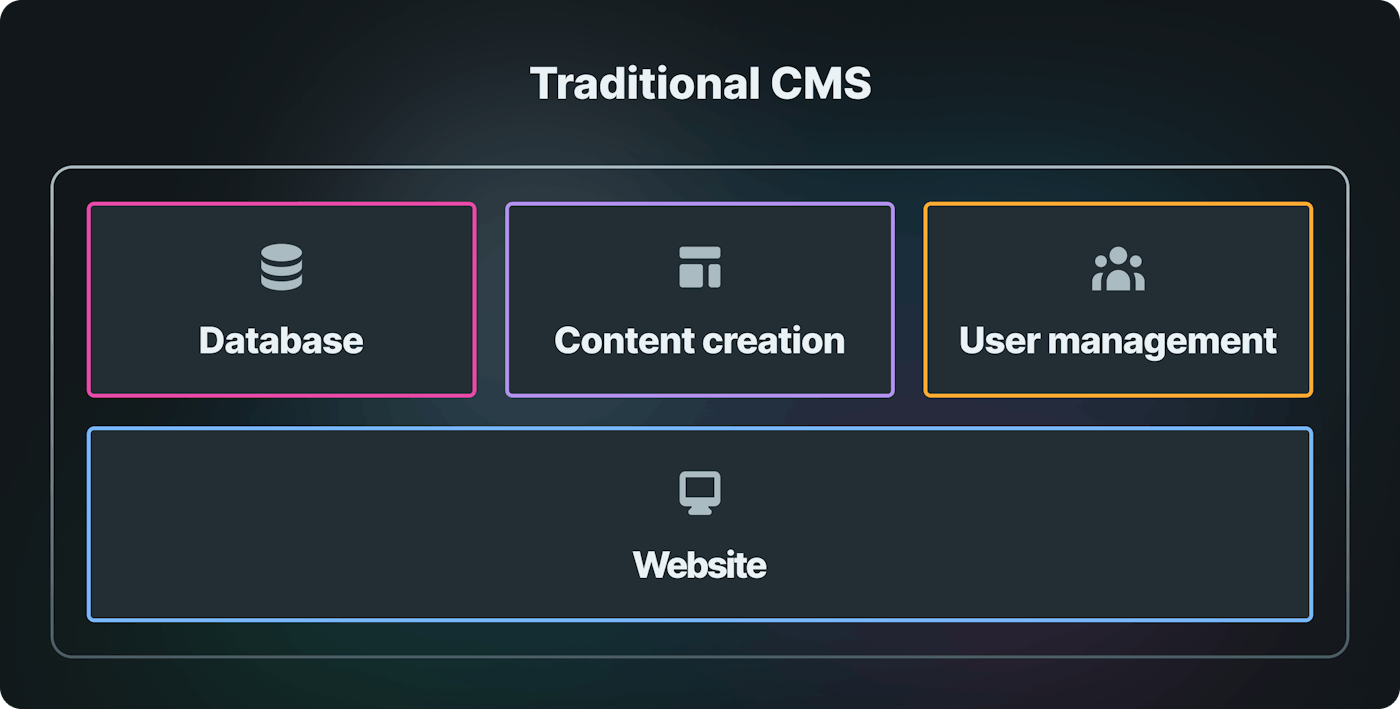
Traditional CMS architecture locks content into a single destination.
The Multichannel Challenge
Today's organizations face increasing pressure to deliver consistent, high-quality content experiences across multiple channels:
- Websites and progressive web apps
- Native mobile applications
- Voice assistants and conversational interfaces
- Digital signage and kiosks
- AR/VR experiences
- IoT devices and wearables
- AI agents and chatbots
A traditional CMS was never built for this. Retrofitting WordPress or Drupal to serve content across all these channels creates fragile, hard-to-maintain systems.
The Headless CMS Solution
By decoupling content creation from presentation, headless CMS platforms free organizations to meet customers wherever they are, using the most appropriate technology for each touchpoint.
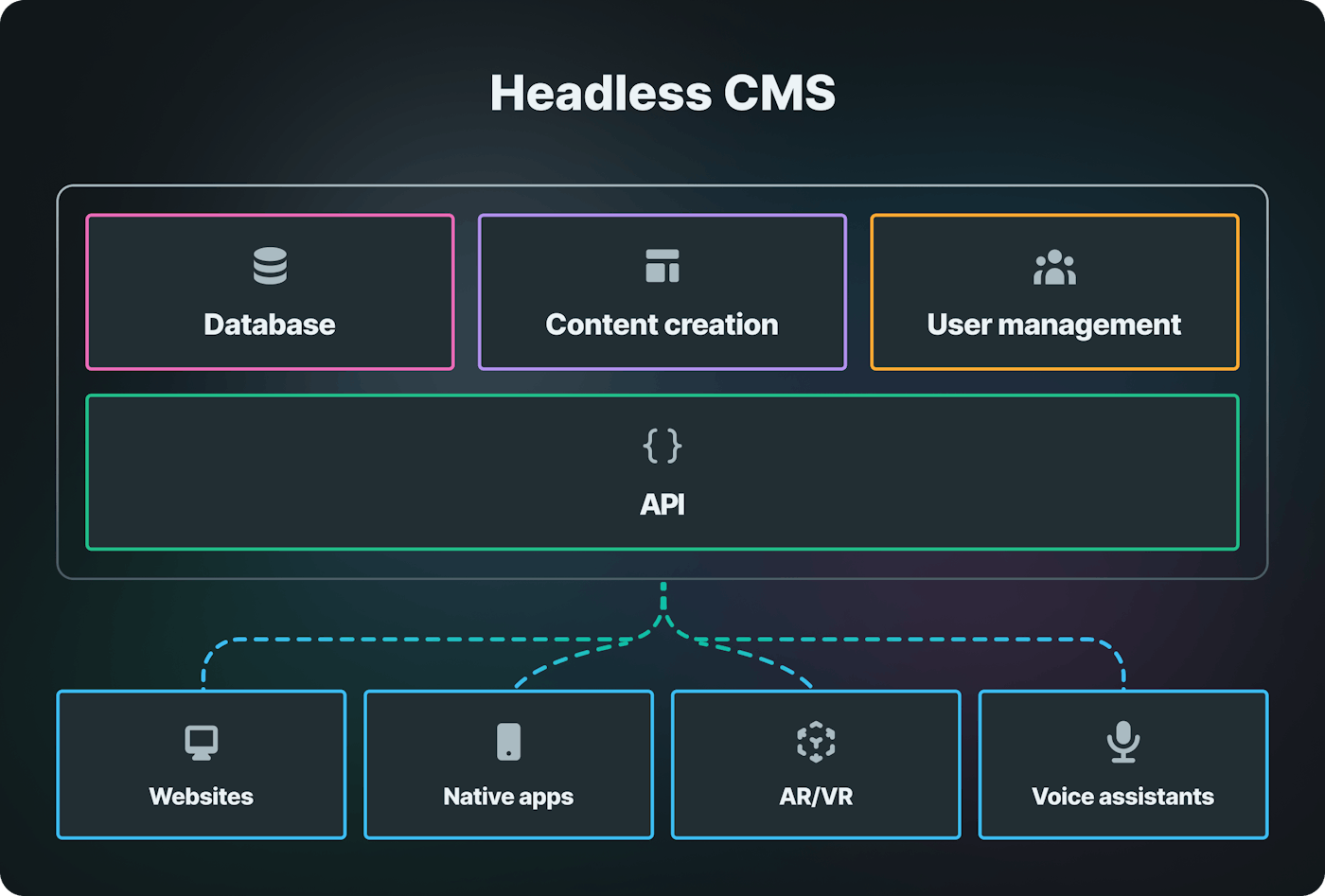
A headless CMS enables content delivery to any digital channel.
Comparative Feature Analysis
| Feature | Traditional CMS | Headless CMS |
|---|---|---|
| Architecture | Monolithic, tightly coupled | API-first, microservices-oriented |
| Hosting & Maintenance | Self-hosted, resource-intensive | Cloud-native, managed infrastructure |
| Scalability | Limited by server resources | Elastic, cloud-based scaling |
| Security | Requires regular patching and updates | Managed security with reduced attack surface |
| Development Approach | Template-driven, limited choices | Any framework, any language |
| Frontend Flexibility | Locked to system templates | Complete technology freedom |
| Performance | Database-dependent, slower | CDN-delivered, optimized API responses |
| Content Reusability | Limited to single channel | Unlimited multichannel delivery |
| AI Capabilities | Plugin-dependent, limited | Native AI content generation, agents, and automation |
Headless CMS vs. Decoupled CMS
A decoupled CMS represents a middle ground. It maintains a default frontend presentation layer while also providing API access to content. While offering more flexibility than traditional systems, decoupled CMSs still require maintaining that default frontend and don't fully embrace the API-first philosophy.
If your team needs complete freedom to build with any technology stack, and you want to avoid maintaining legacy frontend infrastructure, a true headless CMS is the better choice.
Should You Build Your Own Headless CMS?
A headless CMS is, at its core, a database, a schema layer, an auth system, a media pipeline, and a REST API. All of that is buildable. Teams regularly ask whether a custom headless CMS is the better path, and the honest answer depends on how much of that list is actually differentiating for your product.
Building your own makes sense when your content model is genuinely unusual, when data residency or compliance rules rule out managed platforms, or when the CMS itself is the product you are selling.
It tends to go badly when the team underestimates the parts that are not the API. The work that consumes the time is rarely the content endpoint:
- A dashboard non-technical editors will actually use
- Draft and published states, plus revision history
- Role-based permissions and audit trails
- Media upload, storage, resizing, and CDN delivery
- Localization and translation workflows
- Webhooks, caching, and cache invalidation
- Ongoing security patching and uptime
A middle path exists. Use a managed headless CMS for storage, delivery, and the editing interface, then build exactly the custom layer your product needs on top of the API. You keep control of the parts that differentiate you and skip the parts that do not. Cosmic's REST API, TypeScript SDK, and MCP server exist for this pattern.
Why Organizations Choose Headless CMS
Modern enterprises and digital teams increasingly select headless CMS solutions to address critical business and technical challenges:
For Developers
- Use any framework - Build with Next.js, Astro, React, Vue, Svelte, or whatever comes next. Your CMS never locks you in.
- API-first architecture - Structured content accessible through a clean REST API. No wrestling with database schemas or server configs.
- Pre-built infrastructure - Global CDN, automatic image optimization, user management, and webhooks out of the box.
- CLI and automation - Modern platforms like Cosmic provide CLI tools, SDKs, and AI agents to streamline development workflows.
For Content Teams
- Intuitive editing - Visual dashboard with drag-and-drop media management. No technical knowledge required.
- Structured content models - Flexible schemas that adapt to your content strategy without developer intervention.
- Collaboration features - Multi-user editing, revision history, and scheduled publishing.
- AI-powered creation - Generate, translate, and optimize content using built-in AI tools and agents.
For Business Leaders
- Reduced operational costs - Eliminate server maintenance, security patching, and infrastructure management.
- Faster time to market - Launch new digital experiences in days instead of months.
- Technology independence - Avoid vendor lock-in by keeping content separate from presentation.
- Scalable infrastructure - Handle traffic spikes without manual intervention or costly over-provisioning.
AI-Powered Headless CMS
The latest evolution in headless CMS technology is the integration of AI agents directly into the content management workflow. Platforms like Cosmic build AI into the core of the system, so agents, generation, and automation all run against your live content model.
How AI Agents Work in a Headless CMS
In Cosmic you create as many agents as you need and turn on the capabilities each one uses. Capabilities are enabled per agent, so one agent can talk to your team in Slack, write content, and ship code:
- Communication - The agent lives in Slack, WhatsApp, or Telegram as a conversational team member your team can message directly.
- Content - The agent creates, updates, and publishes CMS content against your existing schema.
- Code - The agent works in a connected GitHub repository, commits changes, and opens pull requests.
- Browser Automation - The agent navigates and controls a browser, fills out forms, and records demo videos.
Every agent also gets CMS Integration, so it understands your content models, respects your publishing workflows, and can execute multi-step tasks autonomously.
"Cosmic is: us never having to ask a developer to change anything on the backend of our website." - Maximilian Wuhr, Co-Founder at FINN
Autopilot: Automated Content Operations
Cosmic's Autopilot feature lets you schedule AI agents to run on a recurring basis. Set up a content agent to publish daily blog posts, generate weekly reports, or update product listings automatically. Combined with webhooks and your frontend framework, this creates a fully automated content pipeline.
Connect Your Own AI Coding Tools
Agents that run inside Cosmic are one half of the story. You can also point the AI tools you already use at your content. Cosmic ships an MCP server, so clients like Claude Desktop, Claude Code, and Cursor can read your content model, query objects, and create or update content directly from your terminal or IDE.
Access is controlled by which key you hand the client. Give it a read-only key and the write tools return a blocked error, which makes it safe to connect an agent to production content before you trust it with changes. For step-by-step setup, read Connect Claude to your CMS or Connect Claude Code to your CMS with MCP.
Real-World Headless CMS Use Cases
Organizations across industries rely on headless CMS architecture to power their digital experiences:
E-commerce and Retail
- Dynamic product catalogs delivered to web, mobile, and in-store kiosks
- Personalized content experiences based on customer segments
- Real-time inventory and pricing updates across all channels
Media and Publishing
- Multi-platform content distribution (web, app, newsletter, social)
- Structured content that adapts to different formats automatically
- AI-assisted editorial workflows for faster publishing cycles
SaaS and Technology
- Marketing sites, documentation, and changelog managed from one dashboard
- Developer portals with API reference content
- Multi-language support for global audiences
Enterprise and Institutions
- Consistent brand experiences across hundreds of microsites
- Compliance-friendly content governance and audit trails
- Integration with existing enterprise systems through APIs
Companies like FINN, Vuetify, Tripwire Interactive, Parque Explora, and Plato use Cosmic headless CMS to power their digital experiences.
How to Choose the Right Headless CMS
Selecting a headless CMS requires evaluating several critical dimensions. If you want to see how specific platforms stack up, we maintain a comparison of 10 headless CMS platforms.
1. API Design and Developer Experience
Look for clean, well-documented REST APIs with SDKs for your preferred language. The best headless CMS platforms ship a TypeScript SDK, CLI tools, and comprehensive documentation so your team can go from zero to fetching content in minutes. Cosmic provides a REST API with a JavaScript/TypeScript SDK, CLI tools, and complete documentation.
If your frontend is TypeScript, check whether the SDK ships real types or just a thin fetch wrapper with any return values. Typed responses are the difference between catching a renamed field at build time and catching it in production.
2. Content Modeling Flexibility
Your CMS should support flexible content models that can evolve with your business. Look for support for nested objects, relationships between content types, JSON fields, and reusable components.
3. AI and Automation Capabilities
In 2026, AI is no longer optional. Evaluate whether the CMS offers native AI features like content generation, image creation, and automated workflows, or whether you'll need to build these yourself with third-party integrations. Check how the platform handles AI access control too, since an agent with unrestricted write access to production content is a real risk.
4. Media Management
Image and video handling matters. Look for automatic optimization, responsive image delivery, CDN distribution, and AI-powered media generation.
5. Scalability and Performance
Ensure the platform can handle your traffic requirements. Cloud-native platforms with global CDNs typically offer better performance than self-hosted solutions.
6. Pricing and Total Cost of Ownership
Compare the full cost of ownership, including subscription, hosting, maintenance, and development time. Managed headless CMS platforms eliminate infrastructure costs, and most of them charge per seat, so team size affects the total.
Cosmic pricing is public and works like this:
- Free - $0/month, 1 Bucket, 2 team members, 1,000 Objects
- Builder - $99/month, 2 Buckets, 3 team members, 5,000 Objects
- Team - $299/month, 3 Buckets, 5 team members, 20,000 Objects
- Business - $499/month, 5 Buckets, 10 team members, 50,000 Objects
- Enterprise - Custom pricing
Additional users are $29/user/month beyond the seats included in your plan. Additional Buckets are $29/bucket/month. Full details, including add-ons and overage rates, are on the pricing page.
Cosmic pricing last verified against cosmicjs.com/pricing on September 1, 2026.
7. Security and Compliance
Evaluate the platform's security posture, including encryption, authentication options, role-based access control, and compliance certifications relevant to your industry. If AI clients will touch your content, confirm the platform separates read and write credentials so you can scope what an agent is allowed to change.
Framework Guides
Pick the guide that matches your stack. Each one includes working @cosmicjs/sdk code, not pseudocode:
- React CMS - Server Components, client-side fetching, and key handling
- Best headless CMS for React and Next.js - how the main platforms compare for React teams
- Headless CMS for Angular - injectable service pattern with SSR
- Headless CMS for Vue and for Nuxt
- API-first CMS - what API-first means in practice and how to evaluate it
- Image CDN - responsive images and transformations at the edge
Headless CMS FAQ
What is a headless CMS in simple terms?
It is a place to store and edit your content that has no website attached to it. You define the shape of your content, editors fill it in, and your website or app reads it over an API. The CMS never decides how the content looks.
What is headless CMS architecture?
Three layers. A content repository holds structured data. An API layer exposes that data over HTTP, usually REST, typically behind a CDN. One or more frontends consume the API and render it. Because the layers are independent, you can replace the frontend without touching the content, and add a second frontend without duplicating content.
Is a headless CMS better than WordPress?
It depends on what you are building. WordPress is faster to launch if you want one website, a theme, and a plugin ecosystem. A headless CMS is the better fit when you need to serve several channels from one content source, when you want to choose your own frontend framework, or when you want to avoid ongoing server maintenance and plugin security patching.
How much does a headless CMS cost?
Managed platforms generally price on some combination of seats, content volume, and API usage, and most have a free tier for small projects. Cosmic starts at $0/month for 1 Bucket, 2 team members, and 1,000 Objects, with paid plans at $99, $299, and $499/month and custom Enterprise pricing. Additional users are $29/user/month. Self-hosted options have no license fee but carry hosting, scaling, and maintenance costs that are easy to underestimate.
What should developers look for in a headless CMS API?
Predictable REST endpoints, field selection so responses stay small, relationship resolution in a single request, sensible caching headers, a typed SDK for your language, and separate read and write keys. Response time matters, but so does how much code you have to write to get the exact shape of data your component needs.
What is the best headless CMS for TypeScript?
Look for a first-party SDK published as TypeScript with real exported types, not a community wrapper. Cosmic's @cosmicjs/sdk is TypeScript-first, so queries, field selection, and responses are typed end to end.
Can I use a headless CMS with an existing website?
Yes. Because content is delivered over an API, you can move one section at a time. A common approach is to start with the blog or a marketing section, point that route at the CMS, and leave the rest of the site untouched until you are ready.
What is a lightweight headless CMS?
One you can be productive in on day one: a short setup path, a small API surface, and no required build tooling or self-hosted infrastructure. The practical test is how long it takes from creating an account to rendering real content in your app. On Cosmic that is a signup, a content model, and one cosmic.objects.find() call.
Getting Started with Cosmic Headless CMS
Cosmic is the AI-powered headless CMS built for modern development teams. Backed by Y Combinator (W19), Cosmic provides:
- REST API with JavaScript SDK and CLI tools
- AI agents for content, code, and team collaboration
- Autopilot for automated content operations
- MCP server so Claude Desktop, Claude Code, and Cursor can work with your content directly
- Global CDN with automatic image optimization
- Flexible content models with relationships, JSON fields, and localization
- Webhooks for real-time integrations
- Multi-user collaboration with role-based access
The Free plan does not require a credit card, so you can model content and make your first API call before deciding anything.
Start building for free or book a 15-minute intro with our CEO to see how Cosmic fits your stack.