
Tony Spiro
May 20, 2024
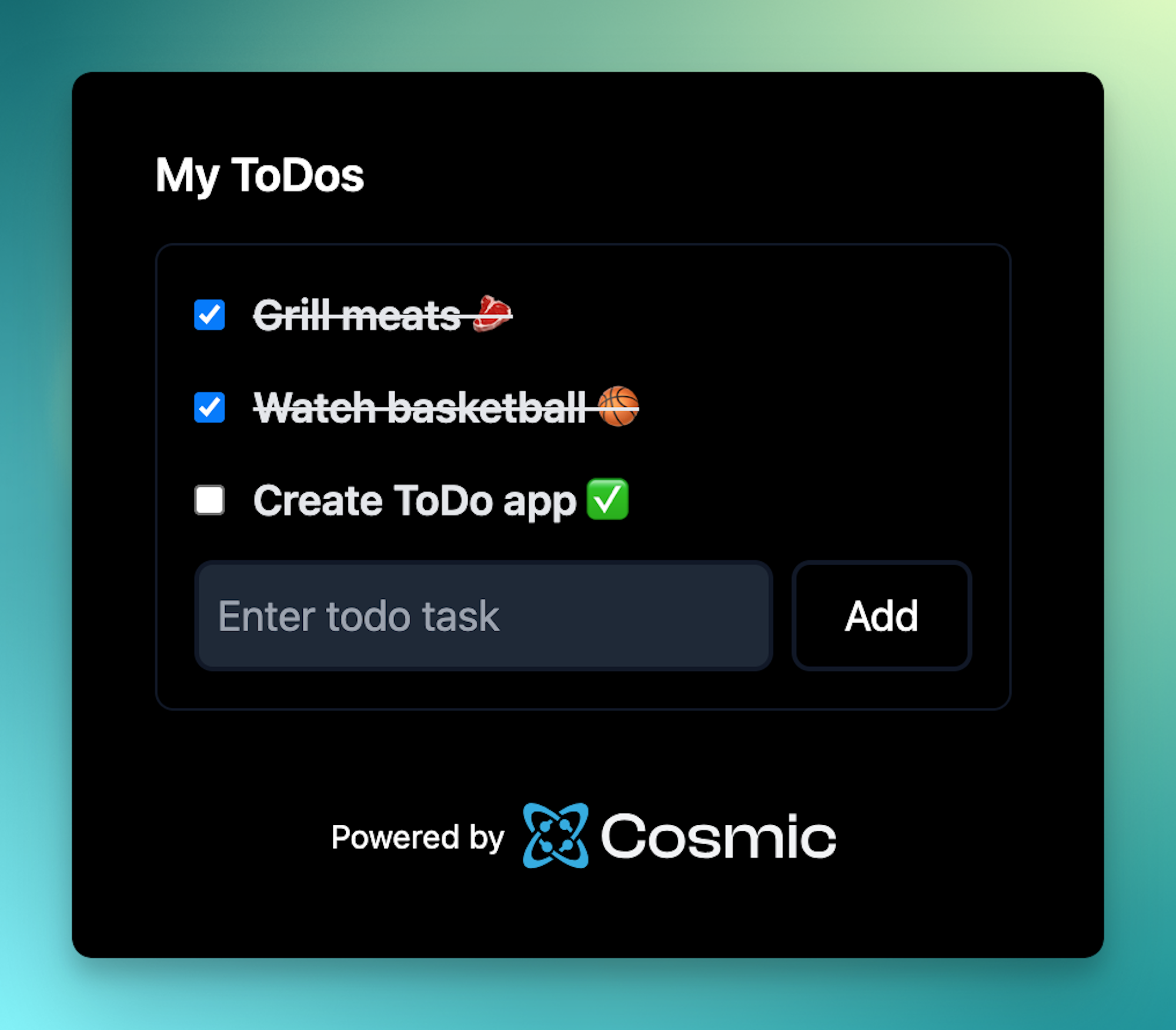
In this article, we're going to build the quintessential application for demonstrating CRUD (Create, Read, Update, Delete) capabilities, a ToDo app using React Server Actions and the Cosmic CMS API.
By using the Cosmic CMS API to store our ToDo tasks and React Server Actions to update the tasks we will be able do all client-side interactions without exposing any endpoints or API keys. And our tasks will be saved in Cosmic which we could then use in any website or application using the Cosmic API. Let's get into it.
TL;DR
Check out the ToDo app code on GitHub
Getting started
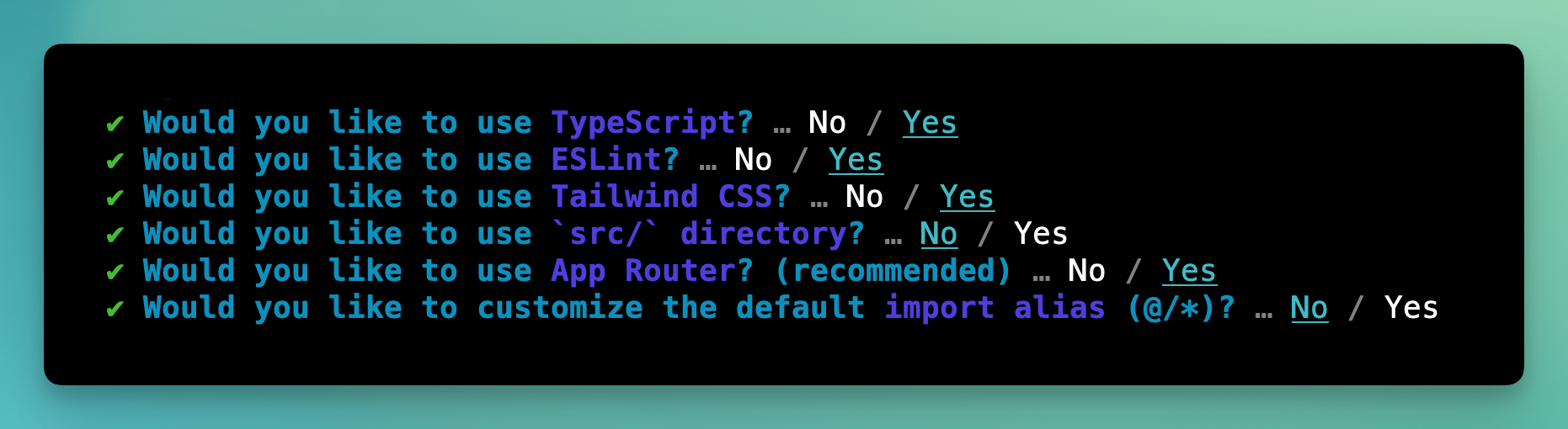
First, install a fresh Next.js project.
bunx create-next-app@latest cosmic-todo
cd cosmic-todo
Select the following options:
Install the Cosmic JavaScript SDK.
bun add @cosmicjs/sdk
Create a new file located at cosmic/client.ts with the following code:
import { createBucketClient } from "@cosmicjs/sdk";
export const cosmic = createBucketClient({
  bucketSlug: process.env.COSMIC_BUCKET_SLUG || "",
  readKey: process.env.COSMIC_READ_KEY || "",
  writeKey: process.env.COSMIC_WRITE_KEY || "",
});
Create Project in Cosmic
Log in to the Cosmic dashboard and create a new empty Project.
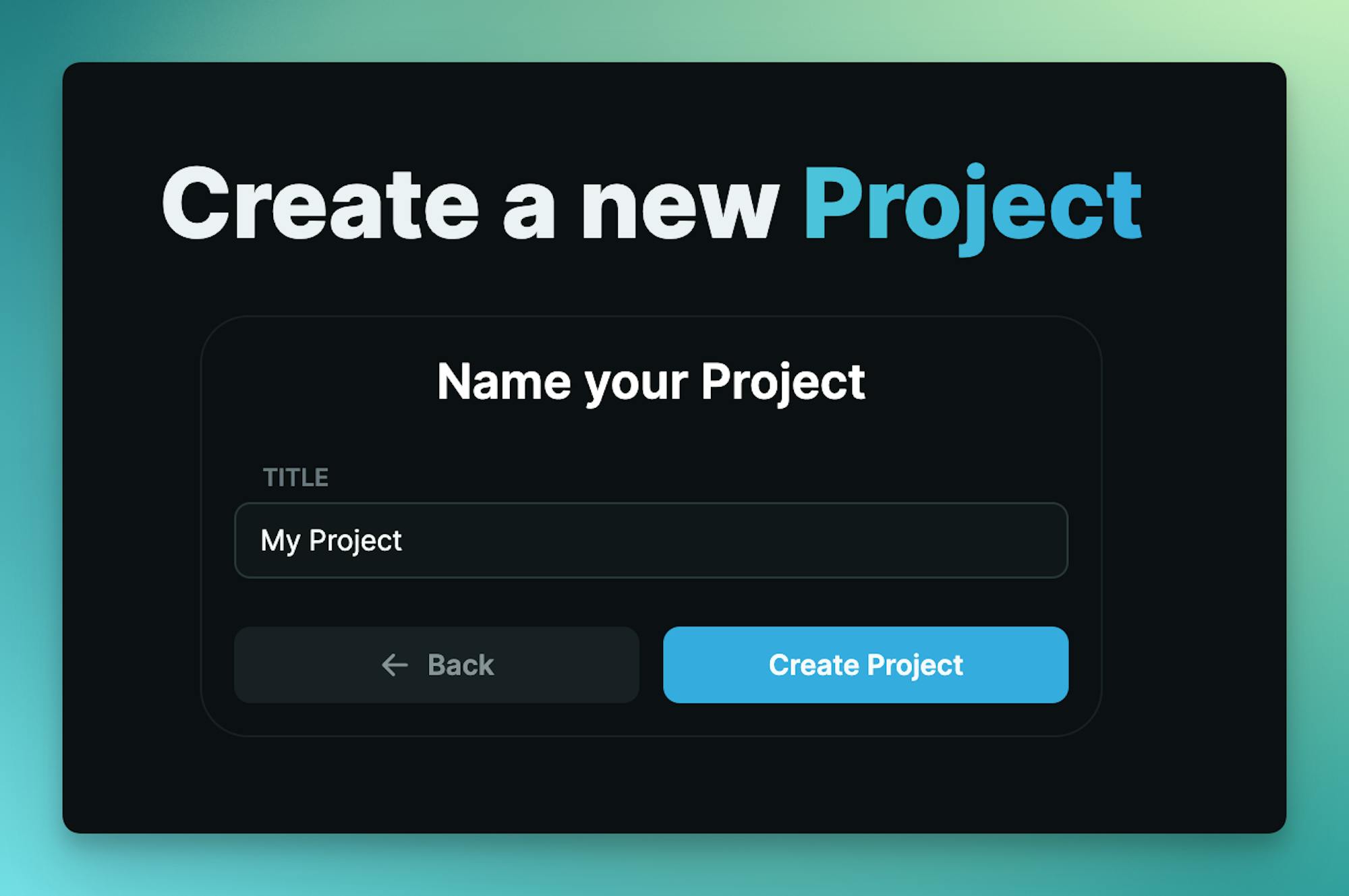
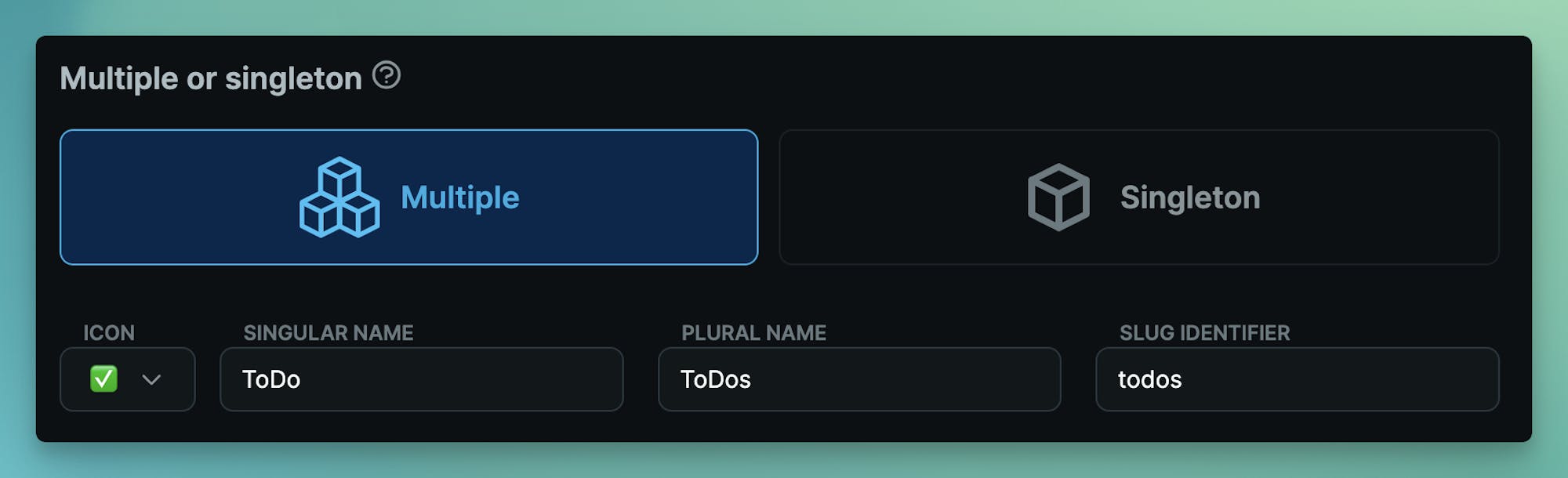
Create an Object type ToDos with slug todos:
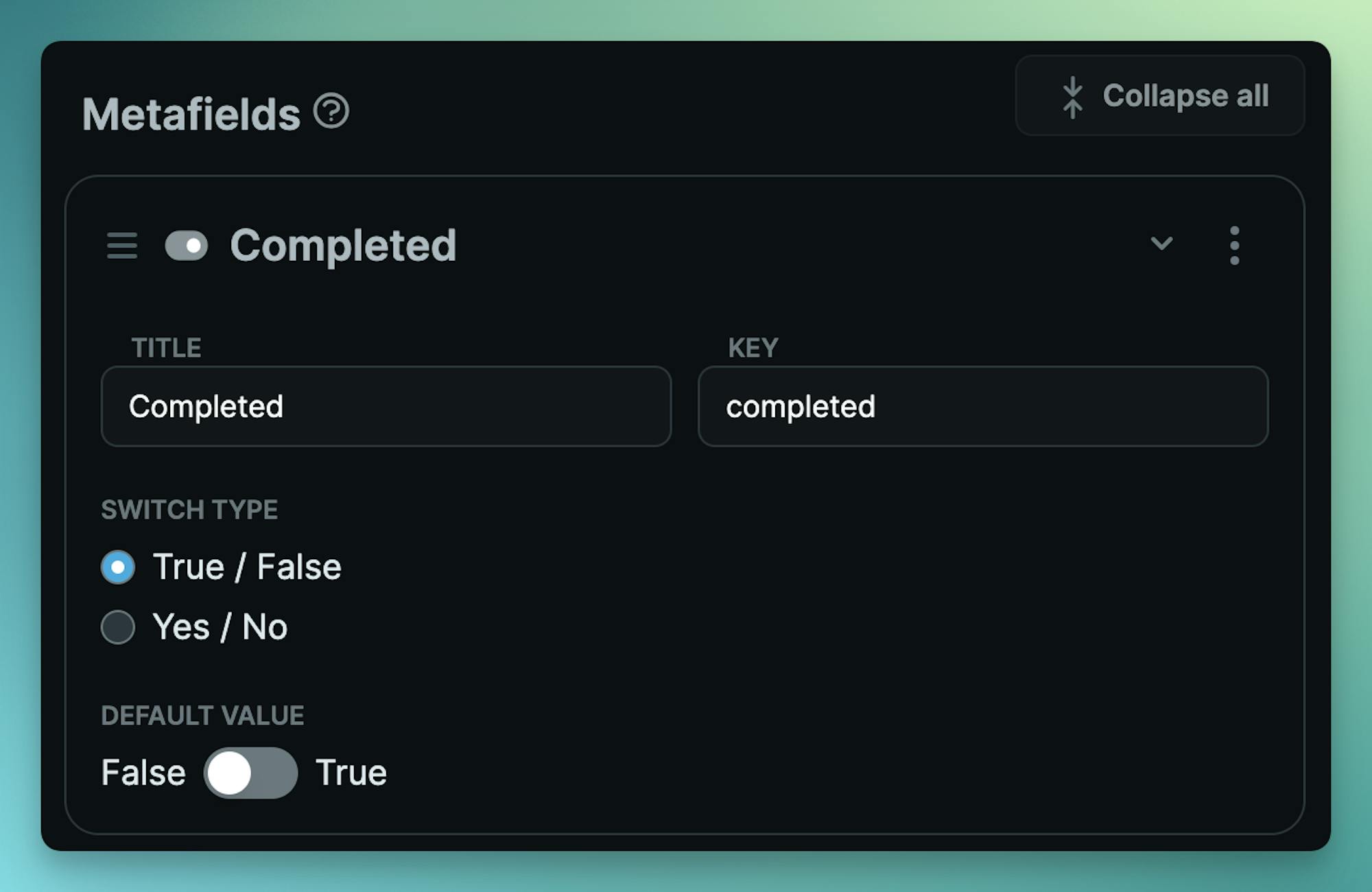
Add the switch Metafield with key completed.
Create a new .env.local file. And add your API keys found in the Cosmic dashboard at Project / API keys.
# .env.local
COSMIC_BUCKET_SLUG=your_bucket_slug
COSMIC_READ_KEY=your_bucket_read_key
COSMIC_WRITE_KEY=your_bucket_write_key
Code the ToDo logic
Create a new file in components/ToDos.tsx with the following code.
// components/ToDos.tsx "use client"; import { useState } from "react"; import { getToDos, addToDo, updateToDo, deleteToDo } from "@/actions"; import { ToDoForm } from "@/components/ToDoForm"; export type ToDoType = { id: string; title: string; metadata: { completed: boolean }; }; export function ToDos({ todos }: { todos: ToDoType[] | [] }) { const [clientTodos, setClientTodos] = useState(todos); const [todoTitle, setTodoTitle] = useState(""); const [disabled, setDisabled] = useState(false); function handleStatusChange(todo: ToDoType) { updateToDo(todo.id, !todo.metadata.completed); const updatedTodos = clientTodos.map((updatedTodo) => { if (updatedTodo.id === todo.id) updatedTodo.metadata.completed = !updatedTodo.metadata.completed; return updatedTodo; }); setClientTodos(updatedTodos); } async function handleAddToDo(title: string) { if (disabled) return; if (!title.trim()) return; addToDo(title); // Reset title field setTodoTitle(""); // Instant data change setClientTodos([ ...clientTodos, { id: "temporary-id", title, metadata: { completed: false } }, ]); // Disable add setDisabled(true); // Refetch real data const todos = await getToDos(); setClientTodos(todos); setDisabled(false); } async function handleDeleteClick(id: string) { deleteToDo(id); // Instant data change setClientTodos(clientTodos?.filter((todo) => todo.id !== id)); } function handleTitleChange(title: string) { setTodoTitle(title); } return ( <> <div className="text-gray-600 dark:text-gray-200 text-lg font-semibold"> {clientTodos.map((todo: ToDoType) => { return ( <div key={todo.id} className="group mb-3 flex gap-x-1 items-center"> <input onChange={() => handleStatusChange(todo)} type="checkbox" checked={todo.metadata.completed} className="cursor-pointer" /> <div onClick={() => handleStatusChange(todo)} className={ todo.metadata.completed ? "cursor-pointer line-through" : "cursor-pointer" } > {todo.title} </div> <div className="cursor-pointer group-hover:inline-block hidden ml-2 w-[100px] text-red-400" onClick={() => handleDeleteClick(todo.id)} > delete </div> </div> ); })} </div> <ToDoForm handleTitleChange={handleTitleChange} handleAddToDo={handleAddToDo} todoTitle={todoTitle} /> </> ); }
There is a bit going on in this file, but the main thing to understand is that this file has the "use client" directive at the top of the page which tells Next.js to render this code to the client.
All of the hook actions for handleAddToDo, handleStatusChange, and handleDeleteClick interacts with the React Server Actions located in the @/actions folder.
React Server Actions
To make our ToDo list data interactive with React Server Actions, create a new file located at actions/index.tsx with the following:
// actions/index.tsx
"use server";

import { cosmic } from "@/cosmic/client";

export async function getToDos() {
  const { objects: todos } = await cosmic.objects
    .find({ type: "todos" })
    .props("id,title,metadata.completed")
    .sort("created_at");
  return todos;
}

export async function addToDo(title: string) {
  await cosmic.objects.insertOne({
    type: "todos",
    title,
    metadata: {
      completed: false,
    },
  });
}

export async function updateToDo(id: string, completed: boolean) {
  await cosmic.objects.updateOne(id, {
    metadata: {
      completed,
    },
  });
}

export async function deleteToDo(id: string) {
  await cosmic.objects.deleteOne(id);
}
Notice the directive at the top of the page "use server" which tells Next.js to only render this code on the server. Even though these functions are being called in the client component, the code from the Server Action is kept securely private on the server.
The magic happening here is "When calling a Server Action on the client, it will make a network request to the server that includes a serialized copy of any arguments passed." as noted in the React docs.
Next, create the form component in components/ToDoForm.tsx with the following code:
// components/ToDoForm.tsx
export function ToDoForm({
  handleTitleChange,
  handleAddToDo,
  todoTitle,
}: {
  handleTitleChange: (title: string) => void;
  handleAddToDo: (title: string) => void;
  todoTitle: string;
}) {
  return (
    <div className="grid grid-cols-1 md:grid-cols-4 gap-x-2 flex-row text-lg">
      <input
        className="text-gray-600 md:col-span-3 col-span-4 dark:text-gray-200 dark:bg-gray-800 border-gray-400 dark:border-gray-900 p-2 border-2 rounded-lg"
        type="text"
        onChange={(e: React.FormEvent<HTMLInputElement>) => {
          handleTitleChange(e.currentTarget?.value);
        }}
        onKeyDown={(e: React.KeyboardEvent) => {
          if (e.key === "Enter") {
            handleAddToDo(todoTitle);
          }
        }}
        placeholder="Enter todo task"
        autoFocus
        value={todoTitle}
      />
      <button
        type="submit"
        disabled={!todoTitle.trim()}
        className="p-2 mt-2 md:mt-0 md:col-span-1 col-span-4 border-2 border-gray-400 dark:border-gray-900 rounded-lg"
        onClick={() => handleAddToDo(todoTitle)}
      >
        Add
      </button>
    </div>
  );
}
Put it all together in the app/page.tsx file.
// app/page.tsx
export const dynamic = "force-dynamic";

import { ToDos } from "@/components/ToDos";
import { getToDos } from "@/actions";
export default async function ToDoPage() {
  let todos = [];
  try {
    todos = await getToDos();
  } catch (e) {}
  return (
    <div className="p-10 max-w-[450px] my-10 mx-auto">
      <h1 className="text-xl font-semibold mb-4">My ToDos</h1>
      <div className="p-4 mx-auto border border-gray-400 dark:border-gray-900 rounded-lg">
        <ToDos todos={todos} />
      </div>
    </div>
  );
}
Notice that we set "force-dynamic" so that our data is the most up to date on page load. And we fetch the initial ToDos using the getToDos action.
Now run the app:
bun dev
Open up your browser to http://localhost:3000 and see the ToDo app. Add / update / delete ToDo tasks and see them available in the Cosmic dashboard.
Next steps
I hope you enjoyed this example of using React Server Actions and the Cosmic CMS to create a ToDo application that keeps your API access secure. For more information on Cosmic capabilities, go to the Cosmic documentation and react out to us on X (fka Twitter).