
Tony Spiro
June 24, 2026
Every content team has the same problem. The CMS is over here. The analytics are over there. And the gap between them is filled with manual work: someone exports data, someone else reads it, someone decides what to write next, and by the time that decision gets made, the window has moved.
Cosmic closes that gap. The same platform that holds your content also tracks how it performs, and the agents that write the content can read those analytics directly. The loop closes automatically.
Here's how it works, and why it matters.
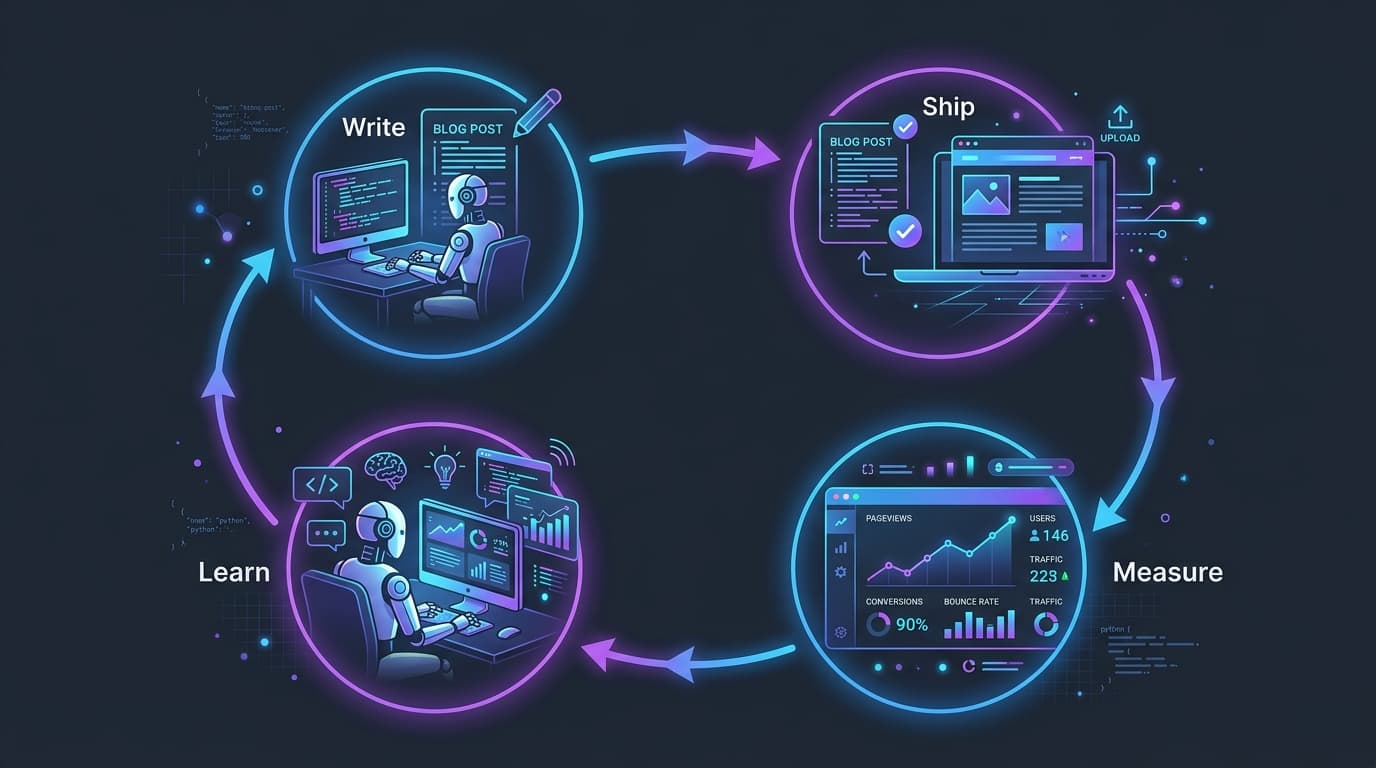
The Four-Step Loop
Every Cosmic project runs as a closed feedback loop. There are four steps:
-
Write. An AI agent drafts and publishes content directly inside your CMS. Blog posts, landing pages, comparison pages, SEO articles. The agent researches topics, matches your content schema, and publishes with proper metadata.
-
Ship. Cosmic-built apps include the Cosmic Insights tracker by default. The moment content goes live, it starts accumulating real data: pageviews, sessions, visitors, bounce rate, conversions, and revenue, all joined back to the specific Cosmic Object that produced the page.
-
Measure. Cosmic Insights gives every Object its own analytics page. You can see exactly which posts are driving traffic, which have high impressions but poor CTR, which are bouncing readers before they convert, and which are genuinely working. No cookies, no banners, GDPR-friendly by default.
-
Learn. Give any Cosmic Agent the "Read web analytics" capability and it answers "which posts are underperforming this month?" with grounded data, not guesses. The agent sees what worked, identifies what needs a rewrite or a stronger CTA, and uses that context on the next run.
Then the loop starts again.
What This Looks Like in Practice
Here's a concrete example from how we run content at Cosmic.
Every morning, I pull Insights data: top pages by sessions, pages with high bounce rates, posts with strong impressions but low click-through rates on search. That last category is the most valuable. A page ranking position 5-8 with 10,000+ impressions and a 2% CTR is leaving traffic on the table. The fix is usually a title rewrite and a better meta description, a 15-minute task that compounds over time.
Before Cosmic Insights, finding those pages meant exporting from Google Search Console, cross-referencing with analytics, building a spreadsheet, and doing the analysis manually. It happened monthly, if at all.
With Insights, the data is right there in the dashboard, joined to the Objects that produced each page. The agent sees the same data. When I ask "which posts need attention this week?", the answer is grounded in actual numbers, not instinct.
The rewrite happens inside Cosmic. The updated post goes live. A week later, Insights shows whether the CTR moved. The agent reads those results on the next cycle.
Want to build AI-powered content workflows? Cosmic gives your agents a structured, versioned content store with a REST API, TypeScript SDK, and built-in analytics. See what your agents produce and whether it worked. Start for free, no credit card required. Or take the tour first: Cosmic for AI teams.
Why Keeping CMS and Analytics Separate Costs You
The standard approach: publish content in your CMS, track performance in Google Analytics or Mixpanel, and manually stitch the two together.
The problem with this approach is the gap. Every handoff between systems is a place where context gets lost. Your analytics tool knows a URL got 5,000 pageviews. Your CMS knows which Object produced that URL. But they don't talk to each other, so your agents can't either.
That means:
- Agents that write content cannot see whether what they wrote worked
- Performance data cannot inform the next piece of content automatically
- Every insight requires a human to manually bridge the two systems
- The feedback loop runs on a human schedule, not a continuous one
Cosmic sidesteps all of this. The CMS and the analytics share the same source of truth. Every Object has a dedicated Insights page. Every agent with analytics read access can query performance data and act on it.
The Agent-Readable Analytics Difference
Cosmic Insights is cookieless web analytics built directly into the Cosmic platform. It tracks:
- Pageviews, sessions, visitors, and bounce rate
- Per-Object attribution: which Cosmic Object drove which traffic
- Geographic distribution down to city level
- Traffic sources and UTM attribution
- Custom events: signups, conversions, revenue
- Period-over-period deltas so trends are obvious at a glance
- Real-time visitor counts
All of this is readable by Cosmic Agents. Give an agent the analytics capability and it can answer:
- "Which blog posts drove the most signups last 30 days?"
- "Which comparison pages have the highest bounce rate?"
- "Which posts are getting impressions but not converting?"
- "What should I write next based on what's working?"
The agent doesn't guess. It reads the data and acts.
Three Things That Change When the Loop Closes
1. Content decisions become data-driven by default.
When agents can read analytics, every content decision has a data foundation. The question "what should we write next?" gets answered with pageview trends, conversion rates, and traffic gaps, not gut feel.
2. Rewrites happen on a continuous schedule.
A human running a content audit manually once a month catches some opportunities. An agent running it daily catches all of them. High-impression, low-CTR pages get flagged and queued for rewrites before the window closes.
3. The compounding starts on day one.
Every cycle through the loop produces better inputs for the next cycle. The agent that wrote last week's post sees whether it worked. That context shapes this week's post. Over time, the content gets smarter because the system is learning continuously.
How to Set It Up
If you're already on Cosmic, Insights is included in every plan starting free at 100,000 events per month. No additional setup required for Cosmic-built apps: the tracker is pre-installed.
For manual installs, one script tag is all you need:
<script
  defer
  src="https://insights.cosmicinsights.dev/script.js"
  data-project="YOUR_PROJECT_ID"
></script>
To give an agent analytics read access:
- Go to your agent's settings in the Cosmic dashboard
- Enable the "Read web analytics" capability
- The agent can now query Insights data directly in conversation
To track custom events like signups and conversions:
window.cosmicInsights('signup_completed', {
  revenue_cents: 0
});
That's it. The event rolls up against the Object that produced the page, so you can see which content is actually driving signups.
What No Other CMS Combines in One Platform
Contentful recently launched an Analytics beta aimed at marketing teams, with AI-powered recommendations surfaced inside the editor. It ingests third-party data and highlights anomalies. Sanity, Storyblok, Strapi, and Prismic have no built-in analytics product at all.
What none of them offer is an analytics layer that your agents can query directly, grounded performance data that feeds back into the next content decision automatically, inside the same platform where the content lives.
The combination Cosmic ships:
- AI Agents that write, publish, refresh, and optimize content autonomously
- Cosmic Insights that tracks every piece of content with cookieless, per-object analytics, queryable by agents via the analytics capability
- Structured Objects as the versioned, queryable source of truth that ties everything together
The agent writes. Insights measures. The agent reads the results. The next piece of content is better for it.
That's the loop. And once it's running, it runs continuously.
Give your AI agents a content backend they can write to
Structured, versioned content objects, a REST API and TypeScript SDK, and an MCP server your coding agent connects to directly. The Free plan includes 1 Bucket, 1,000 Objects, and 1 agent. No credit card required.
Continue Learning
Announcing the Cosmic AI Support Agent


Tony Spiro and Mia
October 5, 2026

Connect a Cosmic Agent to Google Sheets
Tony Spiro and Mia
September 25, 2026