

Cosmic
May 19, 2026
Cosmic now includes built-in, cookieless web analytics. Cosmic Insights captures pageviews, visitors, sessions, conversions, revenue, and any other custom events from your live apps. You can also tie every event back to the Cosmic Object that produced it. Drop one script onto your site and your dashboard lights up with page views, top pages, bounce rate, and custom events in seconds.
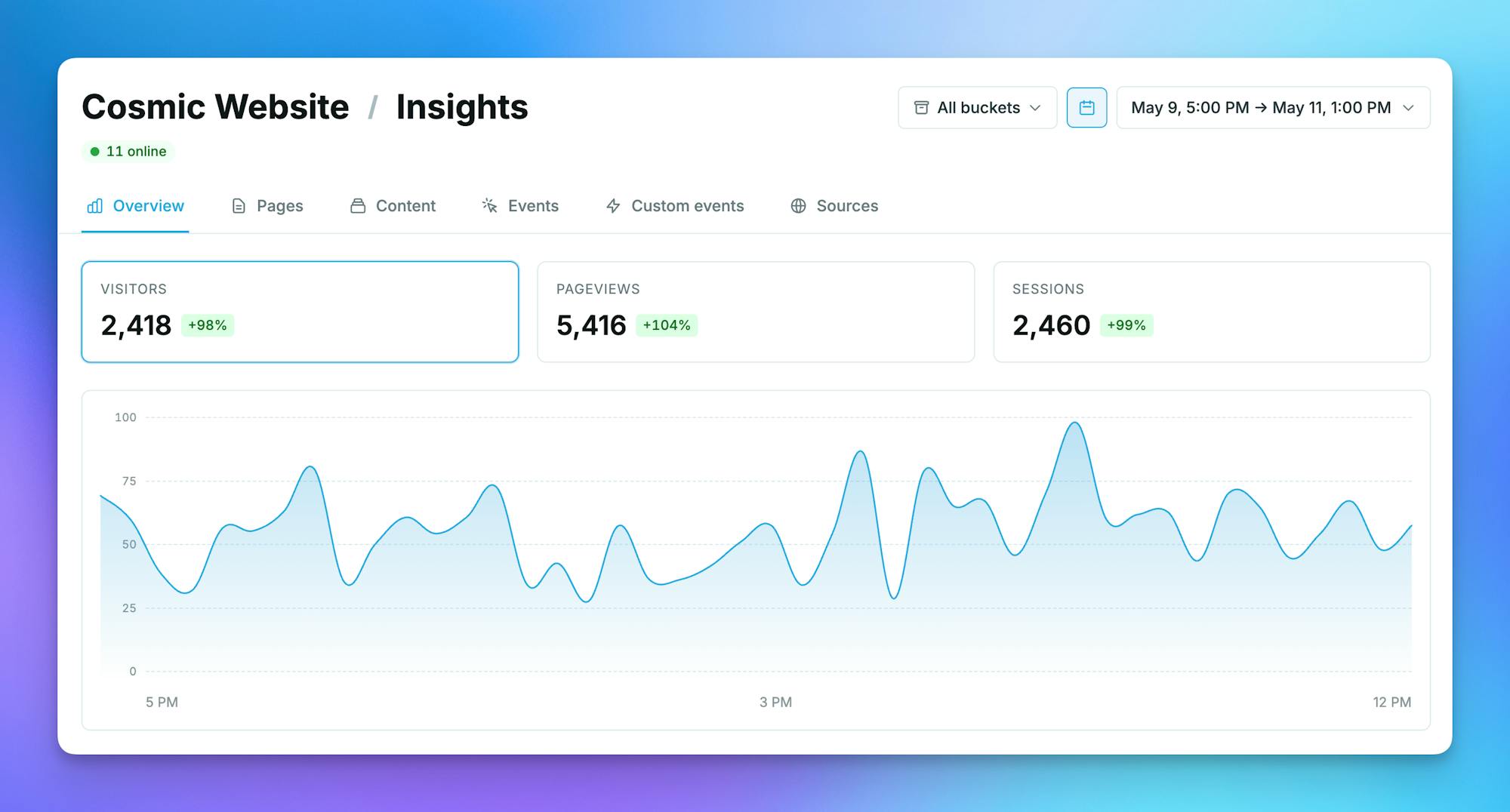
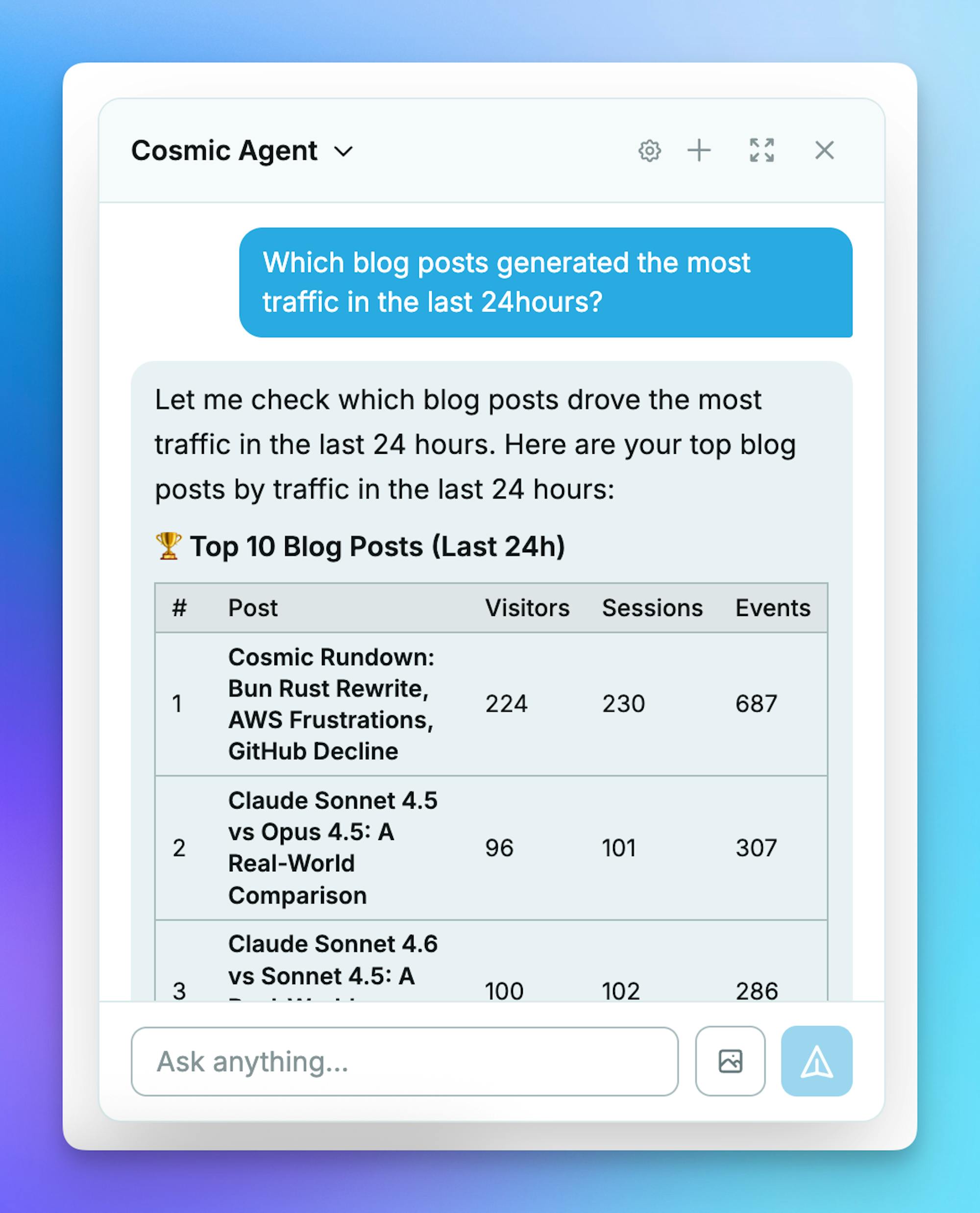
Something powerful happens when you connect your AI team agents to Cosmic Insights. With the Read web analytics capability enabled, agents can pull live performance data, generate reports, and act on what they learn. This closes the loop from content creation to measurable results, turning your CMS into a feedback system that learns and improves.
What's New
- Cookieless web analytics, built into Cosmic. Pageviews, sessions, bounce rate, unique visitors, sources, devices, and geography. No cookies, no localStorage, no fingerprinting, no banners. Visitor IDs are derived from a daily-rotating server-side salt and reset every UTC midnight.
- Per-Object attribution. Every Cosmic Object gets its own Insights page with pageviews, visitors, conversions, and revenue, plus top sources and recent events. Open it from the 3-dot menu on any Object, or click any row in Insights → Content to drill in.
- Period-over-period deltas. Every metric tile shows how the current window compares to the previous one (vs. previous 7 days, 30 days, 90 days, and so on), so trends are obvious without reaching for a second chart.
- Real-time online indicator. A live "X online" pill in the Insights header counts unique visitors active in the last 5 minutes, scoped to the current project or bucket.
- Custom events and revenue. One line of code for signups, conversions, and revenue. Pass
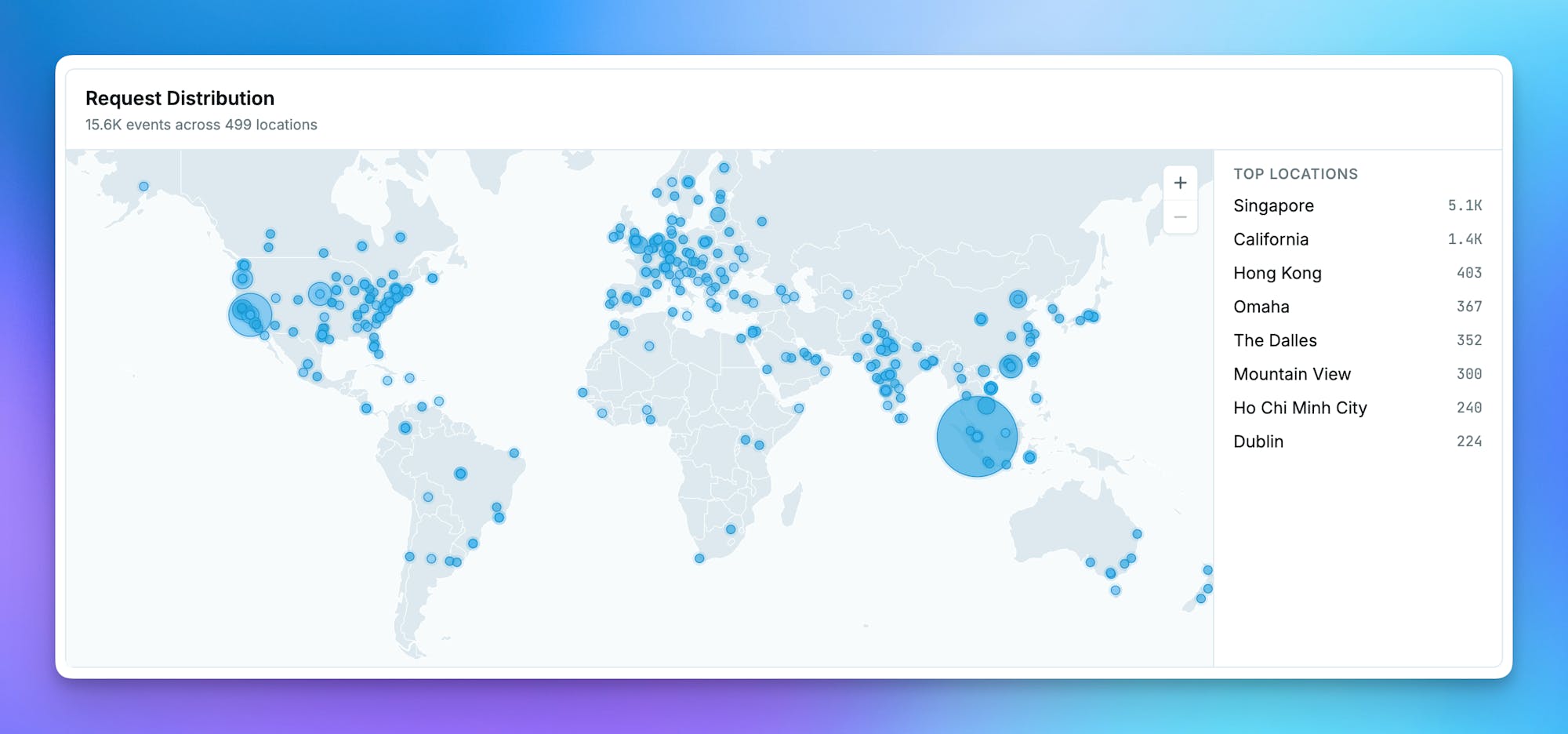
revenue_centsand the event auto-rolls up against the Object that drove it. - Geographic distribution map. An interactive world map of your traffic, drillable to country, region, and city.
- Auto-installed for AI-built apps. Apps generated with Cosmic Autopilot (our AI app builder) ship with the tracker pre-wired for Next.js (App and Pages Router), Astro, Nuxt, Remix, SvelteKit, and vanilla HTML.
- Agent-readable performance data. Give any team agent the Read web analytics capability and it can call
read_performanceto pull pageviews, visitors, conversions, and revenue attributed to specific Objects, agents, or traffic sources. Now your agents can answer "which posts are underperforming this month?" with grounded data instead of guesses.
Why This Matters
Most CMS + analytics setups are two unrelated systems duct-taped together. You write content in one place, ship it, then squint at a separate dashboard trying to remember which slug maps to which post. The signal is there, but it never makes it back to the content team, and it definitely never makes it back to your AI agents.
Cosmic Insights closes that loop. Because the same platform owns both the Object and the pageview, every metric is already attributed to a real piece of content. That changes what your agents can do:
- Write. AI agents draft and ship content from your CMS.
- Ship. Build and deploy automatically with the tracker pre-installed (or added with one line of code).
- Measure. Cookieless web analytics, joined back to the Cosmic Objects that produced each page.
- Learn. Agents use Cosmic Insights to read live performance data and propose what to write, rewrite, or retire next.
How It Works
Installation is a single script tag on any HTML page.
One-line install (any HTML page):
<script
  defer
  src="https://insights.cosmicinsights.dev/script.js"
  data-project="YOUR_PROJECT_ID"
></script>
Custom events
window.cosmicInsights('signup', {
  object_id: '660...',
  plan: 'team',
  revenue_cents: 9900,
});
Snake_case prop keys. Pass an object_id and the event automatically rolls up against the content that drove it.
Let an agent read the data
Add the Read web analytics capability to any team agent and it gains the read_performance tool. Sample prompts that now Just Work:
- "Which blog posts published in the last 30 days are underperforming on visitors? Suggest three rewrites."
- "Did the new pricing page convert better than the old one? Compare last 14 days vs. previous 14."
- "What traffic source drove the most signups last month, and which Object did they land on first?"
- "List the top 10 Objects by revenue this quarter and draft a recap email about the leaders."
The agent gets real numbers attributed to real Objects, then uses its existing tools (write content, open a PR, send a Slack update) to act.
Privacy by Default
Cookieless, IP-anonymized, GDPR-friendly by default.
- No cookies, no localStorage, no fingerprinting.
- IPs are hashed with a rotating server-side salt and dropped.
- Visitor identifiers reset every day at UTC midnight.
- Bot traffic is filtered before it ever hits your dashboard.
- No cookie banner required for the tracker itself.
Pricing
Insights is included in every Cosmic plan and starts free with 100,000 events per month. It scales with you up through Enterprise, with a soft-cap warning email before you hit your hard cap so nothing gets silently dropped. You only pay for events you actually capture.
Try It Now
Open any project, click Insights in the sidebar, and pick a date range. Apps built with Cosmic Autopilot already have the tracker live, so your data is waiting for you. For everything else, drop the one-line script tag onto any HTML page and watch traffic appear in seconds.
New to Cosmic? Create your free account, deploy an app, and see your first pageview land on the Insights page for the exact Object that served it.
Next steps:
- Read the Cosmic Insights documentation for the full setup guide.
- Create your free Cosmic account and start shipping content with built-in, actionable insights from day one.
Stop guessing what works. Start measuring it, learning from it, and letting your AI agents act on it.