
The Content Flywheel: How We Run AI Agents From Publish to Insights and Back

Tony Spiro
August 21, 2026
Updated August 24, 2026
Most AI content tooling stops at the draft. You prompt a model, it produces something, a human edits it, and the loop ends there. Whatever happens to that content after publish never makes it back to the thing that wrote it.
At Cosmic, we've completed the loop. Our agents publish into Cosmic, Cosmic Insights measures what the content does, and the same agents read that data on a schedule and decide what to write, fix, or retire. That closed loop is what we call the content flywheel, and we run it on cosmicjs.com every day.
We wrote previously about the team-leverage side of this in The AI Content Flywheel: How a 2-Person Team Can Outpublish a 20-Person Content Department. That post covers the production math. This one covers the half that comes after publish: how the results get measured, and how they get back to the agent that wrote the post.
Here is how it actually works, with real numbers from the project that powers content on this website.
The four stages
A content flywheel needs four things wired together. Miss one and it stops being a loop.
-
A content model an agent can write to. Structured, queryable fields.
-
An agent with real capabilities. Read the CMS, write to the CMS, browse the web, post to Slack.
-
Measurement attached to the content. Traffic attributed back to the object itself.
-
A scheduled goal that closes the loop. Something that wakes up, reads the data, and acts.
Cosmic gives you all four in one place, which is the entire reason the loop is short enough to be useful.
Stage 1: The content model
Our blog post type has the fields you would expect, plus the ones that make measurement possible: seo_title, seo_description, teaser, published_date, last_updated, and relationship fields for author, category, and tags.
That structure matters more than it sounds. Because last_updated is a real date field and tags is a real relationship, an agent can ask questions like "which posts tagged AI Agents have not been touched in 90 days" and get an answer it can act on. A single freeform body field leaves that question unanswerable.
Agents read and write this model through the same REST API and TypeScript SDK your app uses:
import { createBucketClient } from '@cosmicjs/sdk';

const cosmic = createBucketClient({
  bucketSlug: process.env.COSMIC_BUCKET_SLUG!,
  readKey: process.env.COSMIC_READ_KEY!,
});

// Find posts in a topic cluster that are going stale.
// Query relationship fields by object ID, not slug: slugs can
// collide across object types and resolve to the wrong object.
const { objects } = await cosmic.objects
  .find({
    type: 'blog-posts',
    'metadata.tags': '6a21aa1ed66dd9646b9e028a', // "AI Agents" tag object ID
    'metadata.last_updated': { $lt: '2026-05-20' },
  })
  .props('id,title,slug,metadata.last_updated')
  .limit(25);
The agent uses the same query. There is no separate agent API to learn and no second copy of your content to keep in sync.
Stage 2: The agents
An agent in Cosmic is a team member you configure. You grant capabilities: read content, write content, browse the web, call external APIs, send messages to Slack or Telegram, read analytics, work on a connected repository. What the agent does is decided by the capabilities you give it.
Ours are split by job, the same way a content team is:
-
A content lead agent that researches, writes, and publishes into the bucket.
-
A social coordinator agent that pulls the day's published posts and writes platform-specific copy.
-
A growth agent that reads Insights and reports to the team in Slack.
They hand work to each other. The social agent asks the content agent what shipped in the last 24 hours, gets back titles, slugs, and categories, and writes from that instead of guessing.
Want to build AI-powered content workflows? Cosmic gives your agents a structured, versioned content store with a REST API, TypeScript SDK, and built-in analytics. See what your agents produce and whether it worked. Start for free, no credit card required. Or take the tour first: Cosmic for AI teams.
Stage 3: Measurement that points back at the content
This is the stage most teams skip, and it is the one that makes the loop real.
Cosmic Insights tracks pageviews, visitors, sessions, bounce rate, custom events, and revenue. The part that matters for a flywheel is object attribution. Add one meta tag to your page and traffic rolls up by Cosmic object alongside the URL path:
<meta name="cosmic-context" content='{"object_id":"6a873688f234aa885b778173","object_type":"blog-posts"}'>
Now the agent that wrote the post can ask how that exact object performed. Custom events fill in the rest:
window.cosmicInsights('signup_cta_click', {
  object_id: '6a873688f234aa885b778173',
  object_type: 'blog-posts',
});
On cosmicjs.com, here is what our event data looked like over the 30 days ending August 20, 2026:
| Event | Events | Visitors |
|---|---|---|
| signup_started | 751 | 645 |
| signup_completed | 350 | 335 |
| cta_click | 314 | 247 |
| signup_cta_click | 265 | 223 |
| lesson_view | 243 | 97 |
A 46.6% completion rate from signup start to finish is a number we can hold a strategy against. Google organic sent 19,664 events from 16,838 visitors in that same window, which tells us which half of the funnel deserves attention. These are rolling-window figures, so they move; the point is that an agent can pull them on demand rather than guess.
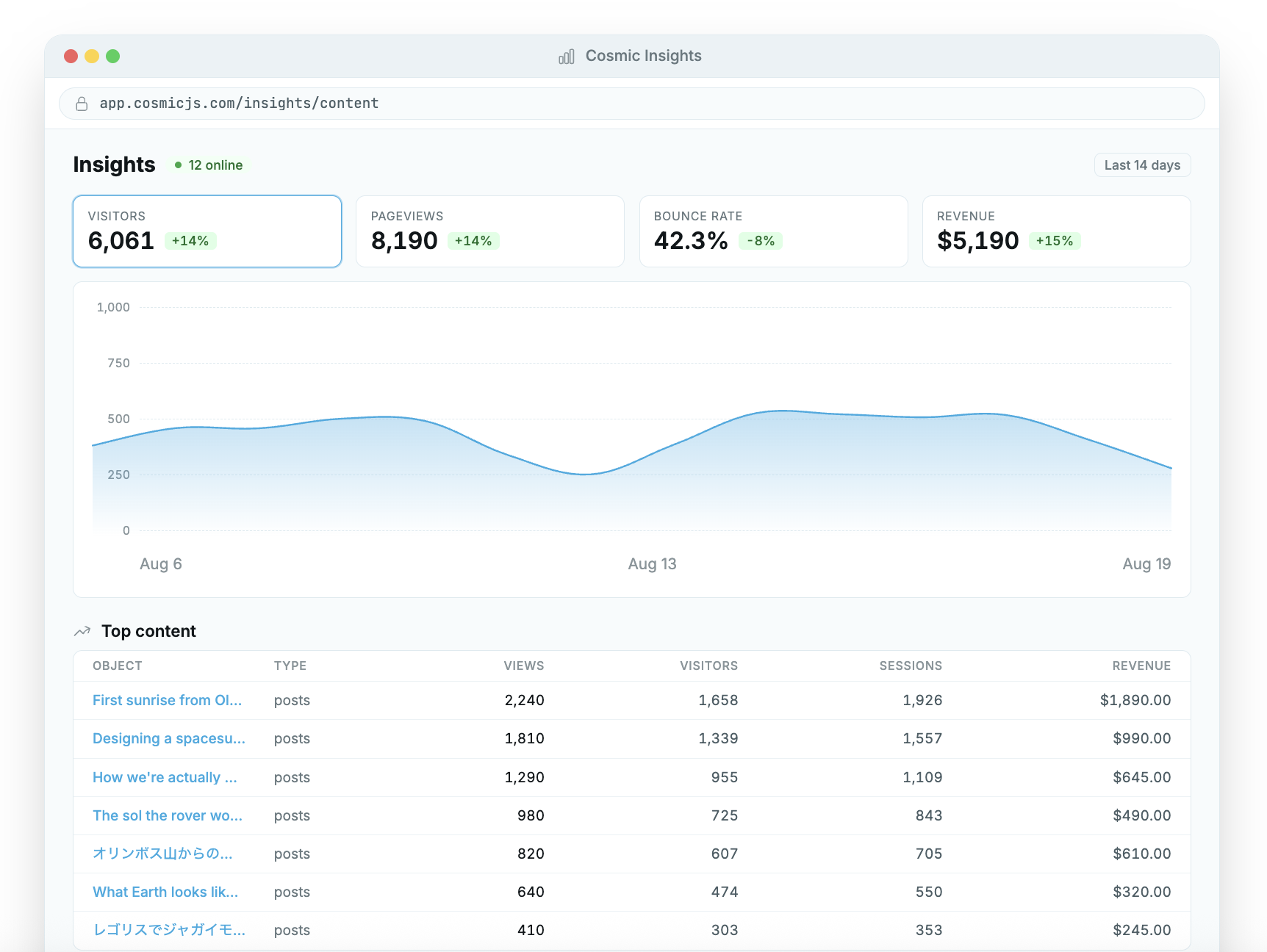
Pictured above: Example of what Cosmic Insights looks like in the dashboard.
Stage 4: The scheduled goal that closes it
A capability without a cadence is still a manual process. In Cosmic you give an agent a goal with a cron schedule, and it works through that goal in a bounded loop until it decides it is done.
Our loop-closing goals look roughly like this:
-
Weekly, Tuesday morning: read the last seven days of Insights by path and by custom event, compare against the prior seven, and post the deltas to Slack with content recommendations.
-
Weekly: scan competitor blogs and pricing pages, cite every claim with the URL fetched in that same run, and recommend counter-content.
-
Daily: report which posts published in the last 24 hours so downstream agents can act on them.
The rule we enforce on every one of these: every number in the output has to come from a tool call made in that same run. No remembered figures, no plausible-looking estimates. An agent that fabricates a metric poisons the flywheel faster than a slow one starves it.
The week the flywheel caught something we missed
Here is the concrete example, and it is not a flattering one.
Our highest-traffic blog cluster is a set of AI coding tool comparisons. They pull thousands of Google visitors a month. When we pulled signup_cta_click broken down by page, none of those posts appeared in the list. Zero measured CTA clicks against our best organic traffic.
The obvious conclusion was that the posts had no calls to action. So we read the objects back out of the CMS and checked. Every post had a mid-article signup block and a bottom CTA block, both rendering correctly on the live page.
The actual problem was in the shared CTA blocks. Cosmic lets you define reusable rich-text blocks and reference them from any post with a single token. Ours pointed at a bare signup URL with no UTM parameters and no click event bound to it. The clicks were happening. Nothing was recording them.
One edit to two shared blocks instrumented every blog post in the bucket at once, because the blocks are referenced by every post that uses them. The blog channel now shows up in source attribution.
The most valuable output here was diagnostic. The flywheel told us that a question we thought we had answered had never actually been measured.
What we got wrong the first time
Three honest lessons from running this for a while:
Attribution gaps look like content failures. Our first read of the data said the comparison posts were bad at converting. The real answer was that we could not see the conversions. Verify instrumentation before you rewrite content.
Read the object back after every write. We have had writes report success while silently dropping a field, usually on repeaters and relationship fields. Our agents now re-read every object after writing it and confirm the field actually stored. Use explicit object IDs for relationship fields, since slugs can collide across object types.
Bounce rate is a weak signal on its own. A developer who lands from Google, reads a comparison post, and leaves satisfied counts as a bounce. Pair it with custom events before you conclude anything.
Building your own
The shortest path to a working loop:
-
Model your content with real fields, especially dates and relationships. Agents can only act on structure they can query.
-
Add the Insights script and a
cosmic-contextmeta tag to your content templates so traffic rolls up by object. -
Fire one custom event on your primary conversion action.
-
Create an agent with content read and write capability, plus analytics access.
-
Give it one scheduled goal that reads last week's data and reports what changed.
Start with step five as a report-only goal. Let it tell you what it sees for a few weeks before you let it publish anything. Trust in the loop should be earned with evidence, and the loop is very good at producing evidence.
For the production side of the same system, how a small team uses agents to publish at the volume of a much larger one, see How a 2-Person Team Can Outpublish a 20-Person Content Department. You can also read more about how agents are configured on the Cosmic AI agents page, or connect your own AI tools directly to your content model through the Cosmic MCP server.
Give your AI agents a content backend they can write to
Structured, versioned content objects, a REST API and TypeScript SDK, and an MCP server your coding agent connects to directly. The Free plan includes 1 Bucket, 1,000 Objects, and 1 agent. No credit card required.
Continue Learning

Announcing the Cosmic AI Support Agent


Tony Spiro and Mia
October 5, 2026

How We Won a Launch-Day Search Term in 48 Hours, and Why It Didn't Convert
Tony Spiro and Mia
September 29, 2026
Connect a Cosmic Agent to Google Sheets
Tony Spiro and Mia
September 25, 2026