
Cosmic AI
March 21, 2025
How to Build a Spotify Clone with Next.js and Cosmic
Streaming music platforms have revolutionized how we consume audio content. In this tutorial, we'll build a Spotify-like music streaming application using Next.js for the frontend and Cosmic as our headless CMS to manage music tracks, artists, and playlists.
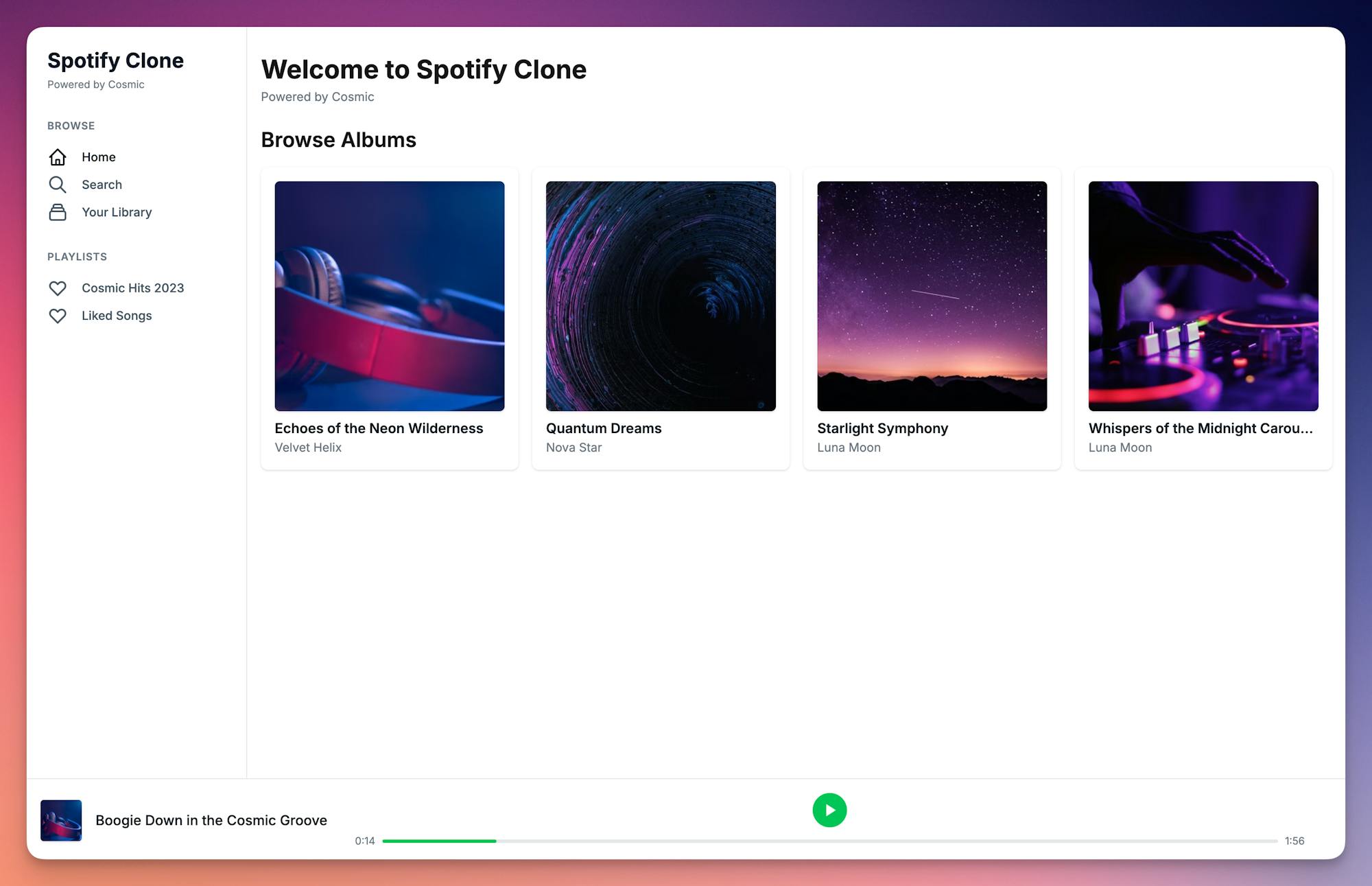
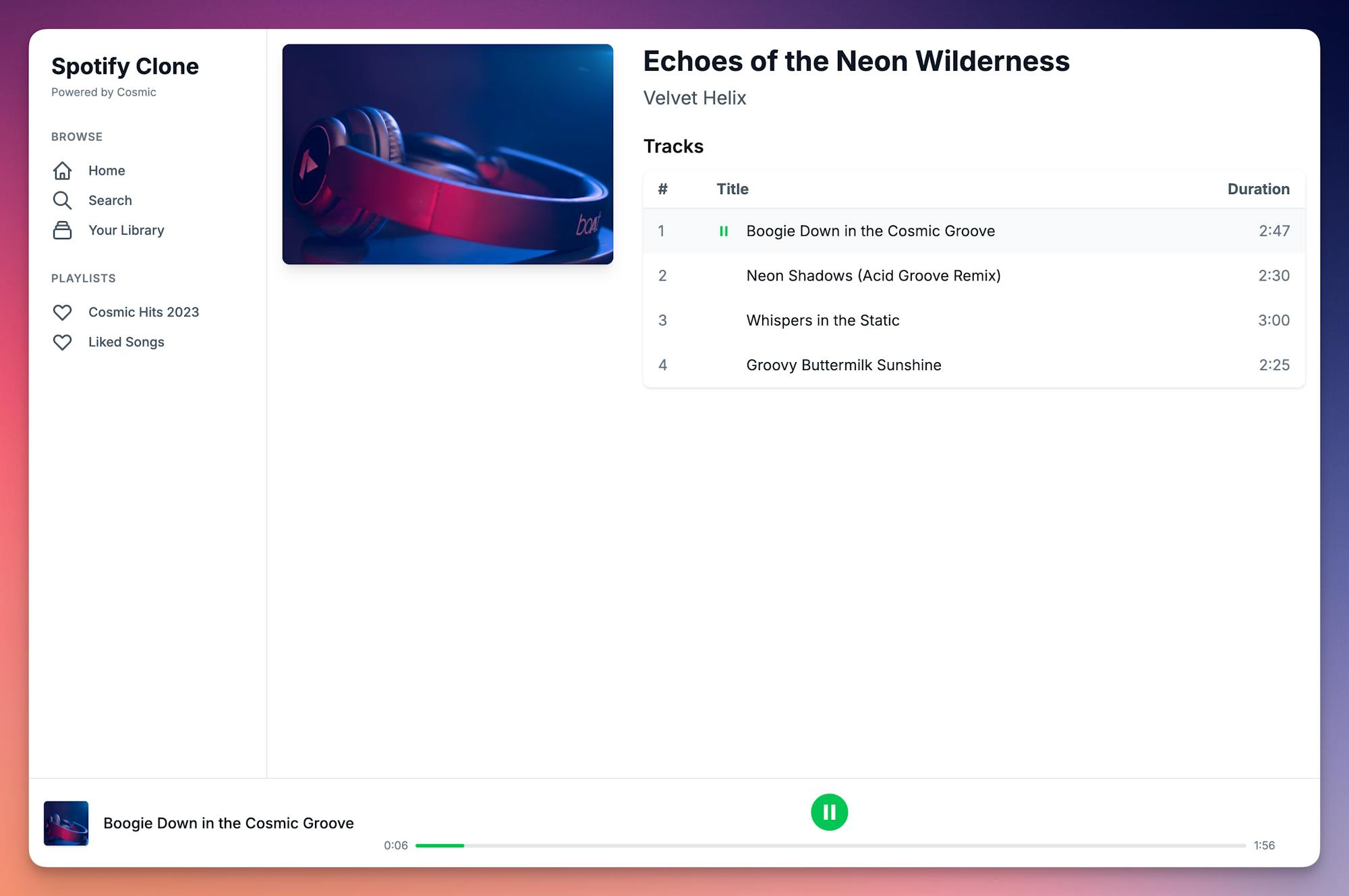
What We'll Build
Our Spotify clone will feature:
- Music library with artists, albums, and tracks
- Playlist creation and management
- A music player with playback controls
- Responsive design for all devices
Prerequisites
- Node.js 18.x or later (if using npm)
- Bun runtime (if using bun, recommended)
- A Cosmic account and bucket
- Basic knowledge of React and TypeScript
Setting Up Our Project
First, let's create a new Next.js project with TypeScript:
Using bun (recommended):
bunx create-next-app spotify-clone --typescript
cd spotify-clone
Using npm:
npx create-next-app spotify-clone --typescript
cd spotify-clone
Install the required dependencies:
Using bun:
bun add @cosmicjs/sdk react-audio-player
bun add -d tailwindcss postcss autoprefixer @types/react-audio-player
Using npm:
npm install @cosmicjs/sdk react-audio-player
npm install -D tailwindcss postcss autoprefixer @types/react-audio-player
Initialize Tailwind CSS:
Using bun:
bunx tailwindcss init -p
Using npm:
npx tailwindcss init -p
Update your tailwind.config.js:
/** @type {import('tailwindcss').Config} */
module.exports = {
  content: [
    "./app/**/*.{js,ts,jsx,tsx,mdx}",
    "./components/**/*.{js,ts,jsx,tsx,mdx}",
  ],
  theme: {
    extend: {},
  },
  plugins: [],
};
Setting Up Environment Variables
Create a .env.local file in your project root:
COSMIC_BUCKET_SLUG=your-bucket-slug
COSMIC_READ_KEY=your-read-key
COSMIC_WRITE_KEY=your-write-key
Project Structure
Let's organize our project with the following structure:
spotify-clone/
├── app/
│   ├── layout.tsx
│   ├── page.tsx
│   ├── albums/
│   │   └── [slug]/
│   │       └── page.tsx
│   └── playlists/
│       └── [slug]/
│           └── page.tsx
├── components/
│   ├── AlbumCard.tsx
│   ├── AlbumDetail.tsx
│   ├── MusicLibrary.tsx
│   ├── MusicPlayer.tsx
│   ├── Navigation.tsx
│   ├── Footer.tsx
│   └── TrackList.tsx
├── lib/
│   ├── cosmic.ts
│   └── PlayerContext.tsx
├── types/
│   └── index.ts
└── scripts/
    └── seed-cosmic.ts
Setting Up TypeScript Types
Create types/index.ts to define our data types:
export interface Track {
  id: string;
  title: string;
  metadata: {
    audio: {
      url: string;
    };
    duration: number;
    album: {
      metadata: {
        cover: {
          imgix_url: string;
        };
        artist: {
          title: string;
        };
      };
    };
  };
}

export interface Album {
  id: string;
  slug: string;
  title: string;
  metadata: {
    cover: {
      imgix_url: string;
    };
    artist: {
      title: string;
    };
  };
}

export interface Playlist {
  id: string;
  title: string;
  metadata: {
    description: string;
    cover: {
      imgix_url: string;
    };
    tracks: Track[];
  };
}
Configuring Cosmic Connection
Create lib/cosmic.ts:
import { createBucketClient } from "@cosmicjs/sdk";

const cosmic = createBucketClient({
  bucketSlug: process.env.COSMIC_BUCKET_SLUG as string,
  readKey: process.env.COSMIC_READ_KEY as string,
});

export default cosmic;
Seeding the CMS
Create scripts/seed-cosmic.ts to set up our object types and sample content:
import { createBucketClient } from "@cosmicjs/sdk";

const BUCKET_SLUG = process.env.COSMIC_BUCKET_SLUG;
const WRITE_KEY = process.env.COSMIC_WRITE_KEY;
const READ_KEY = process.env.COSMIC_READ_KEY;

if (!BUCKET_SLUG || !WRITE_KEY || !READ_KEY) {
  throw new Error("Missing required environment variables");
}

const cosmic = createBucketClient({
  bucketSlug: BUCKET_SLUG,
  writeKey: WRITE_KEY,
  readKey: READ_KEY,
});

// Helper functions for uploading media
async function uploadImageFromUrl(url: string, filename: string) {
  const response = await fetch(url);
  const blob = await response.blob();
  const buffer = await blob.arrayBuffer();

  const { media } = await cosmic.media.insertOne({
    media: {
      originalname: filename,
      buffer: Buffer.from(buffer),
    },
  });

  return media;
}

async function uploadAudioFromUrl(url: string, filename: string) {
  const response = await fetch(url);
  const blob = await response.blob();
  const buffer = await blob.arrayBuffer();

  const { media } = await cosmic.media.insertOne({
    media: {
      originalname: filename,
      buffer: Buffer.from(buffer),
    },
  });

  return media;
}

// Create object types
async function seedObjectTypes() {
  // Create Artists object type
  await cosmic.objectTypes.insertOne({
    title: "Artists",
    slug: "artists",
    singular: "Artist",
    emoji: "👤",
    metafields: [
      {
        title: "Name",
        key: "name",
        type: "text",
        required: true,
      },
      {
        title: "Image",
        key: "image",
        type: "file",
        required: true,
        media_validation_type: "image",
      },
      {
        title: "Bio",
        key: "bio",
        type: "textarea",
        required: true,
      },
    ],
  });

  // Create Albums object type
  await cosmic.objectTypes.insertOne({
    title: "Albums",
    slug: "albums",
    singular: "Album",
    emoji: "💿",
    metafields: [
      {
        title: "Title",
        key: "title",
        type: "text",
        required: true,
      },
      {
        title: "Cover",
        key: "cover",
        type: "file",
        required: true,
        media_validation_type: "image",
      },
      {
        title: "Release Date",
        key: "release_date",
        type: "date",
        required: true,
      },
      {
        title: "Artist",
        key: "artist",
        type: "object",
        object_type: "artists",
        required: true,
      },
    ],
  });

  // Create Tracks object type
  await cosmic.objectTypes.insertOne({
    title: "Tracks",
    slug: "tracks",
    singular: "Track",
    emoji: "🎵",
    metafields: [
      {
        title: "Title",
        key: "title",
        type: "text",
        required: true,
      },
      {
        title: "Audio File",
        key: "audio",
        type: "file",
        required: true,
        media_validation_type: "audio",
      },
      {
        title: "Duration",
        key: "duration",
        type: "number",
        required: true,
      },
      {
        title: "Album",
        key: "album",
        type: "object",
        object_type: "albums",
        required: true,
      },
    ],
  });

  // Create Playlists object type
  await cosmic.objectTypes.insertOne({
    title: "Playlists",
    slug: "playlists",
    singular: "Playlist",
    emoji: "📀",
    metafields: [
      {
        title: "Title",
        key: "title",
        type: "text",
        required: true,
      },
      {
        title: "Description",
        key: "description",
        type: "textarea",
        required: true,
      },
      {
        title: "Cover",
        key: "cover",
        type: "file",
        required: true,
        media_validation_type: "image",
      },
      {
        title: "Tracks",
        key: "tracks",
        type: "objects",
        object_type: "tracks",
        required: false,
      },
    ],
  });
}

// Create sample content
async function seedContent() {
  // Upload artist images
  const lunaImage = await uploadImageFromUrl(
    "https://images.unsplash.com/photo-1494354145959-25cb82edf23d?w=400&h=400&fit=crop",
    "luna-moon.jpg"
  );
  const novaImage = await uploadImageFromUrl(
    "https://images.unsplash.com/photo-1516223725307-6f76b9ec8742?w=400&h=400&fit=crop",
    "nova-star.jpg"
  );

  // Create sample artists
  const { object: artist1 } = await cosmic.objects.insertOne({
    title: "Luna Moon",
    slug: "luna-moon",
    type: "artists",
    thumbnail: lunaImage.name,
    metadata: {
      name: "Luna Moon",
      bio: "Luna Moon is a cosmic pop sensation known for her ethereal vocals and space-themed music. Her unique blend of electronic and acoustic elements has created a new genre called 'astro-pop'.",
      image: lunaImage.name,
    },
  });

  const { object: artist2 } = await cosmic.objects.insertOne({
    title: "Nova Star",
    slug: "nova-star",
    type: "artists",
    thumbnail: novaImage.name,
    metadata: {
      name: "Nova Star",
      bio: "Nova Star is an indie rock phenomenon who writes songs about quantum physics and parallel universes. His experimental sound has earned him the nickname 'The Einstein of Rock'.",
      image: novaImage.name,
    },
  });

  // Upload album covers
  const starlightCover = await uploadImageFromUrl(
    "https://images.unsplash.com/photo-1419242902214-272b3f66ee7a?w=400&h=400&fit=crop",
    "starlight.jpg"
  );
  const quantumCover = await uploadImageFromUrl(
    "https://images.unsplash.com/photo-1557264337-e8a93017fe92?w=400&h=400&fit=crop",
    "quantum.jpg"
  );

  // Create sample albums
  const { object: album1 } = await cosmic.objects.insertOne({
    title: "Starlight Symphony",
    slug: "starlight-symphony",
    type: "albums",
    thumbnail: starlightCover.name,
    metadata: {
      title: "Starlight Symphony",
      release_date: "2023-06-15",
      artist: artist1.id,
      cover: starlightCover.name,
    },
  });

  const { object: album2 } = await cosmic.objects.insertOne({
    title: "Quantum Dreams",
    slug: "quantum-dreams",
    type: "albums",
    thumbnail: quantumCover.name,
    metadata: {
      title: "Quantum Dreams",
      release_date: "2023-08-22",
      artist: artist2.id,
      cover: quantumCover.name,
    },
  });

  // Create sample tracks
  const cosmicDanceAudio = await uploadAudioFromUrl(
    "https://cdn.cosmicjs.com/1474f620-05be-11f0-993b-3bd041905fff-relaxing-jazz-saxophone-music-saxophone-instruments-music-303093.mp3",
    "cosmic-dance.mp3"
  );

  const parallelWorldsAudio = await uploadAudioFromUrl(
    "https://cdn.cosmicjs.com/147e44f0-05be-11f0-993b-3bd041905fff-iced-coffee-jazz-309947.mp3",
    "parallel-worlds.mp3"
  );

  const { object: track1 } = await cosmic.objects.insertOne({
    title: "Cosmic Dance",
    slug: "cosmic-dance",
    type: "tracks",
    metadata: {
      title: "Cosmic Dance",
      duration: 245,
      album: album1.id,
      audio: cosmicDanceAudio.name,
    },
  });

  const { object: track2 } = await cosmic.objects.insertOne({
    title: "Parallel Worlds",
    slug: "parallel-worlds",
    type: "tracks",
    metadata: {
      title: "Parallel Worlds",
      duration: 312,
      album: album2.id,
      audio: parallelWorldsAudio.name,
    },
  });

  // Upload playlist cover
  const playlistCover = await uploadImageFromUrl(
    "https://images.unsplash.com/photo-1470225620780-dba8ba36b745?w=400&h=400&fit=crop",
    "cosmic-hits.jpg"
  );

  // Create sample playlist
  await cosmic.objects.insertOne({
    title: "Cosmic Hits 2023",
    slug: "cosmic-hits-2023",
    type: "playlists",
    thumbnail: playlistCover.name,
    metadata: {
      title: "Cosmic Hits 2023",
      description:
        "A stellar collection of the year's most out-of-this-world tracks",
      tracks: [track1.id, track2.id],
      cover: playlistCover.name,
    },
  });
}

// Run both seeding functions
async function seed() {
  await seedObjectTypes();
  await seedContent();
}

seed();
Run the seed script to set up your Cosmic bucket:
npx ts-node scripts/seed-cosmic.ts
Building the Application
1. Create the Root Layout
Create app/layout.tsx:
import type { Metadata } from "next";
import { Inter } from "next/font/google";
import "./globals.css";
import { PlayerProvider } from "@/lib/PlayerContext";
import Navigation from "@/components/Navigation";
import Footer from "@/components/Footer";

const inter = Inter({ subsets: ["latin"] });

export const metadata: Metadata = {
  title: "Spotify Clone - Built with Cosmic",
  description: "A demo app showing what's possible with Cosmic",
};

export default function RootLayout({
  children,
}: Readonly<{
  children: React.ReactNode;
}>) {
  return (
    <html lang="en">
      <body className={inter.className}>
        <PlayerProvider>
          <Navigation />
          <main className="min-h-screen pb-24">{children}</main>
          <Footer />
        </PlayerProvider>
      </body>
    </html>
  );
}
2. Create the Player Context
Create lib/PlayerContext.tsx:
"use client";

import { createContext, useContext, useState, ReactNode } from "react";
import MusicPlayer from "@/components/MusicPlayer";
import { Track } from "@/types";

interface PlayerContextType {
  currentTrack: Track | null;
  setCurrentTrack: (track: Track | null) => void;
}

const PlayerContext = createContext<PlayerContextType | undefined>(undefined);

export function PlayerProvider({ children }: { children: ReactNode }) {
  const [currentTrack, setCurrentTrack] = useState<Track | null>(null);

  return (
    <PlayerContext.Provider value={{ currentTrack, setCurrentTrack }}>
      {children}
      {currentTrack && <MusicPlayer track={currentTrack} />}
    </PlayerContext.Provider>
  );
}

export function usePlayer() {
  const context = useContext(PlayerContext);
  if (!context) {
    throw new Error("usePlayer must be used within a PlayerProvider");
  }
  return context;
}
3. Create Server Actions
Create app/actions.ts:
"use server";

import cosmic from "@/lib/cosmic";
import { Album, Track, Playlist } from "@/types";

export async function getAlbums() {
  const { objects } = await cosmic.objects
    .find({
      type: "albums",
    })
    .props(["id", "title", "slug", "metadata.cover", "metadata.artist"])
    .depth(1);

  return objects as Album[];
}

export async function getPlaylists() {
  const { objects } = await cosmic.objects
    .find({
      type: "playlists",
    })
    .props(["id", "title", "slug", "metadata.cover", "metadata.description"])
    .depth(1);

  return objects as Playlist[];
}

export async function getAlbum(slug: string) {
  const { object: albumData } = await cosmic.objects
    .findOne({
      type: "albums",
      slug,
    })
    .props(["id", "title", "metadata"])
    .depth(1);

  const { objects: trackData } = await cosmic.objects
    .find({
      type: "tracks",
      "metadata.album": albumData.id,
    })
    .props(["id", "title", "metadata"])
    .depth(1);

  return {
    album: albumData as Album,
    tracks: trackData as Track[],
  };
}

export async function getPlaylist(slug: string) {
  const { object: playlistData } = await cosmic.objects
    .findOne({
      type: "playlists",
      slug,
    })
    .props([
      "title",
      "metadata.description",
      "metadata.cover",
      "metadata.tracks",
    ])
    .depth(2);

  return playlistData as Playlist;
}
4. Create Components
AlbumCard Component
Create components/AlbumCard.tsx:
import Link from "next/link";
import { Album } from "@/types";

export default function AlbumCard({ album }: { album: Album }) {
  return (
    <Link href={`/albums/${album.slug}`}>
      <div className="bg-gray-800 p-4 rounded-lg hover:bg-gray-700 transition cursor-pointer">
        <img
          src={album.metadata.cover.imgix_url}
          alt={album.title}
          className="w-full aspect-square object-cover rounded-md mb-2"
        />
        <h3 className="font-semibold truncate">{album.title}</h3>
        <p className="text-sm text-gray-400 truncate">
          {album.metadata.artist.title}
        </p>
      </div>
    </Link>
  );
}
MusicLibrary Component
Create components/MusicLibrary.tsx:
"use client";

import { useEffect, useState } from "react";
import { Album } from "@/types";
import { getAlbums } from "@/app/actions";
import AlbumCard from "./AlbumCard";

export default function MusicLibrary() {
  const [albums, setAlbums] = useState<Album[]>([]);
  const [loading, setLoading] = useState(true);

  useEffect(() => {
    async function fetchAlbums() {
      const albums = await getAlbums();
      setAlbums(albums);
      setLoading(false);
    }

    fetchAlbums();
  }, []);

  if (loading) return <div>Loading albums...</div>;

  return (
    <div className="grid grid-cols-2 md:grid-cols-3 lg:grid-cols-4 gap-4">
      {albums.map((album) => (
        <AlbumCard key={album.id} album={album} />
      ))}
    </div>
  );
}
TrackList Component
Create components/TrackList.tsx:
"use client";

import { useState } from "react";
import { Track } from "@/types";

interface TrackListProps {
  tracks: Track[];
  onTrackPlay?: (track: Track) => void;
}

export default function TrackList({ tracks, onTrackPlay }: TrackListProps) {
  const [currentlyPlaying, setCurrentlyPlaying] = useState<string | null>(null);

  const formatDuration = (seconds: number) => {
    const minutes = Math.floor(seconds / 60);
    const remainingSeconds = Math.floor(seconds % 60);
    return `${minutes}:${remainingSeconds < 10 ? "0" : ""}${remainingSeconds}`;
  };

  const handlePlayTrack = (track: Track) => {
    setCurrentlyPlaying(track.id);
    onTrackPlay?.(track);
  };

  return (
    <div className="mt-6">
      <h3 className="text-xl font-semibold mb-3">Tracks</h3>
      <div className="bg-gray-800 rounded-lg overflow-hidden">
        <table className="w-full">
          <thead className="border-b border-gray-700">
            <tr>
              <th className="px-4 py-2 text-left">#</th>
              <th className="px-4 py-2 text-left">Title</th>
              <th className="px-4 py-2 text-right">Duration</th>
            </tr>
          </thead>
          <tbody>
            {tracks.map((track, index) => (
              <tr
                key={track.id}
                className={`hover:bg-gray-700 cursor-pointer ${
                  currentlyPlaying === track.id ? "bg-gray-700" : ""
                }`}
                onClick={() => handlePlayTrack(track)}
              >
                <td className="px-4 py-3 text-gray-400">{index + 1}</td>
                <td className="px-4 py-3">
                  <div className="flex items-center">
                    {currentlyPlaying === track.id ? (
                      <svg
                        className="h-4 w-4 text-green-500 mr-2"
                        viewBox="0 0 24 24"
                        fill="currentColor"
                      >
                        <path d="M8 5v14l11-7z" />
                      </svg>
                    ) : null}
                    <span>{track.title}</span>
                  </div>
                </td>
                <td className="px-4 py-3 text-right text-gray-400">
                  {formatDuration(track.metadata.duration)}
                </td>
              </tr>
            ))}
          </tbody>
        </table>
      </div>
    </div>
  );
}
MusicPlayer Component
Create components/MusicPlayer.tsx:
"use client";

import { useState, useRef, useEffect } from "react";
import ReactAudioPlayer from "react-audio-player";
import { Track } from "@/types";

export default function MusicPlayer({ track }: { track: Track }) {
  const [isPlaying, setIsPlaying] = useState(false);
  const [currentTime, setCurrentTime] = useState(0);
  const [duration, setDuration] = useState(0);
  const audioRef = useRef<ReactAudioPlayer>(null);

  useEffect(() => {
    setIsPlaying(false);
    setCurrentTime(0);
  }, [track]);

  const handleTimeUpdate = (e: React.SyntheticEvent<HTMLAudioElement>) => {
    setCurrentTime(e.currentTarget.currentTime);
  };

  const handleLoadedMetadata = (e: React.SyntheticEvent<HTMLAudioElement>) => {
    setDuration(e.currentTarget.duration);
  };

  const togglePlayPause = () => {
    const audio = audioRef.current?.audioEl.current;
    if (!audio) return;

    if (isPlaying) {
      audio.pause();
    } else {
      audio.play();
    }
    setIsPlaying(!isPlaying);
  };

  // Add keyboard controls
  useEffect(() => {
    const handleKeyPress = (e: KeyboardEvent) => {
      if (e.code === "Space") {
        e.preventDefault(); // Prevent page scroll
        togglePlayPause();
      }
    };

    window.addEventListener("keydown", handleKeyPress);
    return () => window.removeEventListener("keydown", handleKeyPress);
  }, [isPlaying, track.id]);

  const formatTime = (time: number) => {
    const minutes = Math.floor(time / 60);
    const seconds = Math.floor(time % 60);
    return `${minutes}:${seconds < 10 ? "0" : ""}${seconds}`;
  };

  return (
    <div className="fixed bottom-0 left-0 right-0 bg-gray-900 p-4">
      <div className="flex items-center justify-between">
        <div className="flex items-center space-x-4">
          <img
            src={track.metadata.album.metadata.cover.imgix_url}
            className="h-12 w-12 rounded"
            alt={track.title}
          />
          <div>
            <p className="text-white">{track.title}</p>
            <p className="text-gray-400">
              {track.metadata.album.metadata.artist.title}
            </p>
          </div>
        </div>

        <div className="flex-1 mx-8">
          <div className="flex items-center justify-center space-x-4">
            <button className="text-white">
              <svg className="h-6 w-6" fill="currentColor" viewBox="0 0 24 24">
                <path d="M6 6h2v12H6zm10 0h2v12h-2z" />
              </svg>
            </button>
            <button
              className="text-white bg-green-500 rounded-full p-2"
              onClick={togglePlayPause}
            >
              {isPlaying ? (
                <svg
                  className="h-6 w-6"
                  fill="currentColor"
                  viewBox="0 0 24 24"
                >
                  <path d="M6 4h4v16H6V4zm8 0h4v16h-4V4z" />
                </svg>
              ) : (
                <svg
                  className="h-6 w-6"
                  fill="currentColor"
                  viewBox="0 0 24 24"
                >
                  <path d="M8 5v14l11-7z" />
                </svg>
              )}
            </button>
            <button className="text-white">
              <svg className="h-6 w-6" fill="currentColor" viewBox="0 0 24 24">
                <path d="M6 18l8.5-6L6 6v12zM16 6v12h2V6h-2z" />
              </svg>
            </button>
          </div>
          <div className="flex items-center mt-2">
            <span className="text-gray-400 text-xs">
              {formatTime(currentTime)}
            </span>
            <div className="mx-2 flex-1 bg-gray-700 rounded-full h-1">
              <div
                className="bg-white h-1 rounded-full"
                style={{ width: `${(currentTime / duration) * 100}%` }}
              ></div>
            </div>
            <span className="text-gray-400 text-xs">
              {formatTime(duration)}
            </span>
          </div>
        </div>
      </div>

      <ReactAudioPlayer
        ref={audioRef}
        src={track.metadata.audio.url}
        listenInterval={1000}
        onListen={handleTimeUpdate}
        onLoadedMetadata={handleLoadedMetadata}
        style={{ display: "none" }}
      />
    </div>
  );
}
The MusicPlayer component includes several key features:
- Playback Controls: Users can play/pause tracks using the play/pause button in the UI.
- Keyboard Controls: The spacebar can be used to play/pause tracks from anywhere on the page, making it convenient for users to control playback without having to click the UI.
- Progress Bar: A visual progress bar shows the current position in the track and allows users to see how much of the track has played.
- Track Information: Displays the current track's title, artist, and album cover.
- Time Display: Shows the current time and total duration of the track.
The component uses the react-audio-player library for audio playback and manages its state using React hooks. It also includes keyboard event listeners for enhanced user experience.
5. Create Pages
Home Page
Create app/page.tsx:
import MusicLibrary from "@/components/MusicLibrary";
import FeaturedPlaylists from "@/components/FeaturedPlaylists";

export default function Home() {
  return (
    <main className="container mx-auto px-4 py-8">
      <h1 className="text-3xl font-bold mb-6">Welcome to Spotify Clone</h1>

      <section className="mb-10">
        <h2 className="text-2xl font-semibold mb-4">Featured Playlists</h2>
        <FeaturedPlaylists />
      </section>

      <section>
        <h2 className="text-2xl font-semibold mb-4">Browse Albums</h2>
        <MusicLibrary />
      </section>
    </main>
  );
}
Album Detail Page
Create app/albums/[slug]/page.tsx:
import { getAlbum } from "@/app/actions";
import AlbumDetail from "@/components/AlbumDetail";

export default async function AlbumPage({
  params,
}: {
  params: { slug: string };
}) {
  const { album, tracks } = await getAlbum(params.slug);
  return <AlbumDetail album={album} tracks={tracks} />;
}
Playlist Page
Create app/playlists/[slug]/page.tsx:
import { getPlaylist } from "@/app/actions";
import PlaylistDetail from "@/components/PlaylistDetail";

export default async function PlaylistPage({
  params,
}: {
  params: { slug: string };
}) {
  const playlist = await getPlaylist(params.slug);
  return <PlaylistDetail playlist={playlist} />;
}
Running the Application
Start the development server:
npm run dev
Conclusion
We've successfully built a Spotify clone using Next.js and Cosmic! Here's what we've accomplished:
- Created a modern, responsive music streaming application
- Implemented a music player with playback controls and keyboard shortcuts
- Built a library system for albums and playlists
- Set up a headless CMS with Cosmic to manage our music content
- Created a beautiful UI with Tailwind CSS
The application demonstrates the power of combining Next.js for the frontend with Cosmic as a headless CMS. We've shown how to:
- Structure a Next.js application with TypeScript
- Manage state with React Context
- Handle server-side rendering and data fetching
- Create reusable components
- Implement audio playback functionality
- Style our application with Tailwind CSS
Next Steps
Here are some ideas to enhance the application further:
- Authentication: Add user authentication to allow users to create and manage their own playlists
- Search Functionality: Implement a search feature to find tracks, albums, and artists
- User Profiles: Create user profiles with listening history and favorite tracks
- Social Features: Add the ability to follow artists and share playlists
- Offline Mode: Implement offline playback using service workers
- Mobile App: Create a mobile app version using React Native or Next.js mobile features
Resources
- Next.js Documentation
- Cosmic Documentation
- Tailwind CSS Documentation
- React Audio Player Documentation
We hope this tutorial has helped you understand how to build a modern music streaming application. Feel free to customize the design and add more features to make it your own!