
Tony Spiro
June 20, 2026
Most teams building AI agent workflows are flying blind. An agent runs, produces outputs, publishes content, fires events. Somewhere in a log file, or nowhere at all, there is a record of what happened. Whether those outputs are driving real results is a separate question nobody has wired up yet.
Earlier this week, Elastic published a breakdown of persistent agent memory layers that hit the front page of HN. The discussion made one thing obvious: developers running agents in production are actively solving for observability and recall. They want to know what their agents did, whether it worked, and how to make the next run better.
Cosmic already ships it. Cosmic Insights is cookieless web analytics built directly into the platform. Every piece of content your agents create, publish, and update gets tracked automatically. Pageviews, sessions, bounce rate, conversions, and revenue all join back to the Cosmic objects that produced them. Your agents can also read that data directly and use it to decide what to write, rewrite, or retire next.
No third-party tool required. No separate analytics install. No ETL pipeline to maintain.
The Observability Gap in Agent Workflows
When a human writes a blog post, the feedback loop is obvious: you publish, you watch traffic, you iterate. When an agent writes and publishes content autonomously, that loop breaks unless you deliberately wire it back together.
Here is what most agent setups are missing:
- Which agent-authored content is actually performing? Without attribution, you cannot tell whether an agent's output drove traffic or just sat there.
- Did the agent's content convert anyone? Pageviews are vanity. Signups and revenue are the metric that matters.
- Is the agent improving over time? Without grounded performance data feeding back into the agent's context, every run starts from scratch.
- Which agent produced which result? On a team running multiple agents across multiple workflows, attribution by agent is the only way to evaluate what is working.
Cosmic Insights answers all four questions out of the box.
What You Get with Cosmic Insights
Cosmic Insights is included in every Cosmic plan, starting free with 100,000 events per month. Here is what it tracks for agent-authored content:
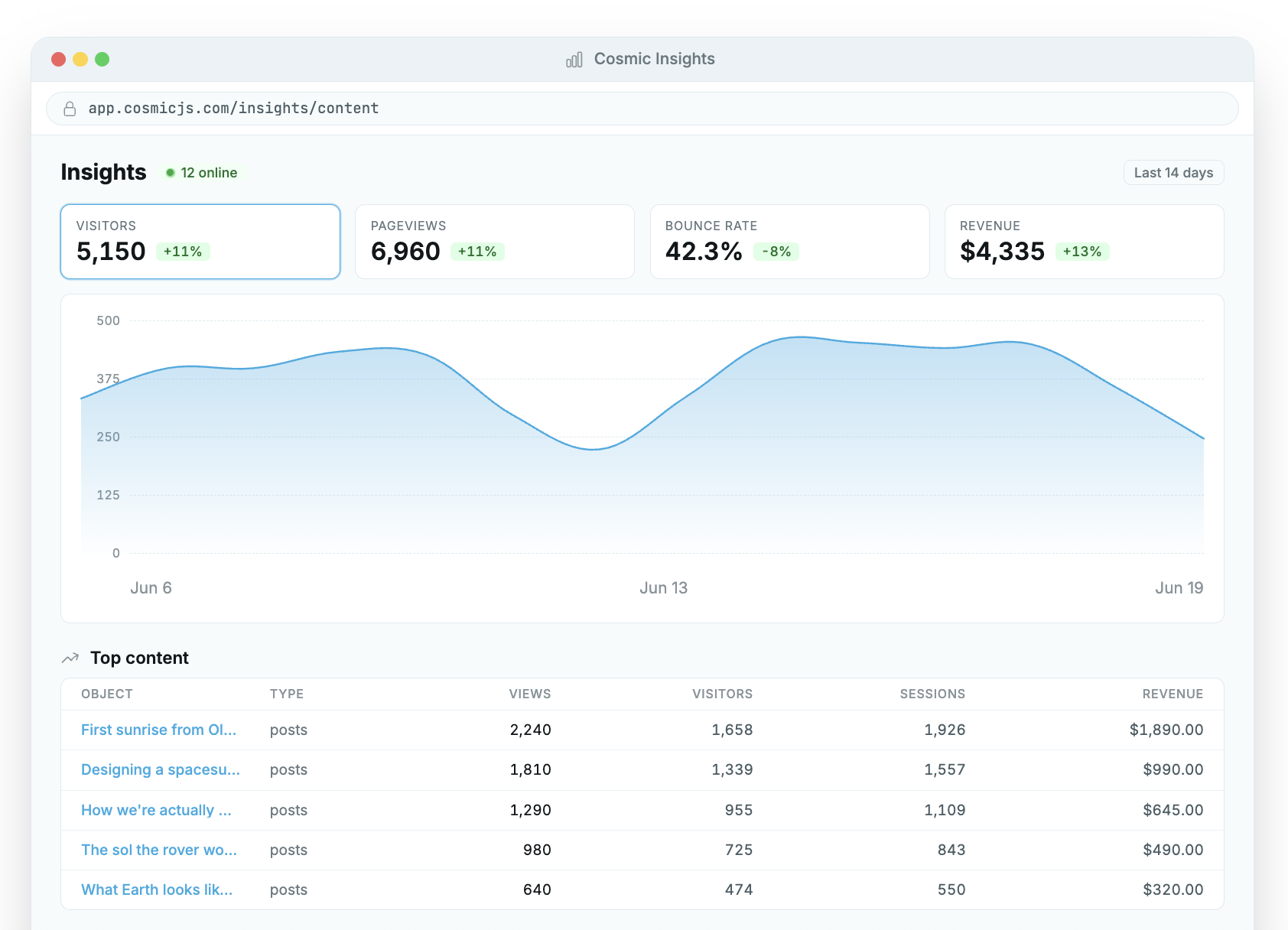
Cookieless pageview tracking. Every page your agents publish gets pageview, session, visitor, and source tracking automatically. No cookies, no banners, IP-anonymized server-side. GDPR-friendly by default.
Per-object attribution. Every Cosmic object gets its own dedicated insights page. See exactly which posts are driving traffic, which have high bounce rates, and which to retire. When an agent creates an object, that object's performance is immediately visible in the dashboard.
Author attribution by agent. The dimension=author breakdown in Insights rolls up performance by who created the content: human, agent, or automation. You can see, at a glance, whether agent-authored content outperforms human-authored content, which agents are producing the highest-traffic pieces, and which agents need their prompts adjusted.
Custom events from agent workflows. Fire window.cosmicInsights() from any point in an agent workflow to track meaningful actions. An agent that publishes a post can fire a content_published event. An approval gate that gets triggered fires approval_requested. A post that gets revised based on performance data fires content_refreshed. Each event ties back to the content object that triggered it.
Real-time visitors. A live "online now" pill shows how many unique visitors are active in the last 5 minutes. When an agent publishes something and submits it to HN or social, you can watch the traffic arrive in real time.
Period-over-period deltas. Every metric tile shows how the current window compares to the previous one. Agent output from this week versus last week, at a glance.
Agent-Readable Performance Data
This is where Cosmic Insights becomes a genuine feedback loop rather than a reporting dashboard.
Give any Cosmic team agent the Read web analytics capability and it can query Insights directly. Ask it "which posts are underperforming this month?" and it answers with grounded data, not guesses. Ask it "what should I write next based on what is driving signups?" and it can correlate content performance with conversion events to give you a real answer.
This is the compounding loop described in the agent context and memory post. Insights tells you which agent outputs worked. Memory stores what the agent learned. Context shapes the next run. Each cycle, the agent has more signal to work with.
This is how we run Cosmic internally. Mia, our content agent, reads Insights data every morning to identify underperforming posts, flag high-impression/low-CTR pages for SERP snippet refreshes, and surface content gaps worth closing. The analytics are part of the agent's decision-making context, not a separate reporting step.
Tracking Custom Agent Events
For teams who want deeper observability into specific agent actions, custom events are one line of JavaScript:
window.cosmicInsights('content_published', {
  object_id: 'your-object-id',
  object_type: 'blog-posts'
})
Useful events to track in agent workflows:
content_published: agent successfully published a new objectcontent_revised: agent updated an existing post based on performance dataapproval_requested: agent triggered a human review gateapproval_granted: human approved an agent's proposed changedraft_created: agent created a draft for human reviewseo_refresh: agent updated a SERP snippet based on low CTR data
Each event ties back to the content object that triggered it. The object_id field connects the event to the Cosmic object's own analytics page, so you can see the full picture: this post was created by an agent on Tuesday, got 400 pageviews, had a 90% bounce rate, was revised by the agent on Friday after Insights flagged it, and now has a 65% bounce rate.
Installing Cosmic Insights
For apps deployed through Cosmic, the tracker is pre-installed automatically. For any other stack, it is one script tag:
<script
  defer
  src="https://insights.cosmicinsights.dev/script.js"
  data-project="YOUR_PROJECT_ID"
></script>
Works in Next.js, Astro, Nuxt, Remix, and SvelteKit. SPA navigation is handled automatically by the script tag.
To attribute analytics to specific Cosmic objects, add a meta tag to your page layout:
<meta
  name="cosmic-context"
  content='{"object_id":"YOUR_OBJECT_ID","object_type":"blog-posts"}'
/>
This connects every pageview and custom event on that page to the Cosmic object that produced it, enabling the per-object attribution and author rollups in the dashboard.
Full framework-specific docs: cosmicjs.com/docs/insights
Getting Started
- Create a free Cosmic account: Insights is included on every plan, starting free with 100,000 events/month.
- Add the one-line script tag to your app, or deploy through Cosmic and get it automatically.
- Add
cosmic-contextmeta tags to your content pages to enable per-object and per-agent attribution. - Fire custom events from your agent workflows to track meaningful actions beyond pageviews.
- Give your team agents the Read web analytics capability so they can ground their decisions in real performance data.
Want to see how Cosmic agents use Insights in a real production workflow? Book a quick call with Tony. Always happy to walk through exactly how we run it internally.
See also: Cosmic as Agent Context and Memory | Cosmic Insights