How I Built a Full E-Commerce Store in Three Prompts Using Cosmic AI

Tony Spiro
June 29, 2026
The Cosmic Store is a real, live, production-grade e-commerce storefront selling Cosmic company swag: hoodies, mugs, t-shirts, stickers, and a bundle box. It has a full product catalog, collection pages, dynamic routing, server-side rendering, and imgix-powered image optimization.
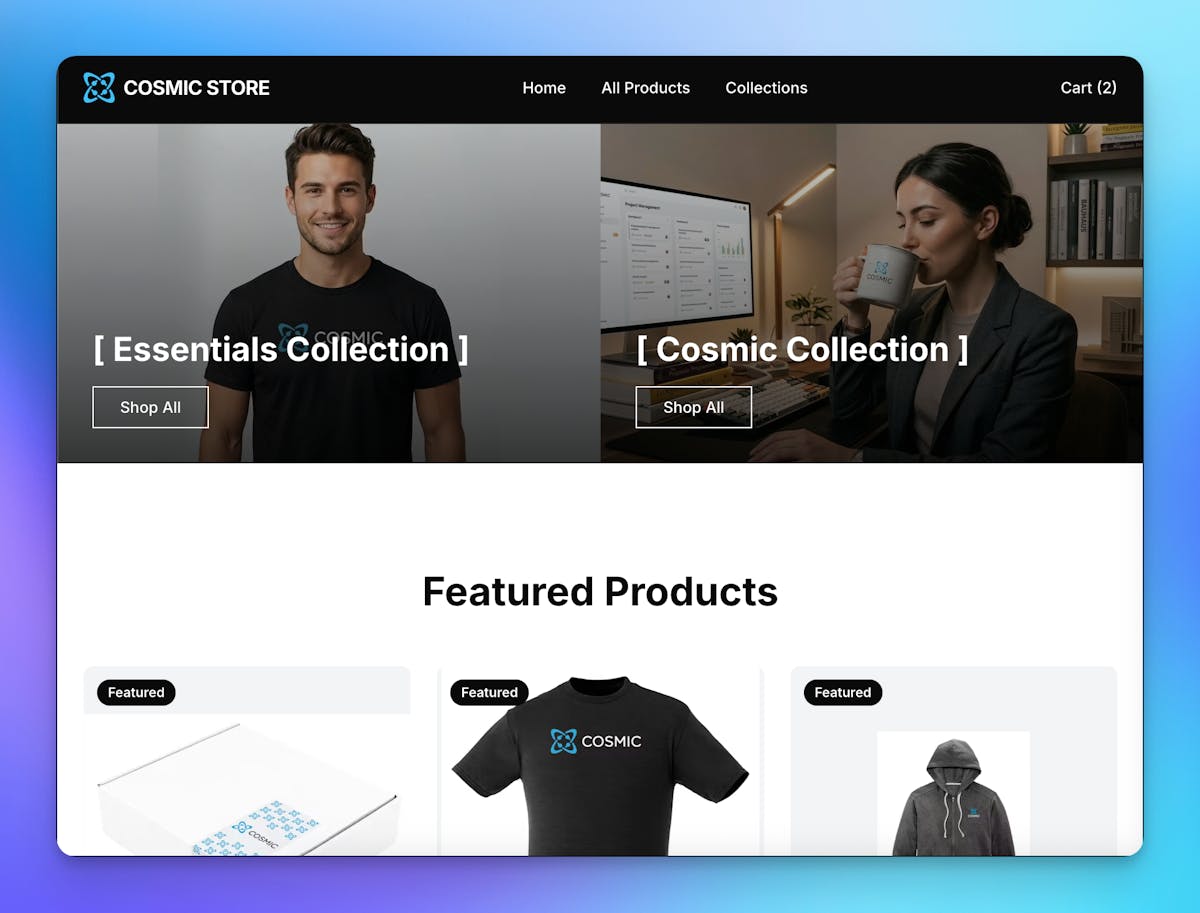
I built it with three prompts.
No scaffolding, no boilerplate, no back-and-forth on the content model. I described what I wanted, the Cosmic Agent figured out the data structure, generated the codebase, wired up Stripe checkout, and produced a deployable Next.js application. The whole thing is live, the source is public, and anyone can clone it to their own Cosmic account in one click.
Here is exactly what I typed and what came out the other side.
The Three Prompts
These are verbatim. Nothing was edited after the fact.
Prompt 1: Content Model
Create a store for the Cosmic company swag. Products include: 1) Hoodie 2) Coffee Mug 3) T Shirt 4) Stickers and a 5) Box of all products. Sizes: S, M, L, XL. Style like https://shop.x.com. Factor these preferences into the content structure.
Prompt 2: Code Generation
Build a Next.js application for a website called 'Cosmic Store'. The content is managed in Cosmic CMS with the following object types: collections, products. Create a beautiful, modern, responsive design with a homepage and pages for each content type. Style like https://shop.x.com.
Prompt 3: Stripe Checkout
Create add to cart and checkout functionality with Stripe. I've already added the env var STRIPE_PRIVATE_KEY.
That is the full input. From those three prompts, the Cosmic Agent produced a working content model, populated it with demo data, generated a full Next.js application, wired everything together using the Cosmic SDK, and added a complete Stripe checkout flow.
What the Agent Built
The Content Model
From Prompt 1, the agent created two object types:
collections — for grouping products by category. Each collection has:
namedescriptionbanner_image
products — the full product schema. Each product has:
namedescriptionpriceavailable_sizes(S, M, L, XL)featured_imagegallery(multiple images)collection(relationship to a collection object)featured(boolean flag for homepage display)
The agent correctly inferred that size variants belong on the product, that products should belong to collections, and that you need both a featured image and a gallery. I did not specify any of that. It read the product list and the style reference and reasoned about what the data model should look like.
The Application
From Prompt 2, the agent generated a complete Next.js 15 application using the App Router. What came out:
- Homepage with featured products pulled dynamically from Cosmic
- Collections index page listing all product collections
- Dynamic collection pages at
/collections/[slug] - Dynamic product pages at
/products/[slug]with full gallery support - Server components throughout for SEO-friendly, cache-optimized data fetching
- imgix CDN wired automatically for responsive, optimized product images
- Tailwind CSS dark-mode design with a clean, modern layout
- Full TypeScript with typed Cosmic SDK responses
The Checkout
From Prompt 3, the agent added a complete cart and checkout flow using Stripe. I had already set the STRIPE_PRIVATE_KEY environment variable. The agent picked up the key, wired Stripe into the existing product pages, and added:
- Add to cart functionality with size selection
- Cart state managed client-side
- Stripe Checkout session creation via a Next.js API route
- Redirect to Stripe-hosted payment page on checkout
- Success and cancel return URL handling
No additional setup required on my end. The agent read the env var, inferred the Stripe integration pattern, and shipped working checkout code.
The Cosmic SDK in Action
Here is the actual data fetching code from the repo. No custom API routes, no middleware. Just the Cosmic SDK querying content directly in server components:
import { cosmic } from '@/lib/cosmic'

// Fetch all products
const { objects: products } = await cosmic.objects
  .find({ type: 'products' })
  .props(['id', 'slug', 'title', 'metadata', 'type'])
  .depth(1)

// Fetch a single product by slug
const { object: product } = await cosmic.objects
  .findOne({ type: 'products', slug })
  .depth(1)
The .depth(1) call resolves the collection relationship automatically, so each product comes back with its full collection object attached. No secondary queries, no manual joins.
The client is initialized once in lib/cosmic.ts using the official SDK:
import { createBucketClient } from '@cosmicjs/sdk'

export const cosmic = createBucketClient({
  bucketSlug: process.env.COSMIC_BUCKET_SLUG as string,
  readKey: process.env.COSMIC_READ_KEY as string,
})
Want to build AI-powered content workflows? Cosmic gives your agents a structured, versioned content store with a REST API, TypeScript SDK, and built-in analytics. See what your agents produce and whether it worked. Start for free, no credit card required. Or take the tour first: Cosmic for AI teams.
Clone It Yourself
The entire project, content model and codebase together, is available as a one-click clone from the Cosmic community.
Cloning copies the full Cosmic bucket (with the collections and products schema and demo content) and the GitHub repository into your own account. You get the working application, the content model, and the demo data. From there you can swap in your own products, update the Stripe keys, and deploy.
The source is also public on GitHub if you want to read the code first: github.com/cosmic-community/cosmic-store-rbb9.
And the live store is at store.cosmicjs.com.
What This Actually Changes
The limiting factor in shipping a new web product used to be implementation time: setting up the content model, scaffolding the app, wiring the API, styling the components, integrating payments. That work now compresses from days to minutes.
The Cosmic Agent reads plain-English intent, reasons about the right data structure, and produces production-grade output. Three prompts to a deployable, Stripe-enabled store is the real result, and the clone link means anyone can take that same output and make it their own in one click.
If you want to build something, sign up for free and open the Cosmic Agent. The constraint is knowing what you want to build.
Give your AI agents a content backend they can write to
Structured, versioned content objects, a REST API and TypeScript SDK, and an MCP server your coding agent connects to directly. The Free plan includes 1 Bucket, 1,000 Objects, and 1 agent. No credit card required.
Resources:
Continue Learning

Announcing the Cosmic AI Support Agent


Tony Spiro and Mia
October 5, 2026

How We Won a Launch-Day Search Term in 48 Hours, and Why It Didn't Convert
Tony Spiro and Mia
September 29, 2026

Connect a Cosmic Agent to Google Sheets
Tony Spiro and Mia
September 25, 2026